476 Issue date: 17 November 2006 50 of 80
20.60 Wait 30 seconds – pre-alarm sounds – do not cancel – wait 15 seconds - full alarm sounds –
Check LEDs, two ‘blue’, two ‘red’ and one ‘green’ illuminate alternatively – Insert Bodyguard key
to cancel.
20.61 Test DSU by pressing the ‘yellow’ button in the centre of the unit to
start the manual DSU alarm – check LEDs, two ‘blue’ and two ‘red’
illuminate alternatively. Remove and reinsert Bodyguard key to cancel.
’B’ test: leak test
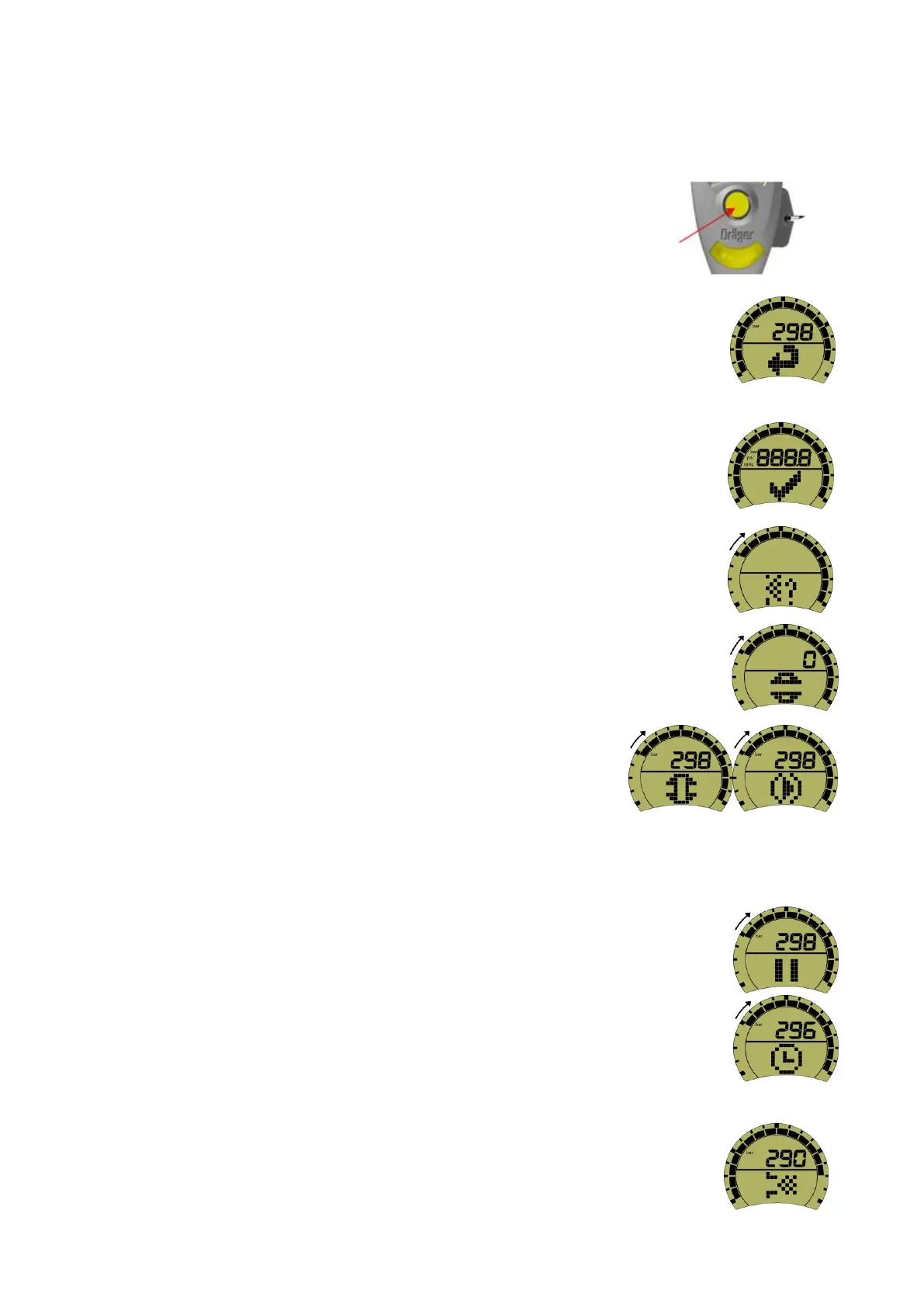
20.62 To undertake the leak test the wearer will need to access the ‘leak test’
icon.
20.63 Press the left button of the Bodyguard unit. The unit will emit a single audible
‘bleep’, and then the ‘self-check’ sequence will start as described in (see image right).
20.64 The initial short display quickly changes to the LCD check display, the backlight
will momentarily illuminate and the blue, red, and single green LED’s in the lower
display cluster will momentarily illuminate (see image right).
Note: during each display the outer radial segments will initially illuminate and then
begin to switch off clockwise. If no action is taken by the time the last segment
disappears, the ‘low pressure’ icon is momentarily displayed followed by the ‘self-
check’ icon which will restart.
20.65 When the ‘leak test’ icon appears press the left button (see image right).
20.66 ‘Open cylinder’ icon momentarily appears (see image right).
20.67 The Bodyguard unit will display the ‘close cylinder’ icon and then
the ‘press right button’ icon; these two icons will alternate (see
image right).
20.68 Close the cylinder valve and then press the right button to confirm.
’B’ test: stabilisation
20.69 Upon the closing of the cylinder valve the Bodyguard unit will take a few seconds
to stabilise the air trapped between the cylinder valve and the first breath button on
the LDV (see image right).
20.70 The ‘leak test timing’ icon, is displayed throughout the leak test period of
approximately one minute. During this time the bar segments will switch off
clockwise (see image right).
Note: during the leak test there may be a drop in pressure displayed. A pressure
drop of up to 10 bar is acceptable and may be caused by the piston in the reducer
settling.
20.71 On completion of the leak test one of the following icons will be displayed:
(a) Leak test – pass. This flashing icon indicates that the leak test was


 To Next Page