Dragonfly Manual Version 3© Page 50
Completing the ICS 205 Incident Radio Communication List
To complete the ICS 205 complete the following steps:
1. Select the Forms tab
2. Double click on the ICS 205 form. This will open the form for editing.
3. Add/Verify “Incident Name” and “Operational Period”.
4. Select “Basic Radio Channel Use” block.
*Frequencies can be added by two methods:
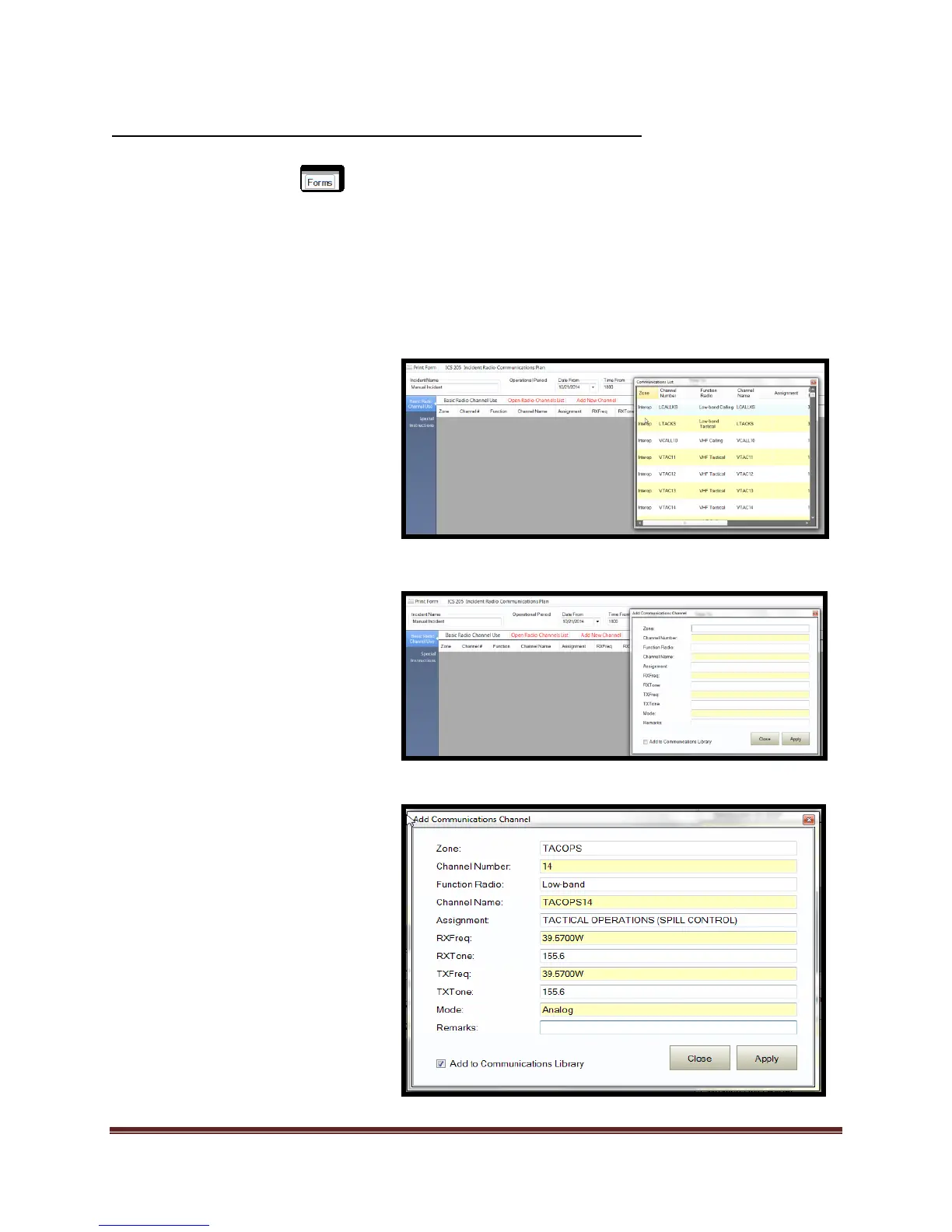
“Open Radio Channel List” tool
“Add New Channel” tool.
1. “Open Radio Channel List” tool
method:
a. Select “Open Radio Channel
List”.
b. The “Communications List”
window will open.
c. “Drag and Drop” desired
frequency to ICS 205 form.
2. “Add New Channel” tool method:
a. Select “Add New Channel”
b. The “Add Communications
Channel” window will open
c. Add desired data into data
fields.
d. Select “Apply” to commit data
to the ICS 205.
e. Select “Add to
Communications Library”
check box if desired.
f. Frequency will be added to the
ICS 205.



 To Next Page