3
3
.
.
2
2
.
.
2
2
G
G
e
e
n
n
e
e
r
r
a
a
l
l
S
S
e
e
t
t
t
t
i
i
n
n
g
g
s
s
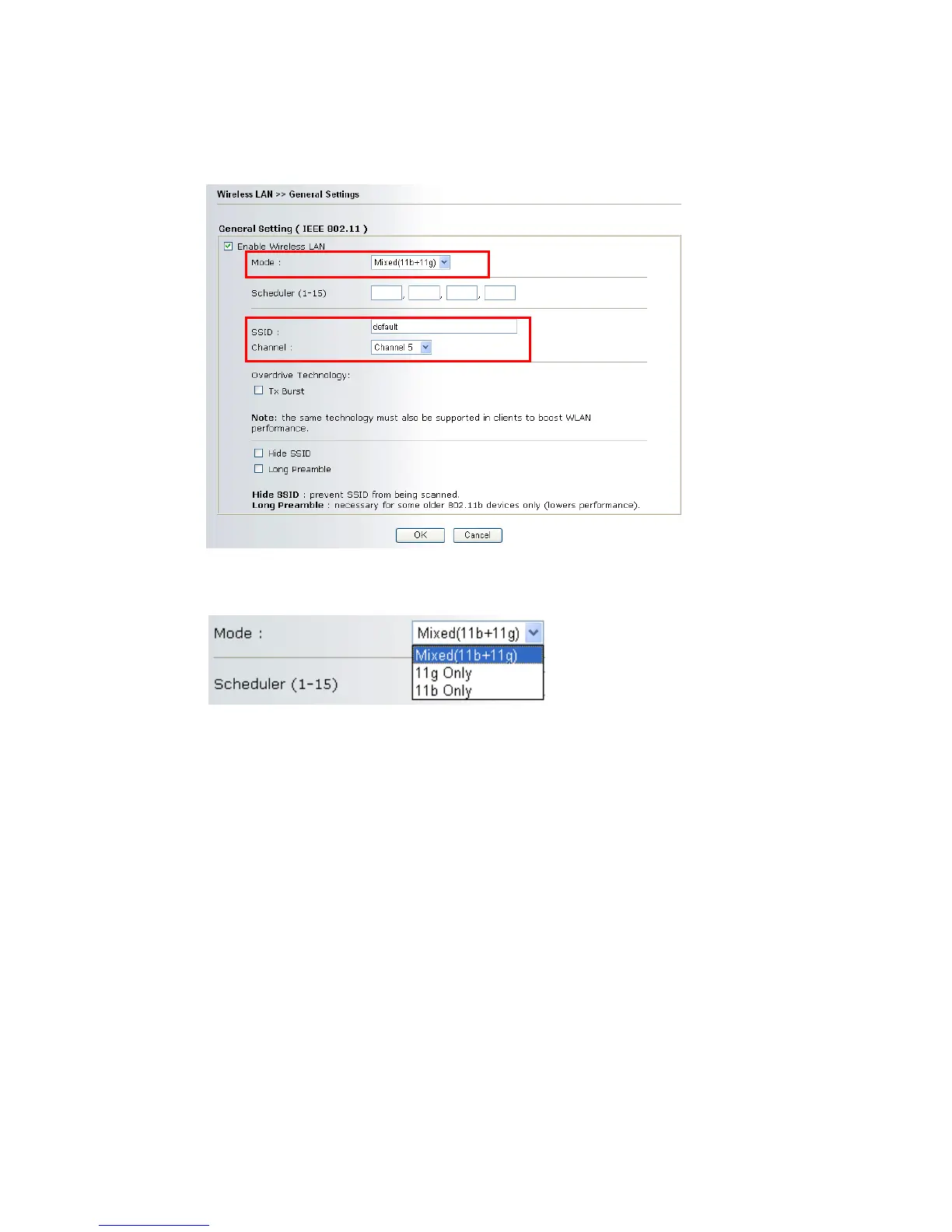
1. On the Wireless LAN group, select General Settings. The following page will be
shown.
2. Check the box Enable Wireless LAN to enable the wireless function.
3. Select an appropriate wireless mode.
Mixed (11b+11g)
The router can connect to IEEE802.11b and IEEE802.11g
stations simultaneously. This is default settings. Choose this
mode if you have no idea to change the mode.
11g-only
The router can connect to IEE802.11g stations.
11b-only
The router can connect to IEE802.11b stations.
4. Type in the name of the SSID and Channel. The default name for SSID is default.
We suggest you change it to a particular name for your necessity.
SSID (service set
identifier)
It is used to name the wireless LAN for this router, and it
have the same content in client PC/notebook wireless card(s).
SSID can be any text numbers or various special characters.
Channel
It is a wireless channel for the router. The default channel is 6.
You can change it to an appropriate one if the selected
channel is under serious interference. Or you can select Auto
to allow the system sensing available channel automatically.











 To Next Page