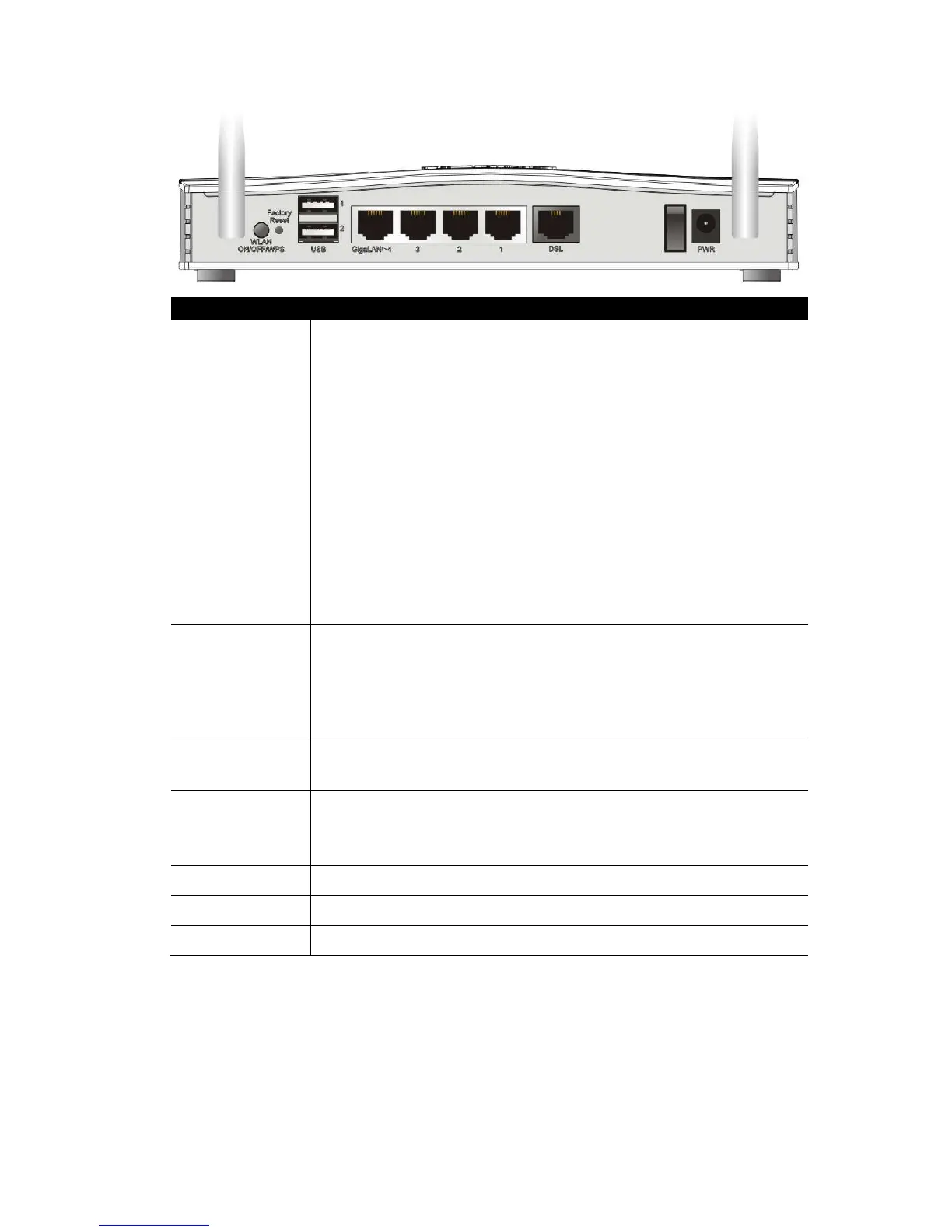
Wireless LAN
ON/OFF/WPS
Press for less than 2 seconds to switch toggle the router’s
wireless interfaces:
For example,
2.4G (On) and 5G (On) – Default state.
2.4G (Off) and 5G (On) – press and release the button
once.
2.4G (On) and 5G (Off) – press and release the button
twice.
2.4G (Off) and 5G (Off) – press and release the button
three times.
When WPS is enabled in the router’s web interface, press this
button for more than 2 seconds to enable WPS pairing mode.
Factory Reset
Restore the default settings.
Usage: Turn on the router (ACT LED is blinking). Press gently
and hold for more than 5 seconds. When the ACT LED blinks
rapidly, release the button. Then the router will restart with
the factory default configuration
USB1~USB2 Connector for a USB 3G/4G modem, storage, printer or USB
Thermometer
GigaLAN1~LAN4
GigaLAN4 can be configured as the Ethernet WAN port, see
Section 5.3 for details
DSL
RJ-11 connector for ADSL or VDSL line
I / O
Power Switch. Turns the unit on (I) or off (O)
PWR Connector for the power adapter










 To Next Page