5
5
.
.
3
3
.
.
1
1
E
E
n
n
a
a
b
b
l
l
i
i
n
n
g
g
t
t
h
h
e
e
E
E
t
t
h
h
e
e
r
r
n
n
e
e
t
t
W
W
A
A
N
N
P
P
o
o
r
r
t
t
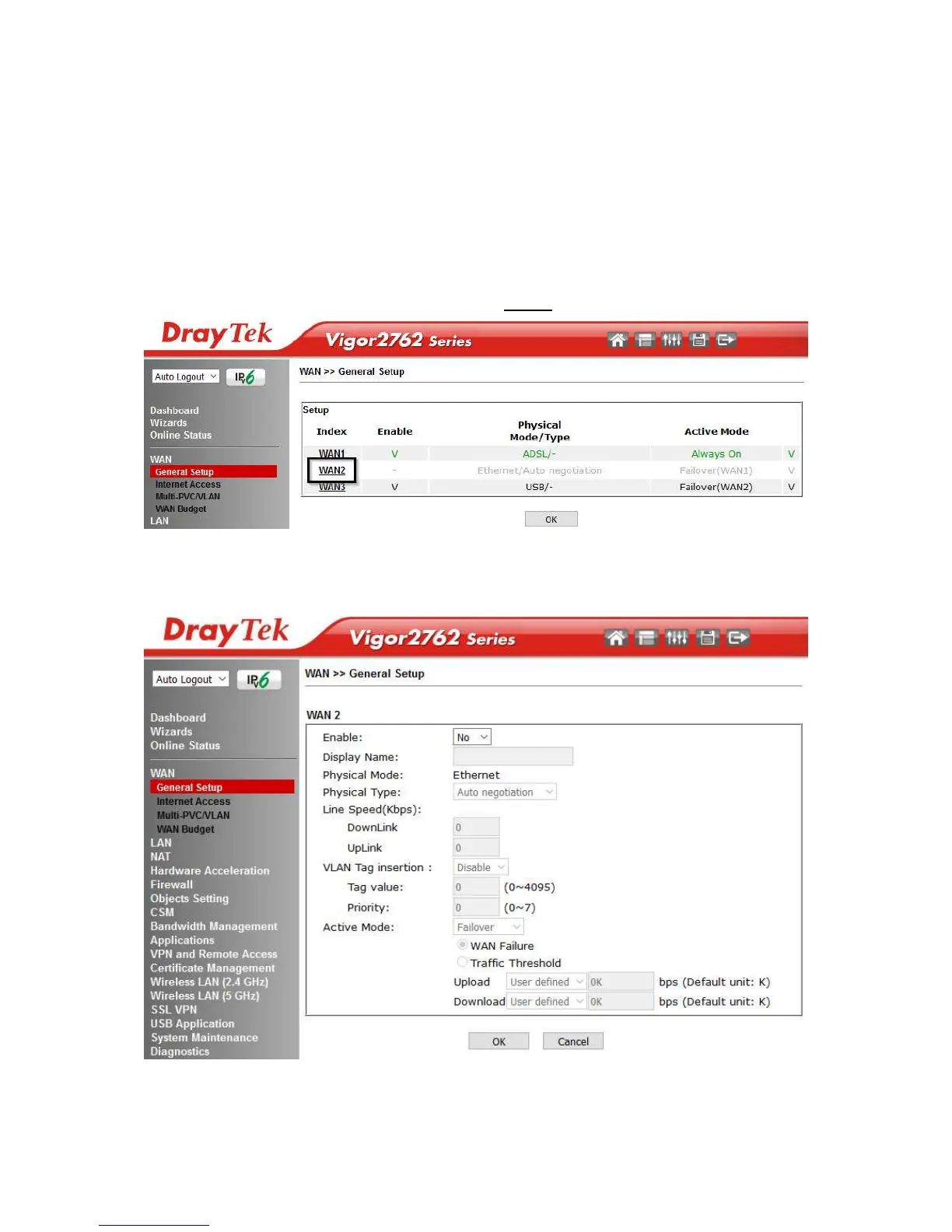
The Vigor 2762 series router uses the GigaLAN4 port to connect to an Ethernet based
Internet connection. In its default state, the GigaLAN4 port operates as a standard
LAN port and the WAN2 (Ethernet WAN) options cannot be selected in the router’s
web interface.
To enable the router’s Ethernet WAN port on GigaLAN4 instead of LAN mode:
1. Go to [WAN] > [General Setup] and click WAN2
2. In its default state, the Enable option is set to No, which allows the GigaLAN4
port to be used as a standard LAN port.










 To Next Page