Vigor2950 Series User’s Guide
153
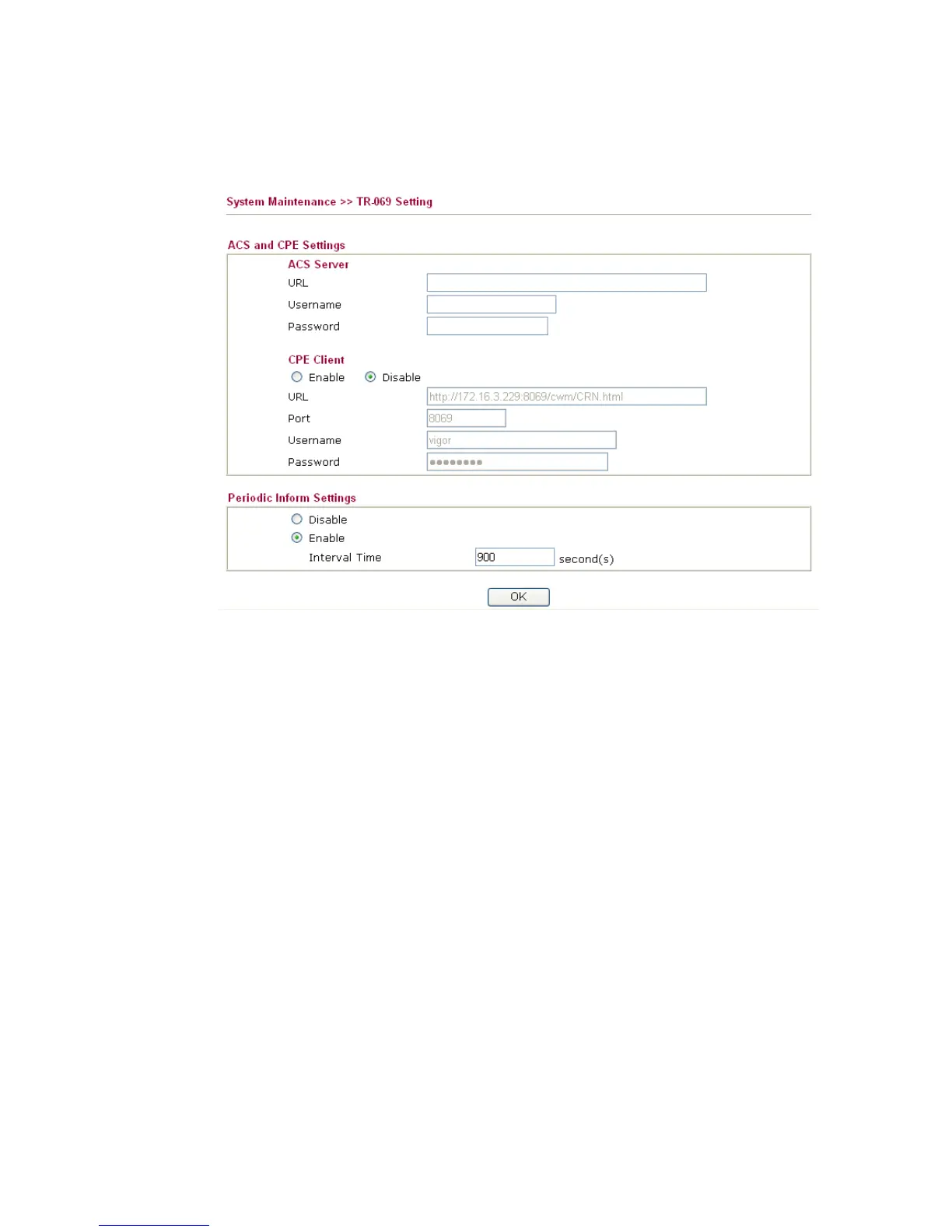
URL, username and password for the VigorACS server that such device will be connected.
However URL, username and password under CPE client are fixed that users cannot change
it.
The default CPE username and password are "vigor" and "password". You will
need it when you configure VigorACS server.
ACS Server Such data must be typed according to the ACS (Auto
Configuration Server) you want to link. Please refer
to VigorACS user’s manual for detailed information.
URL - Type the URL for VigorACS server.
If the connected CPE needs to be authenticated, please
set URL as the following and type username and
password for VigorACS server:
http://{IP address of
VigorACS}:8080/ACSServer/services/ACSServlet
If the connected CPE does not need to be authenticated
please set URL as the following:
http://{IP address of
VigorACS}:8080/ACSServer/services/UnAuthACSServ
let
Username/Password - Type username and password for
ACS Server for authentication. For example, if you want
to use such CPE with VigorACS, you can type as the
following:
Username: acs
Password: password
CPE Client It is not necessary for you to type them. Such information
is useful for
Auto Configuration Server.
Enable/Disable – Sometimes, port conflict might be
occurred. To solve such problem, you might want to













 To Next Page