2
2
2
.
.
P
P
a
a
n
n
e
e
l
l
E
E
x
x
p
p
l
l
a
a
n
n
a
a
t
t
i
i
o
o
n
n
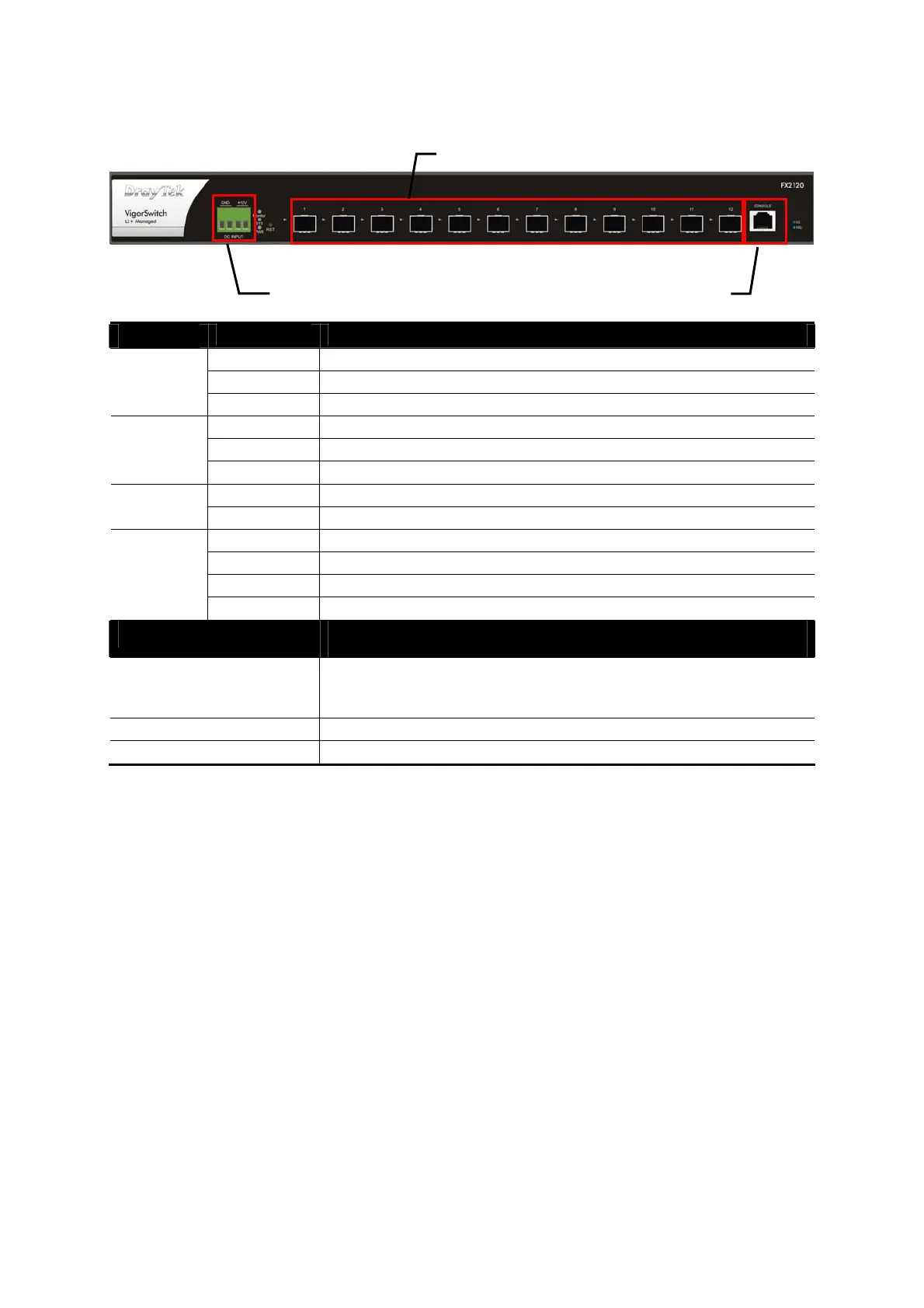
LED
Status Explanation
On (Red) An alert for system failure due to overheating or wrong voltage.
Blinking The system is (TBD)
Monitor
Off The device is in normal condition.
On (Green) The switch finishes system booting and the system is ready.
Blinking (Green) The switch is powered on and starts system booting.
SYS
Off The power is off or the system is not ready / malfunctioning.
On The device is powered on.
PWR
Off The device is powered off or failed.
On (Blue) The device is connected with 10Gbps.
On (Green) The device is connected with 1000Mbps.
Blinking The system is sending or receiving data through the port.
Port 1 ~ 12
SFP LNK/ACT
Off
The port is disconnected or the link is failed.
Interface Description
RST Factory reset button.
Press it to reboot the system. (<5 seconds)
Press it to reset the system with factory default settings. (5~20 seconds)
Port 1 ~ 12 Port 1 to Port 12 can be used for fiber connection.
Console Used to perform telnet command control.
Console
SFP LNK/ACT, Port 1 to Port 12
12V DC Input














 To Next Page