3
3
3
.
.
H
H
a
a
r
r
d
d
w
w
a
a
r
r
e
e
I
I
n
n
s
s
t
t
a
a
l
l
l
l
a
a
t
t
i
i
o
o
n
n
3
3
.
.
1
1
N
N
e
e
t
t
w
w
o
o
r
r
k
k
C
C
o
o
n
n
n
n
e
e
c
c
t
t
i
i
o
o
n
n
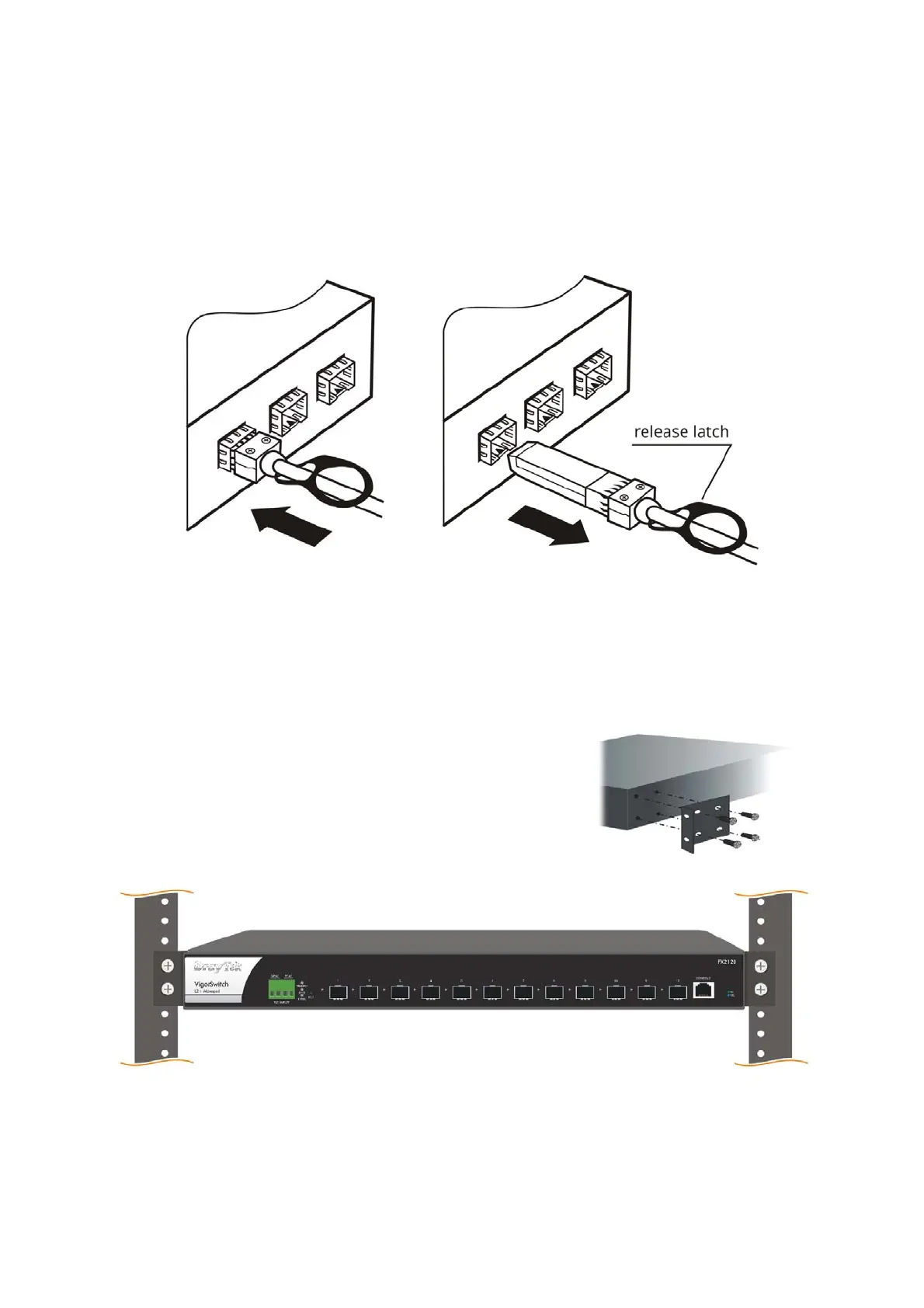
1. Insert the connector into the slot (port 1~12 of this switch).
2. Pull the release latch to remove it.
3
3
.
.
2
2
R
R
a
a
c
c
k
k
-
-
M
M
o
o
u
u
n
n
t
t
e
e
d
d
I
I
n
n
s
s
t
t
a
a
l
l
l
l
a
a
t
t
i
i
o
o
n
n
The switch can be installed easily by using rack mount kit.
1. Fasten the rack mount kit on both sides of the
VigorSwitch using specific screws.
2. Then, install the VigorSwitch (with rack mount
kit) on the 19-inch chassis by using other four
screws.














 To Next Page