WARNINGWARNING
READ ALL OPERATING/SAFETY INSTRUCTIONS IN THE MANUAL AND FAMILIARIZE YOURSELF WITH THE
DREMEL 3D20 BEFORE SETUP AND USE. FAILURE TO COMPLY WITH THE WARNINGS AND INSTRUCTIONS
MAY RESULT IN FIRE, EQUIPMENT DAMAGE, PROPERTY DAMAGE, OR PERSONAL INJURY.
0
.
3
m
m
C
L
E
A
R
A
N
C
E
LEVELING SHEET
TURN LEFT TO RAISE
THE BUILD PLATFORM
TURN RIGHT TO LOWER
Adjust the platform until
leveling tool slides between
the extruder and platform
with some resistance
0.3mm
L
E
VE
L
I
NG T
O
OL
Getting to Know Your Dremel 3D20
3
1. Lid
2. Door
3. Touch Screen
4. Build Platform
5. Build Platform Clips
6. Filament Spool
7. Filament Spool Holder/Lock
8. Extruder Tip
9. Extruder Fan
10. Extruder
11. Extruder Intake
TIP: Save your Dremel 3D20 packaging for future transportation and storage.
Dremel 3D20 Instruction Manual Quick Start Guide 1 Filament Spool
Power CableSpool Lock USB Cable SD Card
Build Tape Object Removal Tool Unclog Tool Leveling Sheet
1
2
3
4
5
6
7
8
1
2
3
BACK
TURN LEFT TO RAISE
THE BUILD PLATFORM
TURN RIGHT TO LOWER
THE BUILD PLATFORM
STEP 1: LEFT ADJUSTMENT
NEXT
WARM
BACK
TURN LEFT TO RAISE
THE BUILD PLATFORM
TURN RIGHT TO LOWER
THE BUILD PLATFORM
STEP 2: RIGHT ADJUSTMENT
NEXT
WARM
BACK
TURN LEFT TO RAISE
THE BUILD PLATFORM
TURN RIGHT TO LOWER
THE BUILD PLATFORM
STEP 3: BACK ADJUSTMENT
NEXT
WARM
Getting Ready to Build (continued…)
5
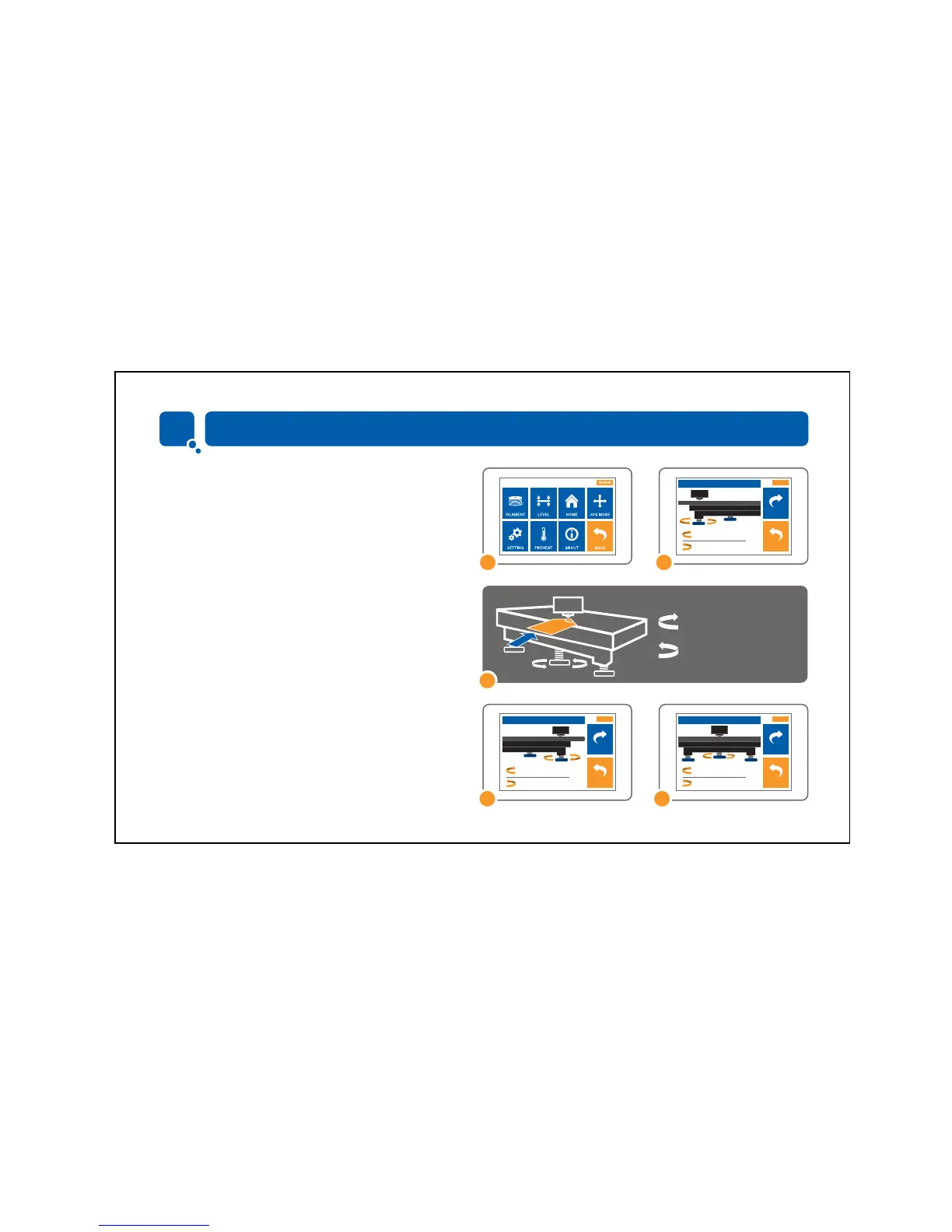
LEVELING BUILD PLATFORM
1. Tap “Tools” on your Dremel 3D20’s touch screen and
tap “Level”.
2. First level the front left of the build platform.
3. Place the leveling sheet between the extruder and build
platform.
a) If the leveling sheet cannot slide between the extruder
and build platform, turn the knob counterclockwise until
you can slide the leveling sheet between the extruder and
build platform with some resistance.
b) If the leveling sheet can slide between the extruder and
build platform too easily, turn the knob clockwise until you
can slide the leveling sheet between the extruder and build
platform with some resistance.
4. Tap “Next” to move the build platform toward the right knob
and repeat step above.
5 Tap “Next” to move the build platform toward the rear knob
and repeat step above.
6. Tap “Finish” to complete the leveling process.
1 2
3
4 5
TURN LEFT TO RAISE
THE BUILD PLATFORM
TURN RIGHT TO LOWER



 To Next Page