17
c. Check battery pack terminals for dirt.
C
lean with cotton swab and alcohol if
necessary.
d. If you still do not get proper charging,
take or send tool, battery pack and charger to
y
our local Dremel Service Center.
Note: Use of chargers or battery packs not
sold by Dremel will void the warranty.
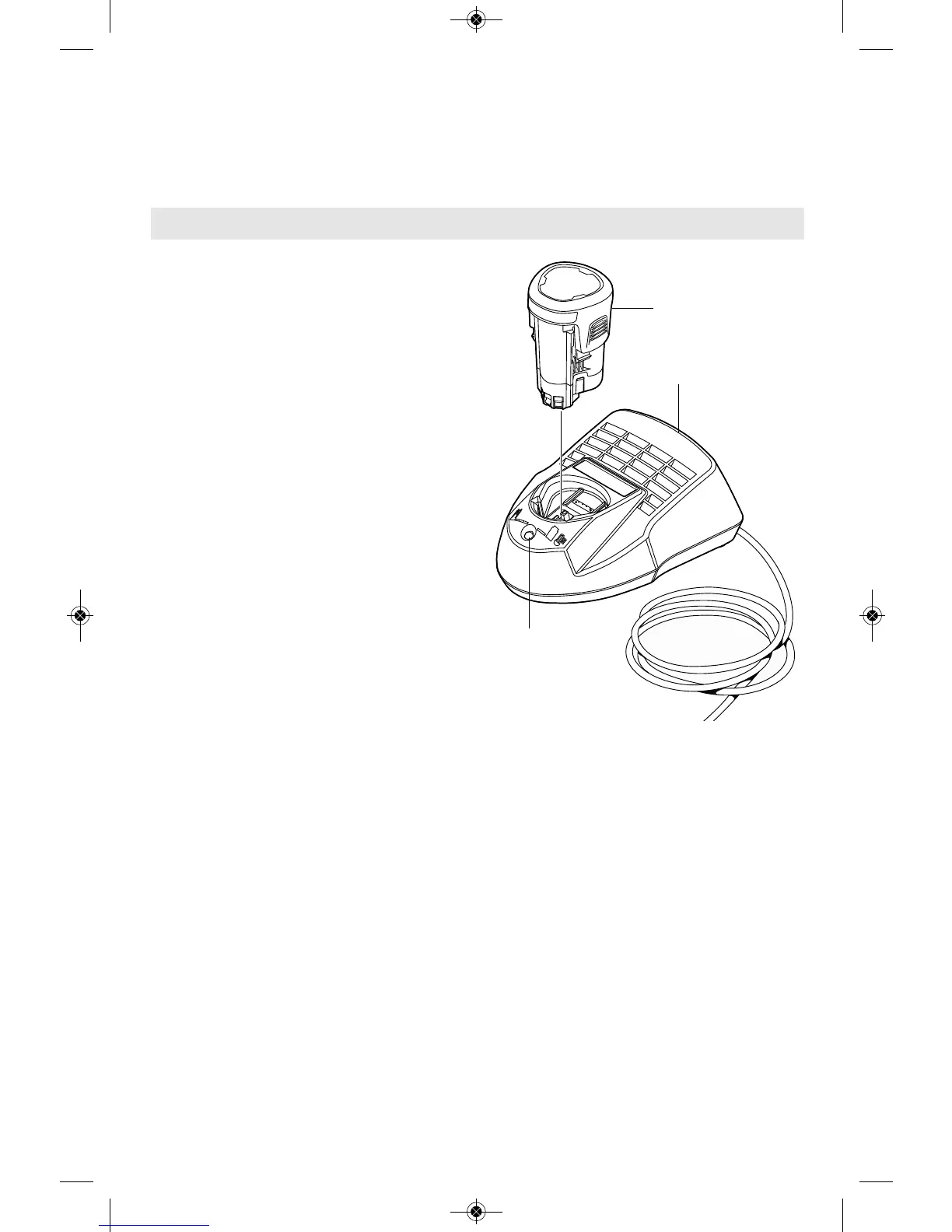
876 1-HOUR CHARGER
Plug charger cord into your standard power
outlet, then insert battery pack into charger.
The charger’s green indicator light will begin to
“BLINK”. This indicates that the battery is
receiving a fast charge. Fast-charging will
automatically stop when the battery pack is
fully charged.
When the indicator light stops “BLINKING”
(and becomes a steady green light) fast
charging is complete.
The battery pack may be used even though
the light may still be blinking. The light may
require more time to stop blinking depending
on temperature.
The purpose of the green light is to indicate
that the battery pack is fast-charging. It does
not indicate the exact point of full charge.
The light will stop blinking in less time if the
battery pack was not completely discharged.
When charging several batteries in sequence,
the charge time may slightly increase.
When the battery pack is fully charged,
unplug the charger (unless you're charging
another battery pack) and slip the battery
pack back into the tool.
Charging Battery Pack
GREEN
LIGHT
CHARGER
BATTERY
PACK


 To Next Page