49
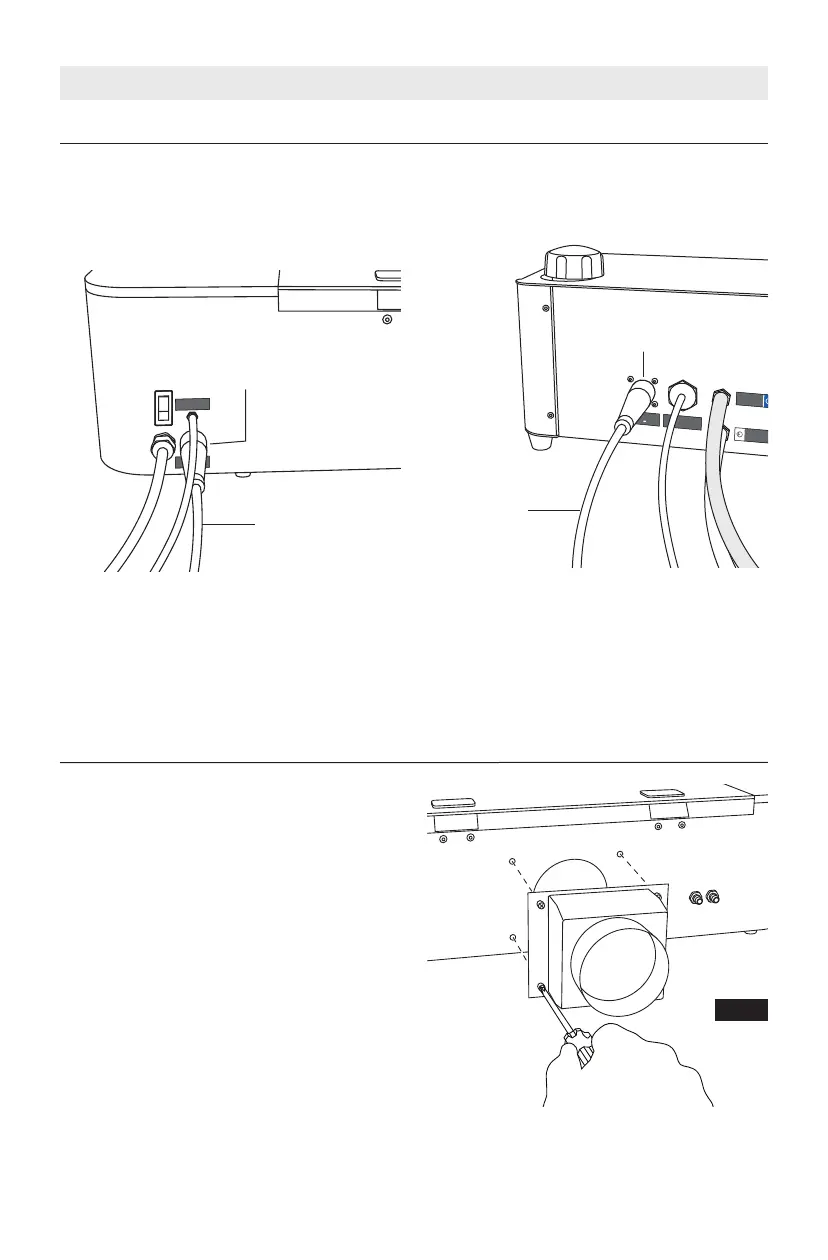
Connect the Hex Box™ connector cord to
the laser cutter and the Hex Box™. Fig. 13
& 14.
Connect Hex Box™ Connector Cord
A
I
R
T
U
B
E
T
U
Y
A
U
À
A
I
R
T
U
B
O
D
E
A
I
R
E
W
A
T
E
R
I
N
E
N
T
R
É
E
D
’
E
A
U
E
N
T
R
A
D
A
D
E
A
G
W
A
T
E
R
O
U
T
S
O
R
T
I
E
D
’
E
A
U
S
A
L
I
D
A
D
E
A
G
U
A
H
e
x
B
o
x
1
2
V
Connector
Cord
A
I
R
T
U
B
E
T
U
Y
A
U
À
A
I
R
T
U
B
O
D
E
A
I
R
E
H
e
x
B
o
x
1
2
V
Connector
Cord
SETUP
Connector
Fitting
Connector
Fitting
Fig. 13 — Rear of Laser Cutter
Fig. 14 — Rear of Hex Box™
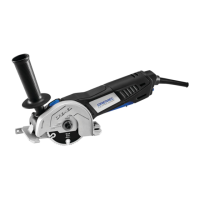
Attach Exhaust Shroud
Fig. 15
Using a screwdriver, attach the exhaust
shroud to the back of the laser cutter,
Fig. 15. Ensure that the shroud is flush
against the back surface of the laser
cutter.
Attachment of the exhaust tubing to the
shroud is explained in the Exhaust
Connections section.



 To Next Page