7
4
8
USING YOUR
AIR CIRCULATOR
FAN
General Operations
Working Modes
1
2
3
4
5
Touch to set a timer.
Getting the Most out of Your
Air Circulator
Touch to turn on the air circulator
fan.
Touch to adjust the airflow
speed.
Touch or to change
the airflow direction.
Touch choose a working mode.
Normal Mode
Air circulator runs at the fixed
speed.
Auto Mode
Air circulator speed adapts to the
ambient temperature.
Natural Mode
Air circulator runs at alternating
speeds.
(Available in the Dreo
app)
Sleep Mode
(Available in the Dreo
app)
Mute auto on.
Fan speed changes according to
temperatures or time you desire.
Air circulator speed decreases every
30 minutes.
Speed decreases by two levels at
most and will remain constant if at
level 3, 2, or 1:
For level 1: 1
Custom Mode
(Available in the Dreo
app)
For level 9: 9 8 7
For level 8: 8 7 6
For level 7: 7 6 5
For level 6: 6 5 4
For level 5: 5 4 3
For level 4: 4 3
For level 3: 3
For level 2: 2
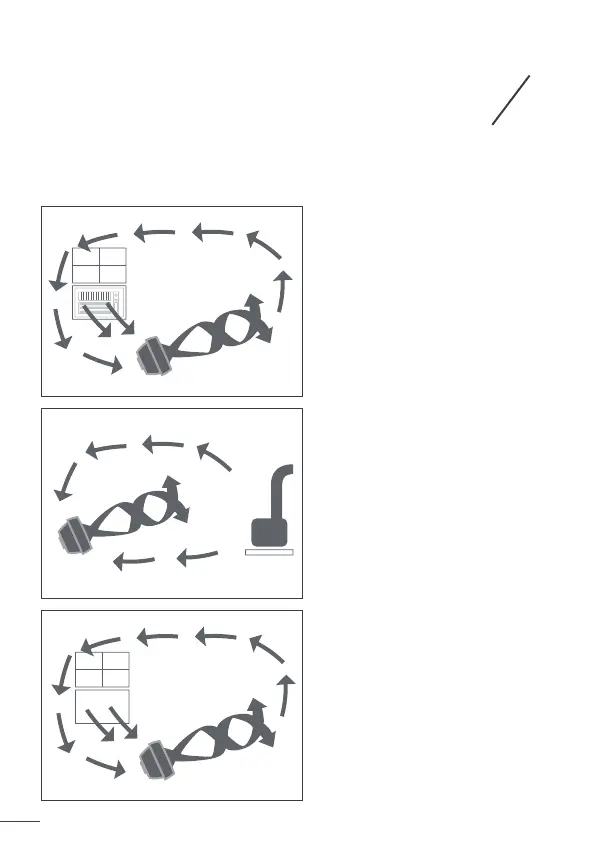
Use with Air Conditioner
Position the air circulator in front
of your AC to circulate cold air and
provide better cooling.
Summer:
Use with Heater
Send the heat to corner of the
room and circulate warm air faster.
Winter:
Circulation
Make the indoors as fresh and
pleasant as the outdoors.
Spring & Fall:
Turbo Mode
Air circulator runs at the maximum
speed.


 To Next Page