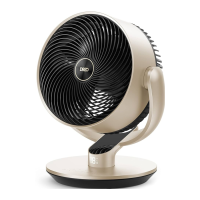
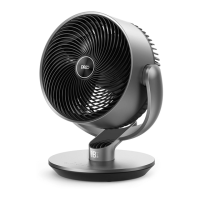
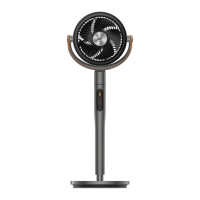
This document is a user manual for the Dreo Air Circulator Fan, model DR-HAF001S. It provides instructions for safe operation, connection to smart devices, general usage, and maintenance.
Function Description:
The Dreo Air Circulator Fan is designed to improve air circulation within a room. It can be used in conjunction with air conditioners to distribute cold air more effectively, with heaters to circulate warm air faster, and for general circulation during spring and fall to make indoor environments feel fresher. The fan offers various operating modes including Normal, Auto, Natural, Sleep, and Custom modes, allowing users to tailor the airflow to their preferences and ambient conditions. It features a timer function for automatic on/off operation and a child lock for safety. The fan can be controlled via a physical control panel, a remote control, or through the Dreo app, which also enables integration with Amazon Alexa and Google Assistant.
Important Technical Specifications:
- Model: DR-HAF001S
- Input: AC 120V 60Hz
- Rated Power: 52W
- Battery Type (Remote Control): CR2025 3V
- Airflow Speed Levels: 1-4
- Oscillation Angle: 90°
- Timer Settings: 0-8 hours
- Connectivity: Wi-Fi, Bluetooth
Usage Features:
- Control Panel:
- Power Button: Turns the fan on/off. A long press (10 seconds) resets to factory settings.
- Mode Button: Switches between Normal/Auto Mode. A long press mutes/unmutes the device. It also exits Natural/Sleep/Custom Modes.
- Fan Speed Button: Adjusts airflow speed (1-4 levels). Exits Custom Mode.
- Timer Button: Sets a timer from 0 to 8 hours for automatic on/off.
- Oscillation Button: Adjusts airflow direction (90°). A long press (5 seconds) initiates Wi-Fi connection settings and device pairing.
- LED Display: Shows current fan speed/timer hour, active mode (Normal, Auto), timer status, and Wi-Fi connection status.
- Remote Control: Includes buttons for power, mode, fan speed adjustment (increase/decrease), mute, oscillation, and timer.
- Smart Control (Dreo App):
- Connects the fan to a mobile device via Bluetooth and Wi-Fi.
- Allows control of all fan functions remotely.
- Enables access to Natural, Sleep, and Custom Modes.
- Integrates with Amazon Alexa and Google Assistant for voice control.
- Provides firmware updates for improved performance.
- Working Modes:
- Normal Mode: Fan runs at a fixed speed.
- Auto Mode: Fan speed adapts to the ambient temperature.
- Natural Mode (App Only): Fan runs at alternating speeds to simulate natural breeze.
- Sleep Mode (App Only): Mute auto on. Fan speed decreases every 30 minutes, reducing by two levels at most until it reaches level 1.
- Custom Mode (App Only): Fan speed changes according to desired temperatures or time.
- Adjustable Fan Head: The fan head can be tilted manually to the desired angle (-30° to 90°).
- Memory Function: The fan operates under previous settings (except timer) when turned on again after being turned off or disconnected from power.
- Countdown Display: Shows a countdown when buttons for Factory Reset, Child Lock, and Mute are long-pressed.
- Display Auto Off: The LED display turns off after 1 minute (or 5 seconds in sleep mode) and can be woken up by pressing any button.
- Child Lock: Activated by long-pressing the Oscillation and Timer buttons simultaneously for 3 seconds. "L" flashes on the display when activated/deactivated. Does not apply to the remote control. Can also be turned off by re-plugging the fan or through the Dreo app.
Maintenance Features:
- Cleaning:
- Outer Surface: Gently wipe off dust with a soft, dry cloth.
- Front Grille and Blades:
- Unplug the fan.
- Remove the screw on the front grille.
- Rotate the grille counterclockwise to remove it.
- Rotate and remove the blade cap.
- Take out the blade assembly from the shaft.
- Rinse the cap, blades, and grille under running water or wipe with a clean, damp cloth.
- Dry all parts thoroughly.
- Reinsert the blade assembly by aligning the D-shaped points on the center shaft.
- Align the point on the front grille with the right point on the casing, rotate clockwise, and install the screw back in place.
- Storage: Store the fan in a cool, dry place and cover it to protect from dust.
- Battery Replacement (Remote Control):
- Press the locking button to pop out the battery holder.
- Replace with a CR2025 3V battery, ensuring the (+) side faces up.
- Push the holder back until securely locked.
- Warning: The product contains a lithium button/coin cell battery. Keep batteries away from children. Seek immediate medical attention if swallowed. Dispose of batteries properly.
- User Servicing Instructions (Fuse):
- Grasp the plug and remove it from the outlet (do not pull the cord).
- Slide open the fuse access cover on top of the attachment plug.
- Carefully remove the old fuse.
- Replace with a 5 Amp, 125 Volt fuse.
- Slide closed the fuse access cover.
- Warning: Do not replace the attachment plug itself if damaged, as it contains a safety device (fuse) that should not be removed. Discard the product if the attachment plug is damaged.

 Need help?

 To Next Page
 General