EasyManua.ls Logo

dreo Lynx CF511 - Additional Features; Feature Descriptions

dreo Lynx CF511
20 pages
Print Icon
To Next Page IconTo Next Page
To Previous Page IconTo Previous Page
Loading...
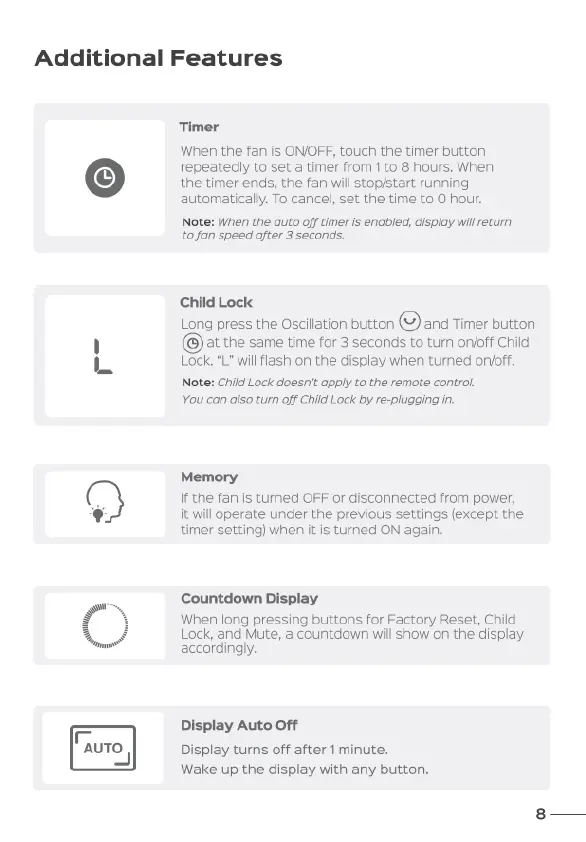
Additional
Features
©
[}
[N
Timer
When
the
fan
is
ONOFF,
touch
the
timer
button
repeatedly
to
set
a
timer
from
1
to
8
hours.
When
the
timer
ends,
the
fan
will
stopistart
running
automatically.
To
cancel,
set
the
time
to
O
hour.
Note:
When
the
auto
off
timer
is
enabled,
display
will
return
tofan
speed
after
3
seconds.
Child
Lock
Long
press
the
Oscillation
button
(2)
and
Timer
button
at
the
same
time
for
3
seconds
to
turn
on/off
Child
.
“L"
wil
fiash
on
the
display
when
tured
orvoff.
Note:
Ch
Lock
doesn't
apply
to
the
remote
control
You
can
also
turn
off
Child
Lock
by
re-plugging
in.
Memory
If
the fan
is
turned
OFF
or
disconnected
from
power,
it
will
operate
under
the
previous
settings
(except
the
timer
setting)
when
it
is
turned
ON
again.
Countdown
Display
When
long
pressing
buttons
for
Factory
Reset,
Child
Lock,
and
Mute,
a
countdown
will
show
on
the
display
accordingly.
Display
Auto
Off
Display
turns
off
after
1
minute.
Wake
up
the
display
with
any
button.

Related product manuals