EasyManua.ls Logo

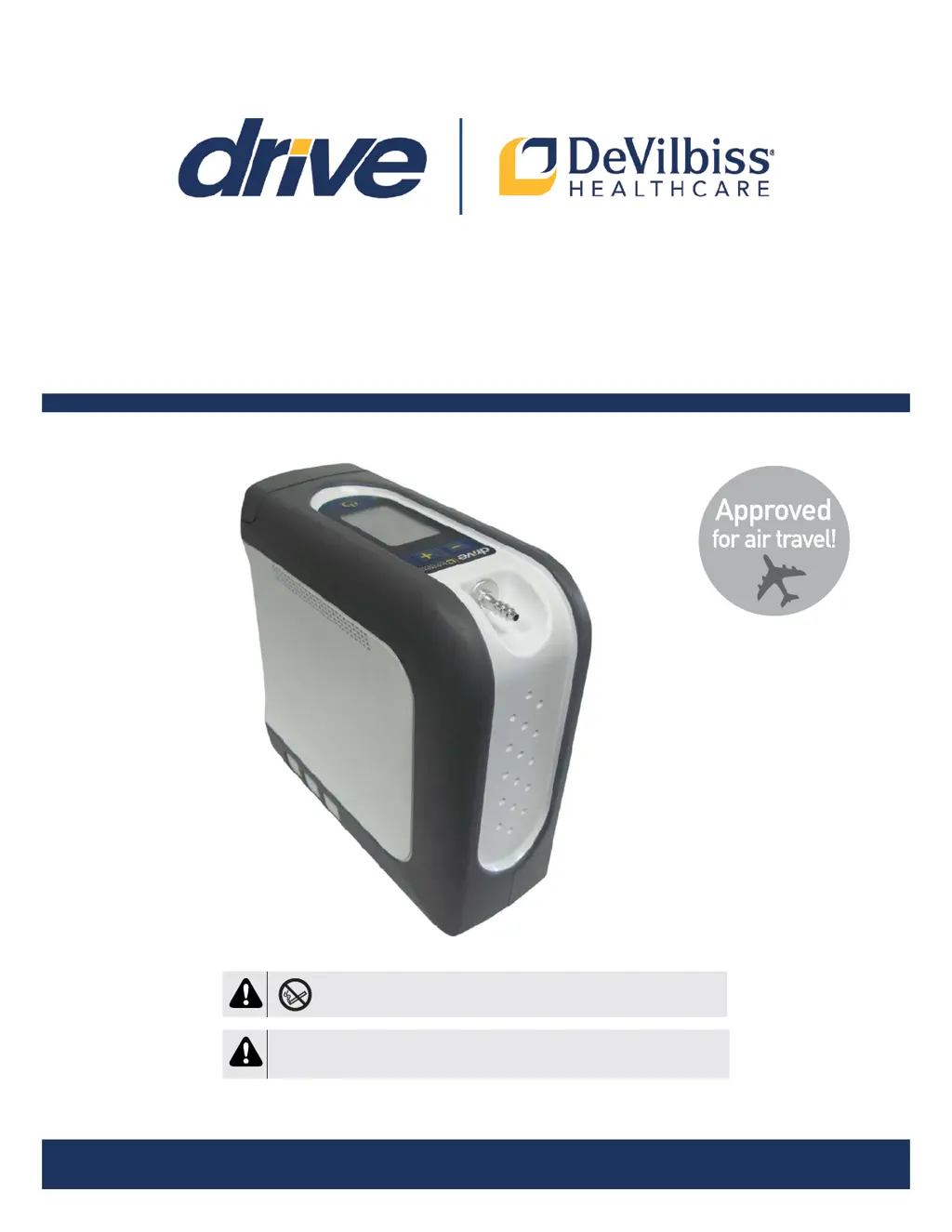
Drive DeVilbiss iGo 2 - User Manual

Drive DeVilbiss iGo 2
28 pages
Print Icon
To Next Page IconTo Next Page
Loading...
Assembled in USA
Drive Devilbiss iGo
®
2 Portable oxyGen ConCentrator
serviCe Manual
MODEL 125D
MODEL 125K
MODEL 125A
CAUTION
Federal (U.S.A.) law restricts this device to sale by or on the order of a physician.
DANGER-NO SMOKING

Table of Contents

Questions and Answers

  • W
    Willie RodriguezAug 15, 2025
    What to do if the Red Service Required symbol flashes with Audible Alert on my Drive DeVilbiss iGo 2?
    • J
      Joshua MayAug 15, 2025
      If the Red Service Required symbol flashes accompanied by an audible alert, it could indicate that the unit has overheated. Ensure that the vent holes are not blocked and allow the unit to cool down before trying again. If the issue persists, contact your provider and switch to your reserve oxygen system, as it may indicate a unit malfunction.
  • C
    Christine PhillipsAug 18, 2025
    What to do if the Battery Fuel Gauge symbol is flashing with or without Audible Alert on my Drive DeVilbiss Medical Equipment?
    • B
      Brian McmillanAug 18, 2025
      If the Battery Fuel Gauge symbol is flashing, with or without an audible alert, it means the battery is nearing depletion. When the symbol flashes, it indicates less than 10% battery life, and the audible alert sounds when it drops below 5%. To resolve this, charge the battery by connecting the device to an AC or DC power source, or install an optional backup battery. Note that the device will automatically shut down within 2 minutes of reporting only 5% charge remaining.
  • C
    Cody ComptonAug 21, 2025
    What to do if my Drive DeVilbiss Medical Equipment unit is On, Audible Alert is sounding, but there is No Visual Alarm?
    • A
      amurrayAug 21, 2025
      If the unit is on and an audible alert is sounding without a visual alarm, it could be due to several reasons: * No breathing detected: Apply cannula and breathe on the device. * Cannula not adjusted properly: Check all cannula connections to ensure they are tight, adjust the cannula for a comfortable fit in your nose, and make sure the tubing is not kinked. * Tubing/cannula too long: Replace with a shorter tubing/cannula, ensuring the total length does not exceed 25 feet. * Low flow cannula being used: Replace with a standard cannula.
  • L
    Linda MillerAug 25, 2025
    Why is the Yellow Low O symbol On with or without Audible Alert on my Drive DeVilbiss Medical Equipment?
    • J
      James WilkersonAug 26, 2025
      If the Yellow Low O symbol is on, with or without an audible alert, it indicates that the oxygen concentration of the unit is falling. The symbol flashes when the concentration drops below 86%, and an audible alert sounds when it falls below 85%. In this situation, you should contact your provider and switch to your reserve oxygen system.
  • K
    Kenneth HodgesAug 31, 2025
    What to do if the Yellow Low O symbol is flashing on my Drive DeVilbiss Medical Equipment?
    • M
      Mikayla CruzAug 31, 2025
      If the Yellow Low O symbol is flashing, it may be due to the start-up period. Wait until the startup period is complete, which usually takes about 10 minutes.
  • R
    Richard GoodwinSep 4, 2025
    Why is the Yellow Low O symbol On and/or Red Service Required light On on my Drive DeVilbiss Medical Equipment?
    • C
      Christopher EvansSep 4, 2025
      If the Yellow Low O symbol is on and/or the Red Service Required light is on, it may be due to contaminated sieve beds. Try running the unit for at least 15 minutes to allow the sieve beds to recover to their full potential. If that doesn't work, replace the sieve beds.
  • K
    Kimberly SpencerSep 7, 2025
    How to fix the Drive DeVilbiss iGo 2 unit if it's not triggering properly?
    • W
      Wendy EdwardsSep 7, 2025
      If the unit is not triggering properly, it may be due to the sensor needing recalibration. To resolve this, turn the unit ON but do not use it for 5 minutes to allow the sensor to auto-calibrate.
  • J
    Jonathan BernardSep 12, 2025
    Why Battery Status Lights Never Indicate Fully Charged on my Drive DeVilbiss Medical Equipment?
    • T
      Tammy StewartSep 12, 2025
      If the Battery Status Lights never indicate fully charged, it may be because you are using the DC auto adapter and there is not enough power to fully charge the battery. The battery will not charge if plugged into a power source less than 13.8V, but the device will still function correctly.
  • A
    annacampbellNov 27, 2025
    How to fix Drive DeVilbiss iGo 2 when the unit does not operate?
    • B
      bmuellerNov 27, 2025
      If the unit does not operate, the display is not illuminated, and nothing happens when the Power button is pressed and held, consider the following: * Ensure the Power button is held for 2 seconds. * Verify a battery is installed, as it is required for operation regardless of the power source. * Install a charged battery or contact your provider for a replacement if the battery is depleted or defective. * Check cord connections to the device, power supply, and power source if external power is not attached and the battery is depleted. * Check your home circuit breaker and reset if necessary. Use a different wall outlet if the situation occurs again. * For a faulty Power Supply, AC Power Cord, or DC Power Cord, contact your Drive DeVilbiss provider. * Check the automotive fus...

Summary

General Information

Symbol Definitions

Explains various symbols used in the manual and on the device for safety and identification.

General Information

Important Safeguards

Details critical safety precautions, including DANGER, WARNING, CAUTION, and IMPORTANT notes.

General Information

Usage and Handling Warnings

Provides warnings related to electrical shock, fire hazards, patient monitoring, and usage conditions.

General Information

Operating Principle and Technical Description

Explains how the concentrator works and its technical aspects, including PVSA technology and filters.

Healthcare Provider Instructions

Guidelines for healthcare providers regarding setting adjustments, reassessment, and accessory compatibility.

Important Parts

Key Concentrator Components

Identifies and illustrates the main parts of the Drive DeVilbiss iGo2 Portable Oxygen Concentrator.

Control Panel Overview

Explains the symbols and indicators on the device's control panel and their meanings.

Set Up and Operating Instructions

Power Options

Details the three available power sources: battery, AC power, and DC (car charger) power.

Battery Operation and Charging

Battery Status and Charging

Covers checking battery level, initial charge, charging process, and recharge times.

Battery Operation and Charging

Battery Charge Display and Discharge

Explains battery charge level displays and the battery bar table for discharged states.

Traveling with the iGo2 POC

Travel Guidelines

Refers to the instruction guide for information and recommendations on traveling with the iGo2 POC.

Maintenance

System Checks and Service Life

Covers alarm system checks, expected service life of components, and information mode access.

Maintenance

Care and Cleaning Procedures

Details cleaning instructions for the POC, accessories, and between patient use.

Maintenance

Return and Disposal Guidelines

Explains procedures for returning the device and proper disposal of batteries and components.

Troubleshooting & Alarm System

Troubleshooting Chart

Provides a chart to help analyze and correct minor malfunctions with possible causes and remedies.

Troubleshooting & Alarm System

Overview of Alarms

Explains the device's alarm system, including display, meaning, audible signals, and actions to take.

Component Description and Function

Key Component Details

Describes the function of major components like Accumulator Manifold, Battery, Compressor, Sieve Beds, etc.

Servicing and Component Replacement

Component Replacement Procedures

Details steps for replacing the cover, control panel label, oxygen outlet port, and sieve beds.

Servicing and Component Replacement

Oxygen Outlet Port and Filter Replacement

Step-by-step guide for removing and replacing the oxygen outlet port and final bacteria filter.

Sieve Bed Replacement

Instructions for removing and replacing the sieve beds, including O-rings and manifold.

Servicing and Component Replacement

Performance Testing

Covers testing procedures for oxygen concentration and inspiratory trigger sensitivity.

Figures, Diagrams and Parts List

Portable Oxygen Concentrator Views

Illustrates the iGo2 POC with power accessories, labeling key external parts.

Figures, Diagrams and Parts List

Internal Component Views

Shows internal views of the POC, labeling various components and assemblies.

Figures, Diagrams and Parts List

Parts and Accessories List

Lists all available parts and accessories for the 125 POC with their respective part numbers.

Figures, Diagrams and Parts List

Pneumatic Diagram

Provides a schematic diagram illustrating the pneumatic flow and components of the device.

Ordering Information and Return

Ordering Components and Manuals

Details the required information for ordering parts, guides, and service manuals.

Returning Units

Explains the procedure for returning a unit to the factory, including obtaining an authorization number.

Specifications

Technical Specifications

Lists detailed technical specifications of the iGo2 POC, including dimensions, weight, and operating parameters.

PulseDose Output Table

Shows the standard and SmartDose mode pulse dose output volumes at different settings and breathing rates.

Electromagnetic Compatibility Information

MR Safety and Usage Warnings

Warns against using the device in Magnetic Resonance (MR) environments and near other electromagnetic equipment.

Cable and Accessory Guidelines

Provides guidelines on cable lengths and the use of specified accessories to avoid performance degradation.

Electromagnetic Compatibility Information

Electromagnetic Compatibility Compliance Levels

Lists compliance levels for various electromagnetic compatibility tests according to industry standards.

Drive DeVilbiss iGo 2 Specifications

General IconGeneral
BrandDrive DeVilbiss
ModeliGo 2
CategoryMedical Equipment
LanguageEnglish

Related product manuals