14
LT-2334
TROUBLESHOOTING AND ALARM SYSTEM
TROUBLESHOOTING & ALARM SYSTEM
Troubleshooting
The following troubleshooting chart will help you analyze and correct minor malfunctions. If the suggested procedures do not help, switch to your reserve oxygen
system and call your Drive DeVilbiss homecare provider. Do not attempt any other maintenance.
WARNING
To avoid electric shock hazard, do not remove the covers. There are no user serviceable internal components. The covers should only be removed by
a qualied Drive DeVilbiss provider/Drive DeVilbiss homecare technician.
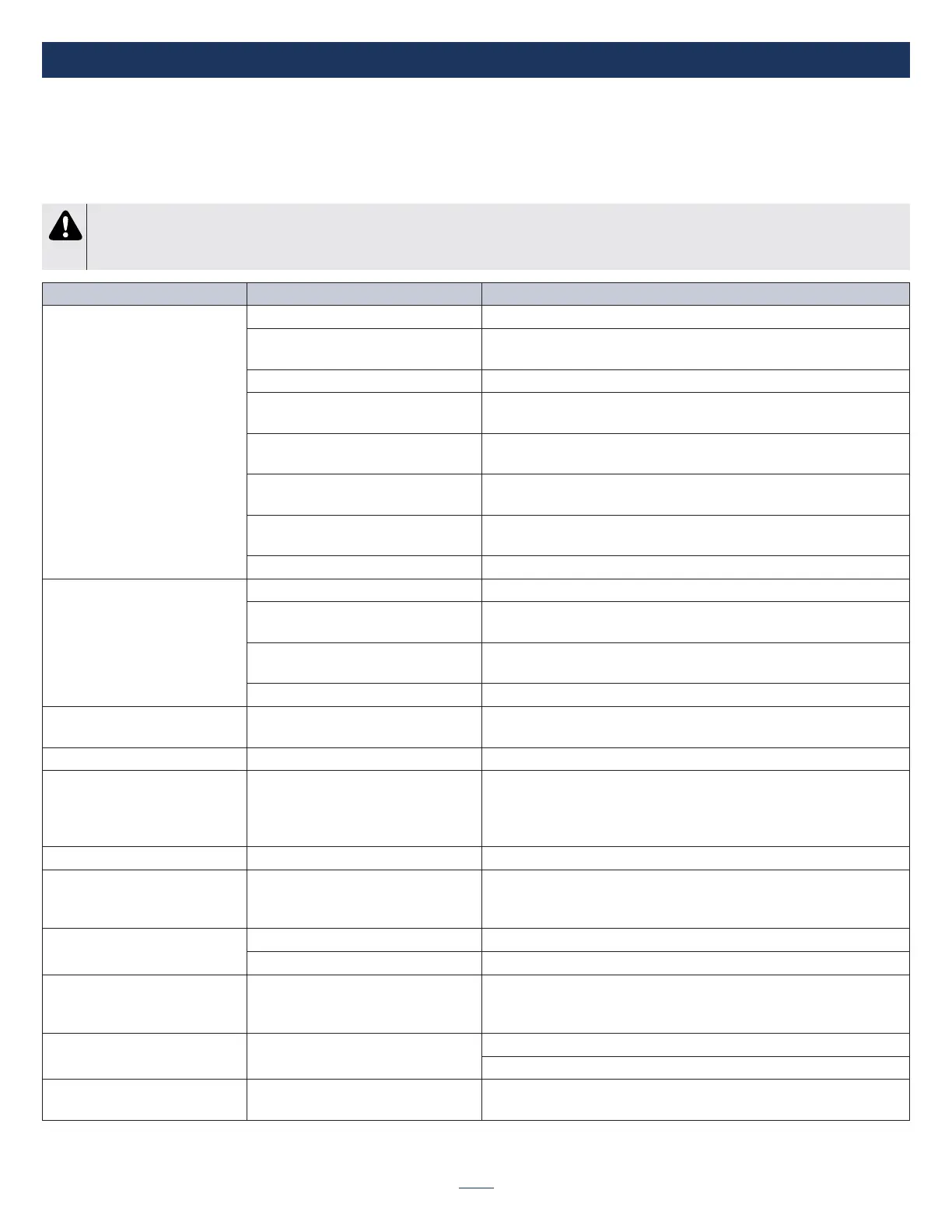
SYMPTOM POSSIBLE CAUSE REMEDY
Unit does not operate. Display is
not illuminated and nothing
happens when Power button is
pressed and held.
1. Power button was not held. 1. Press Power button and hold for 2 seconds.
2. No battery installed 2. Battery must be installed for device to operate regardless of power
source.
3. Battery depleted or defective battery. 3. Install charged battery or contact provider for replacement
4. External power not attached and
battery is depleted.
4. Check cord connections to device, power supply, and power source.
5. No power at wall outlet. 5. Check your home circuit breaker and reset if necessary. Use a different
wall outlet if the situation occurs again.
6. Faulty Power Supply, AC Power Cord
or DC Power Cord
6. Contact your Drive DeVilbiss provider
7. Faulty DC accessory power port
outlet.
7. Check automotive fuse.
8. Unit malfunction 8. Contact your Drive DeVilbiss provider.
Unit is On; Audible Alert is
sounding; No Visual Alarm
1. No breathing detected 1. Apply cannula and breathe on device.
2. Cannula is not adjusted properly. 2. Check all cannula connections to make sure they are tight, and adjust the
cannula to t comfortably in your nose. Ensure tubing is not kinked.
3. Tubing/cannula too long. 3. Replace with shorter tubing/cannula. Cannula and tubing length cannot
exceed 25’.
4. Low ow cannula being used. 4. Replace with standard cannula.
Cannot adjust/change the Oxygen
Prescription setting.
1. Unit malfunction. 1. Contact your Drive DeVilbiss provider.
Unit not triggering properly 1. Sensor needs recalibrated 1. Turn unit ON, but do not use it for 5 minutes to auto-calibrate the sensor.
Battery Fuel Gauge symbol is
ashing with or without Audible
Alert
1. Battery is nearing depletion.
* Symbol ashes at <10% battery life.
* Audible Alert sounds at <5% battery
life.
1a. Charge Battery by connecting device to AC or DC power source.
1b. Install optional backup battery.
Device will automatically shut down within 2 minutes of reporting 5% charge
remaining.
Yellow Low O
2
symbol is ashing 1. Start Up period 1. Wait until startup period is done (about 10 minutes)
Yellow Low O
2
symbol is On with or
without Audible Alert
1. The concentration of the unit is falling.
* Symbol ashes below 86%
* Audible Alert sounds below 85%
1. Contact your provider and switch to your reserve oxygen system.
Red Service Required symbol
ashes with Audible Alert
1. Unit Overheated 1. Ensure vent holes are not blocked. Allow unit to cool and try again.
2. Unit malfunction 2. Contact your provider and switch to your reserve oxygen system.
Battery Status Lights Never
Indicate Fully Charged
1. Using the DC auto adapter but there
is not enough power to fully charge
battery.
1. Battery will not charge if plugged into power source less than 13.8V but
the device will function correctly.
Yellow Low O
2
symbol is On and/or
Red Service Required light is On
1. Contaminated Sieve Beds 1. Run the unit for at least 15 minutes to recover sieve beds to full potential.
2. Replace sieve beds.
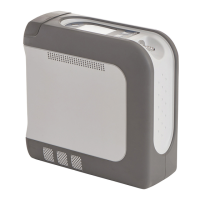
If any other problems occur with
your iGo2 POC.
1. Turn your unit Off and switch to your reserve oxygen system. Contact
your Drive DeVilbiss provider immediately.


 To Next Page