16
Battery charging and care
• Switch o the Powerstroll on the handset.
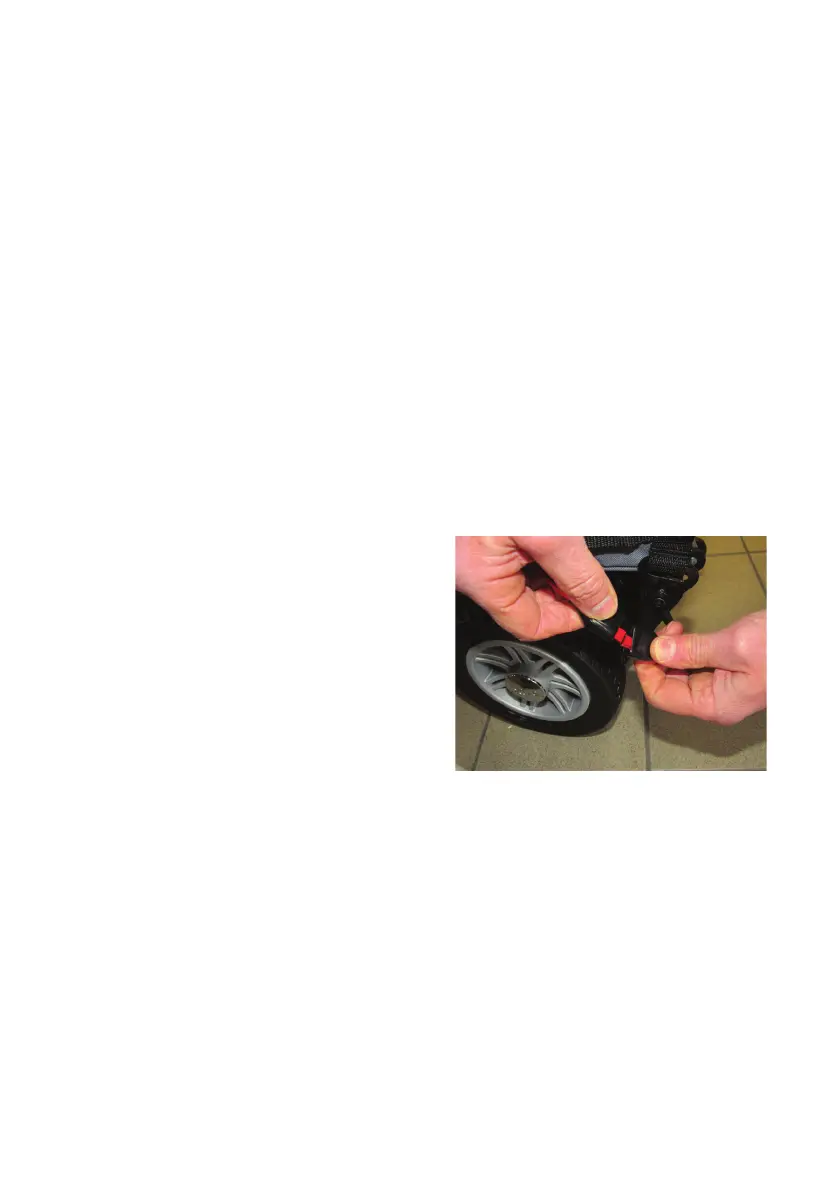
• Disconnect the red and black connector on battery pack from the red and
black connector on the powerpack (see image below). Lift the battery pack o
the battery tray using the handle.
• Plug the charger’s power cord into the mains.
• Plug the charger’s red and black connector into the red and black connector
from the battery pack
• Switch on the mains power.
• The charger’s LED will illuminate orange to indicate the batteries are charging.
The charging duration is about 8 hours. To ensure optimum performance a 12-
hour charge is recommended.
• The orange LED will turn green when charging is complete, but it is
recommended that you leave the battery on charge for a couple of hours after
the green LED has lit, to maintain the battery performance, (When no battery is
connected, the charger's LED will be red).
8.3 Checking Before Use
It is important to check the functionality of the Powerstroll before the initial use
to ensure its safe operation.
• Check that the Powerstroll is securely fixed to the wheelchair and that both
drive wheels are on the ground.
• Check that the Powerstroll drives the wheelchair in a straight line.
• Release the throttle control after moving in any direction. The throttle
control should immediately return to the neutral position and the Powerstroll
should come to a stop.
• When charging is completed, switch
o the mains and unplug the charger.
Disconnect the battery pack from the
charger.


 To Next Page