IMPORTANT PARTS
2
Cannula
Connection
3
2
1
4
F
IGURE B
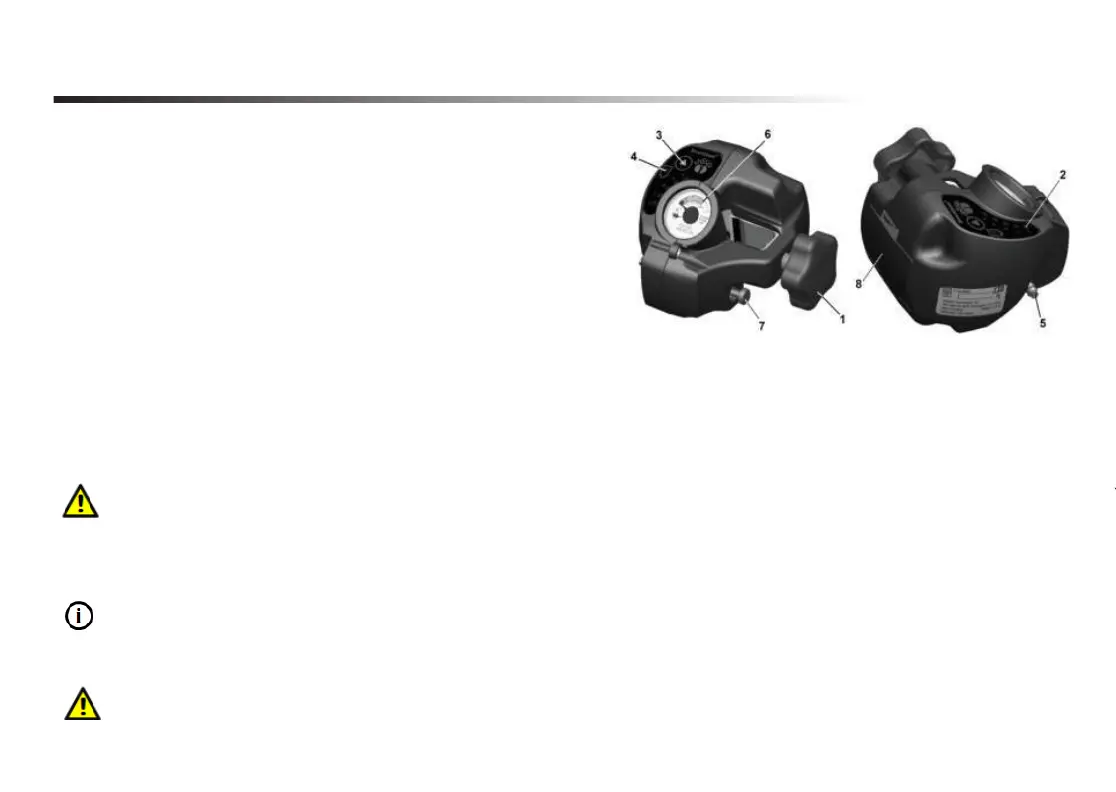
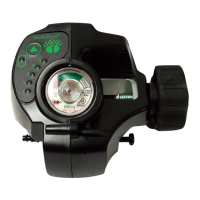
7. Continuous Flow (CF) Knob: Pull knob out to switch unit to 2 LPM CF oxygen,
does not require batteries, must be in to initiate SmartDose.
The CF mode is a mechanical override designed as a safety feature in case of battery power failure. When in the CF mode, the user
can still change the LED display lights by pressing the Selector Button, but it has no effect on the oxygen output.
6. Oxygen Contents Gauge: Indicates the remaining pressure in the
oxygen cylinder. When this gauge falls into the red section, you should
switch to a new cylinder.
8. Battery Compartment: Battery holder for 2 "AA" alkaline batteries. Note polarity when inserting new batteries.
1. Cylinder Attachment Knob: Used to attach the Conserver to the cylinder.
2. SmartDose Information Signal: One green light illuminates one flash
on each breath when in SmartDose mode to show the current setting.
3. SmartDose On/Adjust Button: Use this to power on and adjust the
patient setting. Push and release to turn on. Push and hold to change
settings.
4. Low Battery Information Signal: Flashes red when batteries are low and
should be replaced as soon as possible. Solid red means batteries are dead.
5. Cannula Fitting: Use this fitting to attach the cannula tubing.
another oxyge
n source before depleting t
he ox
ygen cylinder.
The continuou
s flow function on the SmartDose
c
onserver is
factory preset
at 2 LPM.
CAUTION
:
In the
event that it is necessary to operate the unit in the continous flow mode, DO NOT obstruct the
flow of oxygen from the Oxygen Supply Outlet by placing your finger over the outlet or blocking the flow through
the oxygen tubing in any way. Doing so may render the unit inoperable and/or damage the sensor in the unit.
CAUTION: Rem
ember that in continuous f
low m
ode, the
o
xygen will be
consumed at a much faste
r rate
. Switch to
The normal operating mode is with the CF knob pushed in and pulses oxygen at the rate set by the Selector Button.
NOTE: When using the SmartDose in Continuous Flow mode, the information signal light will NOT light up green or red
with each breath. Turning the On/Adjust button all the way down will not completely stop the flow of oxygen.
To stop the flow of oxygen push the CF switch in & turn the cylinder valve off.


 To Next Page