2) No. 26 Lim.Torq(P)
(torque limit for power side)...............The torque limit can be set in the range of 20-150% of the
motor torque.
3) No. 27 Lim.Torq(B)
(torque limit for braking side)............ The torque limit can be set in the range of 0-150%
of the motor torque.
Note 1: The torque limit for the power side is provided by lowering the frequency. To inhibit the
lowering of the frequency, turn off the P side.
Note 2: The torque limit function limits the torque by limiting the acceleration and deceleration and
cannot limit the transient torque. Some difference may be seen compared with the actual torque
depending on the set V/F characteristics and boost.
15
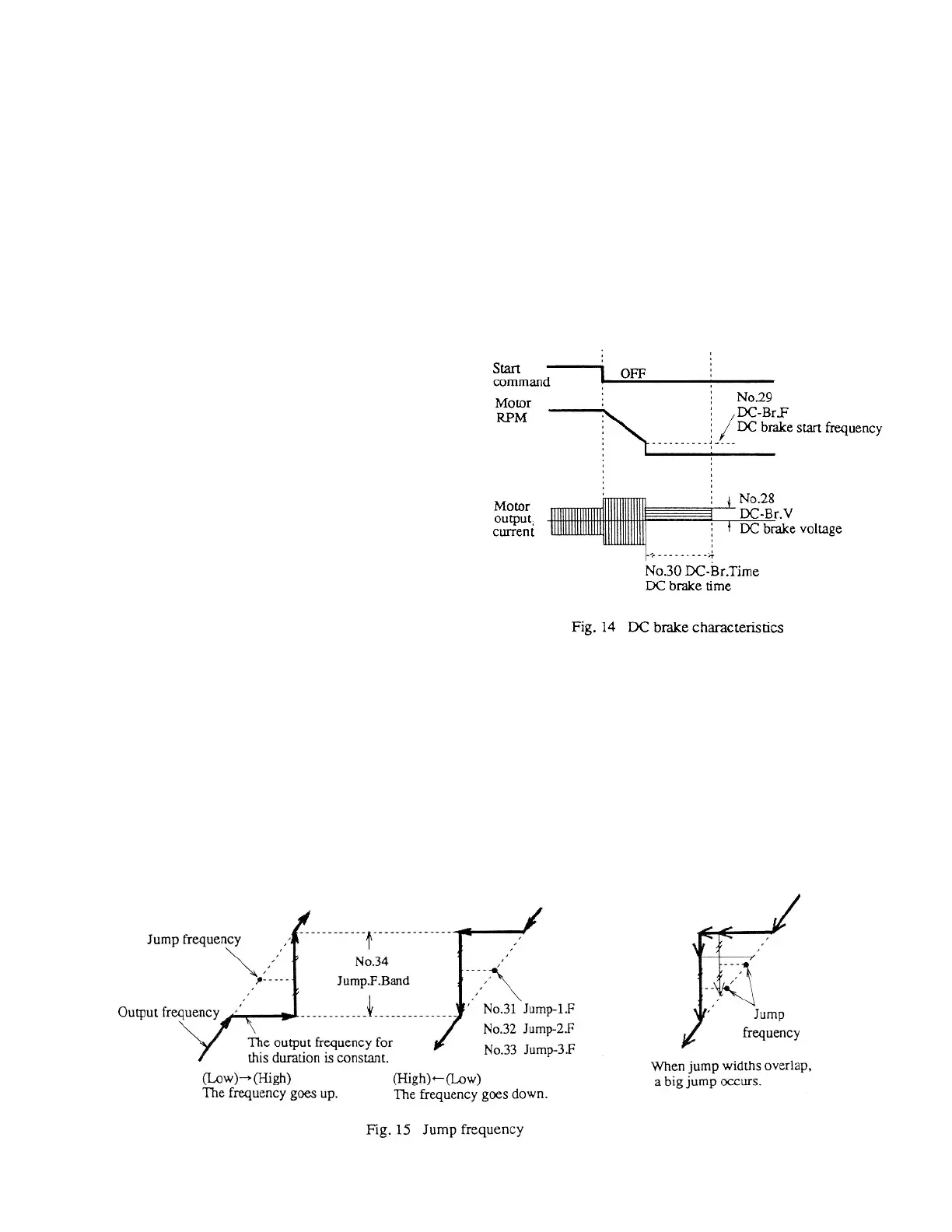
4-2-6 DC brake function
DC brake can be applied when stopping the
inverter. In this case, set the voltage, start fre-
quency, an time for the DC brake. The multi-
function input signal can be used to apply DC
brake. (Turn off the start command, and then
turn on the selected multifunction input.)
1) No. 28 DC-br.V
(DC brake voltage)
2) No. 29 DC-Br.F
(DC brake start frequency)
3) No. 30 DC-Br.Time
(DC brake time)
Note: When using DC brake for stopping the inverter, No. 15 stop.Mode must be set to decel stop. When not
using DC brake for stopping the inverter, the DC brake time must be set to 0.
4-2-7 Jump frequency
When resonance occurs on the load side at a specific number of rotations, the jump function can be used to avoid the
resonance point.
1) No. 31 Jump-1.F Jump(1) frequency
2) No. 32 Jump-2.F Jump(2) frequency
3) No. 33 Jump-3.F Jump(3) frequency
4) No. 34 Jump.F.Band Jump frequency band



 To Next Page