13
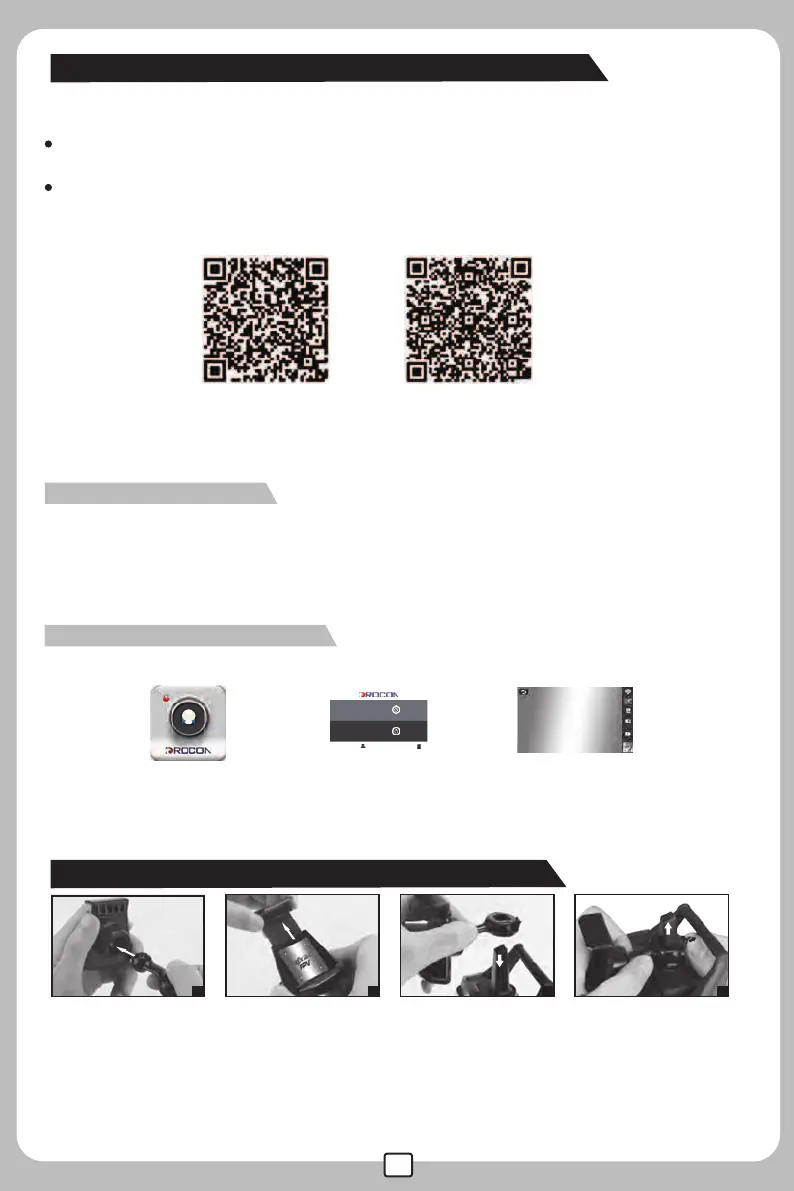
APP Remote control software download
For Android system, please visit our website www.mjxrc.net to download the
software “DROCON”.
For Apple IOS system, please go to the APP store to download the software “DROCON”.
(Or download the mobile phone APP by scanning the QR code below.)
When a memory card is inserted in the card slot, the photos and videos taken by the camera will
automatically save on both the smart phone and the memory card. If not, they will save on the smart
phone only.
WIFI connection instruction
1.Enter into settings of the smart phone, open WIFI, search the WIFI signal “MJX ****”
and connect to it. After successful connection, exit the settings.
2.Open “DROCON” software on the smart phone and click the icon“MONITOR” to enter
the control interface so as to watch the real-time video .
Enter into the APP control interface
X708W FPV software download and installation
QR Code (IOS system) QR Code(Android system)
1
3
4
2
Mobile phone holder installation and remove:
1. Connect the stand bar to the mobile phone holder.
2. Adjust the mobile phone holder upward or downward according to the size of the mobile phone.
3. Fix the connected ring of the stand bar to the top of the remote control.
4. Pull back the lock center of the stand bar and slowly push up the connected ring,the mobile phone
holder would be taken down.
Monitor
Click Image is showing
on the screen
Open “DROCON”
DESIGNED BY MJX R/C
USER CENTER HELP
APPLICABLE MODEL: X300C, X705C, C4005, C4008, C4010
APPLICABLE MODEL: X301H, X401H, X601H,C4015,C4016
MONITOR
CONTROL



 To Next Page