4
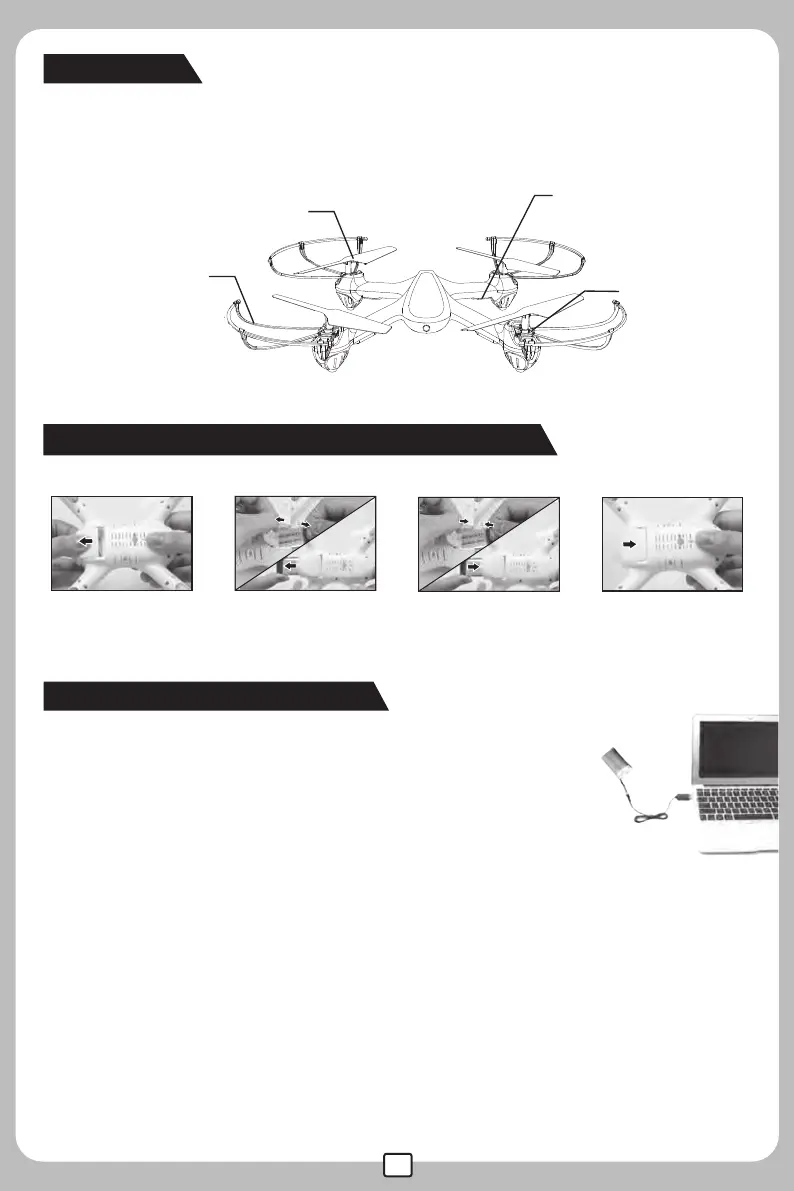
The drone
How to charge the drone
Light
Motor
Propeller
Protecting
Guard
Major parts of the drone
Turn off the aircraft, open the battery door ,unplug the battery cable from the
power wire plug and take out the battery. Insert the USB charger into the USB
interface of the computer or other USB outlet; connect the battery cable with
the USB wire plug, and charging is proceeding with indicator light being red.
Once the battery is full charged, the indicator light of the USB will be off.Full
charging takes about 90 minutes.
How to change new battery for the drone
Note: Please connect the power plug as per the indicated positive and negative polarity.
●Need adult supervision when this aircraft is being played by children.
●Only batteries of the same or equivalent type as recommended are to be used.
●Insert batteries according to the correct polarity.
●Non-rechargeable batteries are not to be charged; the transmitter requires 4 X AA batteries for operation.
●Do not mix old and new batteries.
●Do not mix alkaline,standard(carbon-zinc),or rechargeable(nickel-cadmium) batteries.
●Rechargeable batteries are to be removed from the toy before being charged;
●Rechargeable batteries are only to be charged under adult supervision;
●Exhausted batteries are to be removed from the toy;
●The supply terminals are not to be short-circuited.
●The charing line to be used with the product should be regularly examined for potential hazard,such
as damage to the cable or cord, plug,enclosure of other parts and that in the event of such damage,
the product must not be used until that damage had been properly removed.



 To Next Page