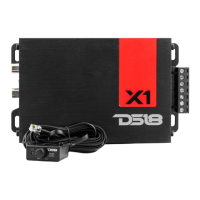
1. CLIP: LED indicator for output clipping monitor
on the Remote Level Knob. If you see the light
blinking, turn down the Gain.
2. GAIN: Adjust the output level.
3. PRO/PWR: Green light= Power ON, Red light=
Protection mode.
1. RECORTE (CLIP): Indicador LED para monitorear el
recorte de salida en el control remoto de nivel. Si
ves la luz parpadeando, baja el nivel de ganancia.
2. Ganancia: ajusta el nivel de salida.
3. PRO/PWR: Luz verde = encendido, luz roja =
modo de protección.
8
REMOTE LEVEL CONTROL / CONTROL REMOTO DE NIVEL
LEVEL
MIN
CLIP
PRO/PWR
MAX
1
3
2
12. Input Mode (G3600.6D)
When the switch is on "6CH", there will be
output only in the channel that has input.
When the switch is on "4CH", CH5 and CH6 will
take output from CH1, CH2, CH3, and CH4. These
channels will have input separately.
When the switch is on “2CH”, CH1, CH3, and CH5
can take output from the CH1 input, while CH2,
CH4, and CH6 can take output from the CH2
input. So, if there is input in CH1 and CH2, there
will be output in all 6 channels.
12. Modo de entrada (G3600.6D)
Cuando el interruptor está en "6CH", solo habrá
salida en el canal que tenga entrada.
Cuando el interruptor está en "4CH", CH5 y CH6
recibirán salida de CH1, CH2, CH3 y CH4. Estos
canales tendrán entrada por separado.
Cuando el interruptor está en "2CH", CH1, CH3 y
CH5 pueden recibir salida de la entrada de CH1,
mientras que CH2, CH4 y CH6 pueden recibir salida
de la entrada de CH2. Entonces, si hay entrada en
CH1 y CH2, habrá salida en los 6 canales.
CONTROLS AND ADJUSTMENTS / CONTROLES Y AJUSTES


 To Next Page
 Loading...