Section 3: Programming
9
3.5 Viewing Programming
LED and LCD5501Z Keypads
LCD Keypad
The keypad will immediately display all the information programmed when a programming section is entered. Use the arrow keys (< >)
to scroll through the data being displayed. Scroll past the end of the data displayed, or press the [#] key to exit the section.
3.6 DLS Programming
Hardware Setup - Local (PC-Link)
Connect an RS-232 to PC-Link Cable between the Computer with DLS Software installed and the alarm panel to be programmed.
Enter the following at a system Keypad to initiate PC-Link:
• Enter Installers programming [
][8][Installer Code][499][Installer Code][499]
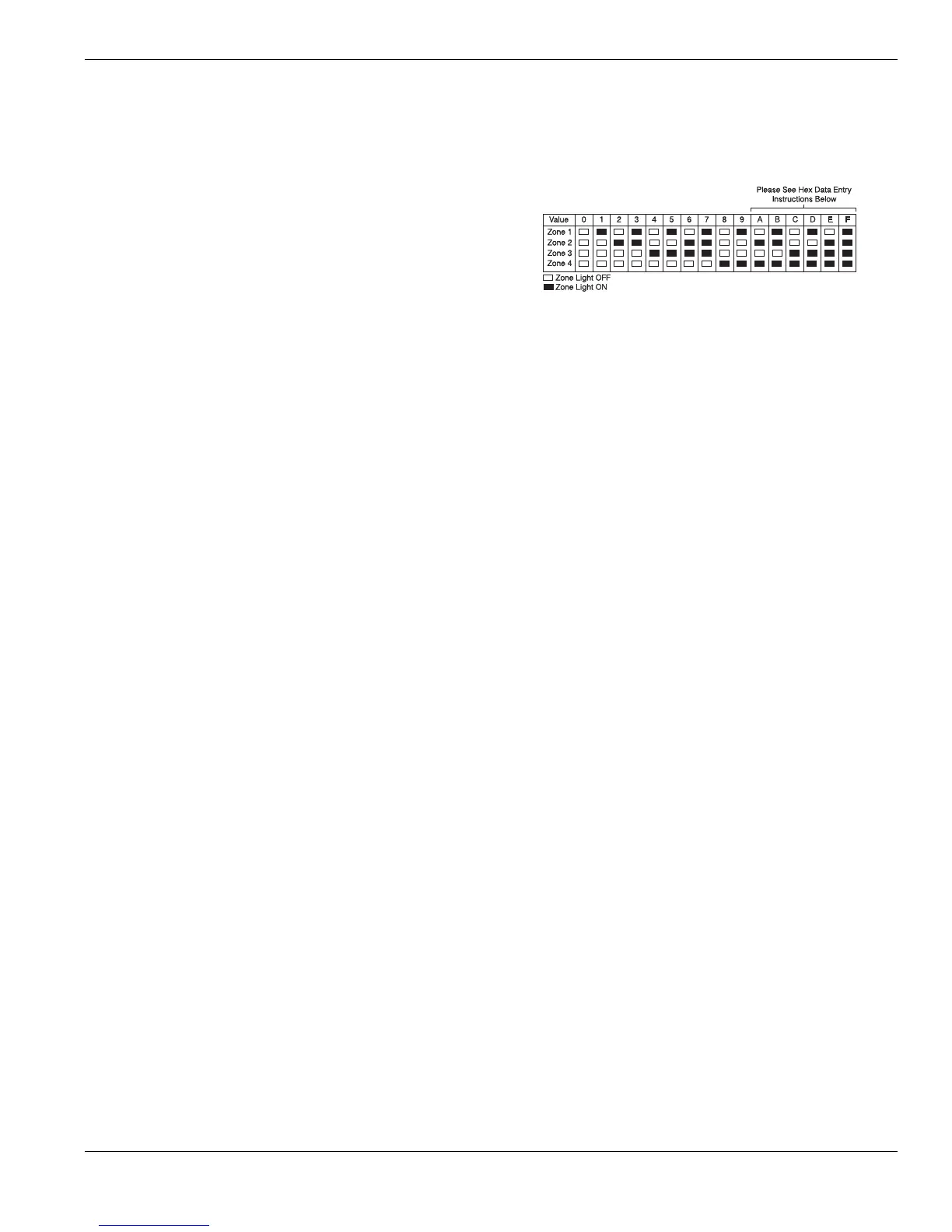
Any programming section can be viewed from an LED or
LCD5501Z keypad. When a programming section is entered, the
keypad will immediately display the first digit of information pro-
grammed in that section.
The keypad displays the information using a binary format, accord-
ing to the following chart:
Press any of the Emergency keys (Fire, Auxiliary or Panic) to
advance to the next digit.
When all the digits in a section have been viewed, the panel will exit the section: the Ready light will turn OFF, and the Armed
light will turn ON, waiting for the next 3-digit programming section number to be entered.
Press the [#] key to exit the section



 To Next Page