HD PVR Viewer’s Guide – UEC Page 15 of 62
T
HE
B
ASICS
T
HE I
-P
LATE
:
N
ORMAL
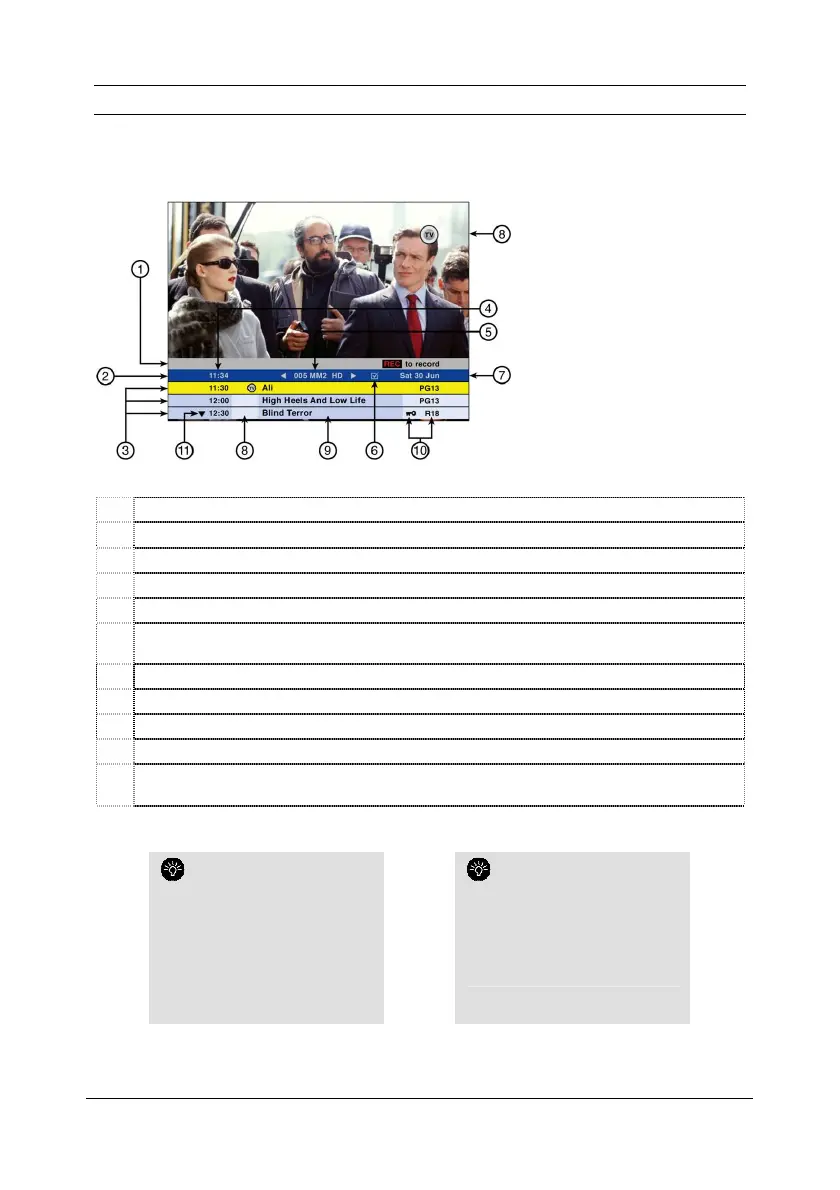
The information plate (i-Plate) is displayed when you press i.
1 Instruction bar – provides helpful information and available options.
2 i-Plate Header.
3 Starting times of programme.
4 Current time.
5 Channel number & name.
6 Favourites Icon - indicates that this channel has been selected as a Favourite Channel (see
page 21).
7 Today’s date.
8 PVR Icons (see page 26).
9 Programme titles.
10 PG Lock & PG Rating.
11
Press the DOWN arrow to access programming information for the next 24 hours on this
channel.
The colour of the i-Plate
indicates the viewing mode (see
page 18).
A blue header indicates that you
are in ALL CHANNELS.
A purple header indicates that you
are in FAVOURITE CHANNELS.
An aqua blue header indicates that
you are viewing a recording.
You can personalise the time
for which the i-Plate is displayed.
Press MENU.
Select Personalise.
Go to #5 (Display Timeout).
Follow the onscreen instructions.


 To Next Page