HD PVR Viewer’s Guide – UEC Page 17 of 62
T
HE I
-P
LATE
:
E
XTENDED
M
ODE
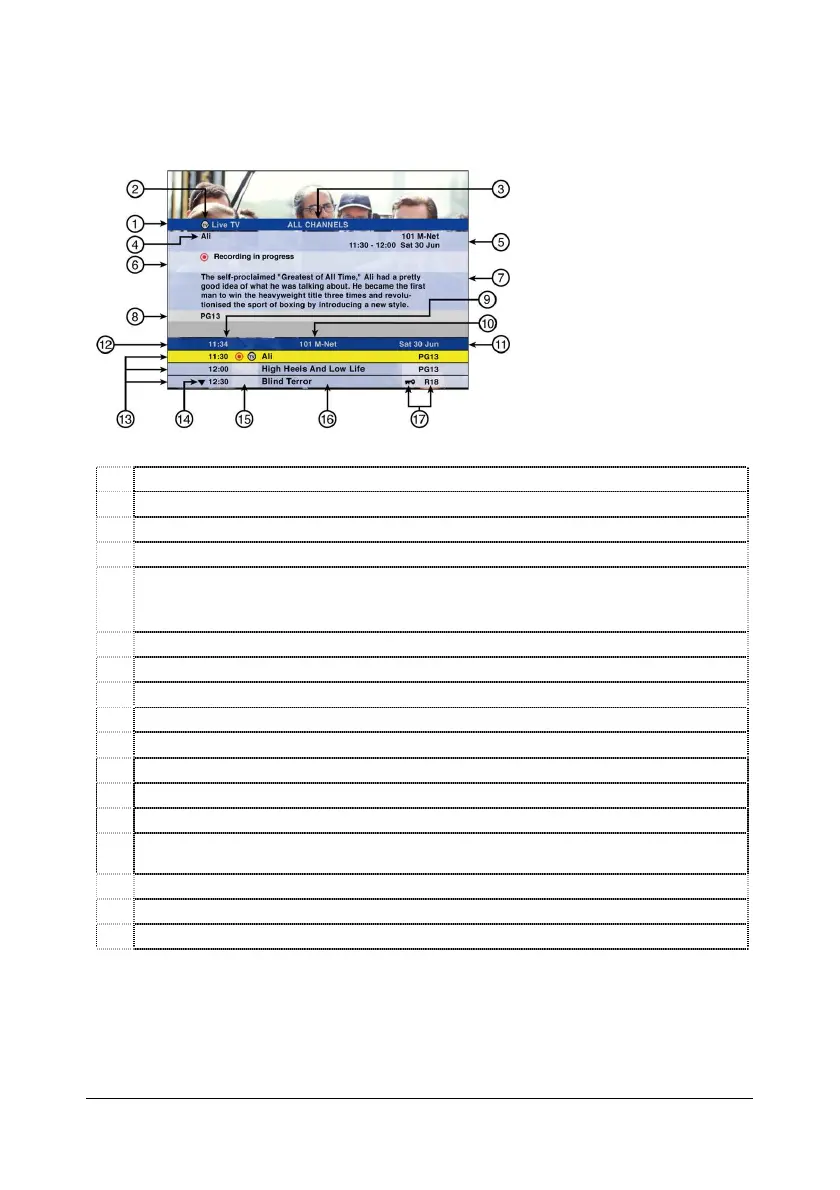
To view more information on a highlighted programme, press i to display the extended information. You
can also “banner browse” in extended mode.
1 Extended information header.
2 Live TV / Buffer indicator.
3 Viewing mode - All Channels or Favourite Channels (see page 18).
4 Programme title.
5 Channel number & name.
Programme start and end time.
Date of programme.
6 PVR icons, example Scheduled Recording icon (see page 26).
7 Synopsis (programme information).
8 PG information.
9 Current time.
10 Current channel number & name.
11 Today’s date.
12 i-Plate header.
13 Starting times of programmes.
14
Press the DOWN arrow to access programming information for the next 24 hours on this
channel.
15 PVR Icons (see page 26).
16 Programme titles.
17 PG Lock & PG Rating.


 To Next Page