Programs & Settings
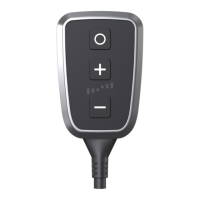
ThePedalBoxstartswiththelastselectedsetting.ThefactorysettingisprogramCity.WiththeProgrambuttonyoucanchoosebetween
fourpresets.
Change programs
Presstheprogrambuttontoswitchbetweenfourpresetprograms[CITY,SPORT,SPORT+ and STOCK].Tone-tunetheselectedprogram,
usetheplusorminusbutton.
Overview of the programs
TheCITYmodeisperfectlydesignedforstop-and-goinurbantrac.Itensuresanimprovedlow-speedrangewitharesponseprogrammed
foreconomicconsumption.
The SPORT mode increasesthe throttle accelerationalready clearly and is suitable formost driving situations. The enginereacts more
spontaneously:Arealplusofdynamism,whichthedriverfeelsespeciallywhenovertaking.
TheSPORT+modehasanoptimizedthrottleresponsethroughoutthecompletespeedrange.Theresponseisdesignedforfastacceleration.
TheSTOCKmodesetsthevehicleindefaultsetting.
Turn o
PressandholdtheprogrambuttonuntilthePedalBoxLEDsgoout.Yourlastsettingswillbesavedautomatically.Pressanykeytoreturnto
thepreviouslysavedsetting.
Please read the safety instructions on page 29.
27
dystrybutor


 To Next Page