17
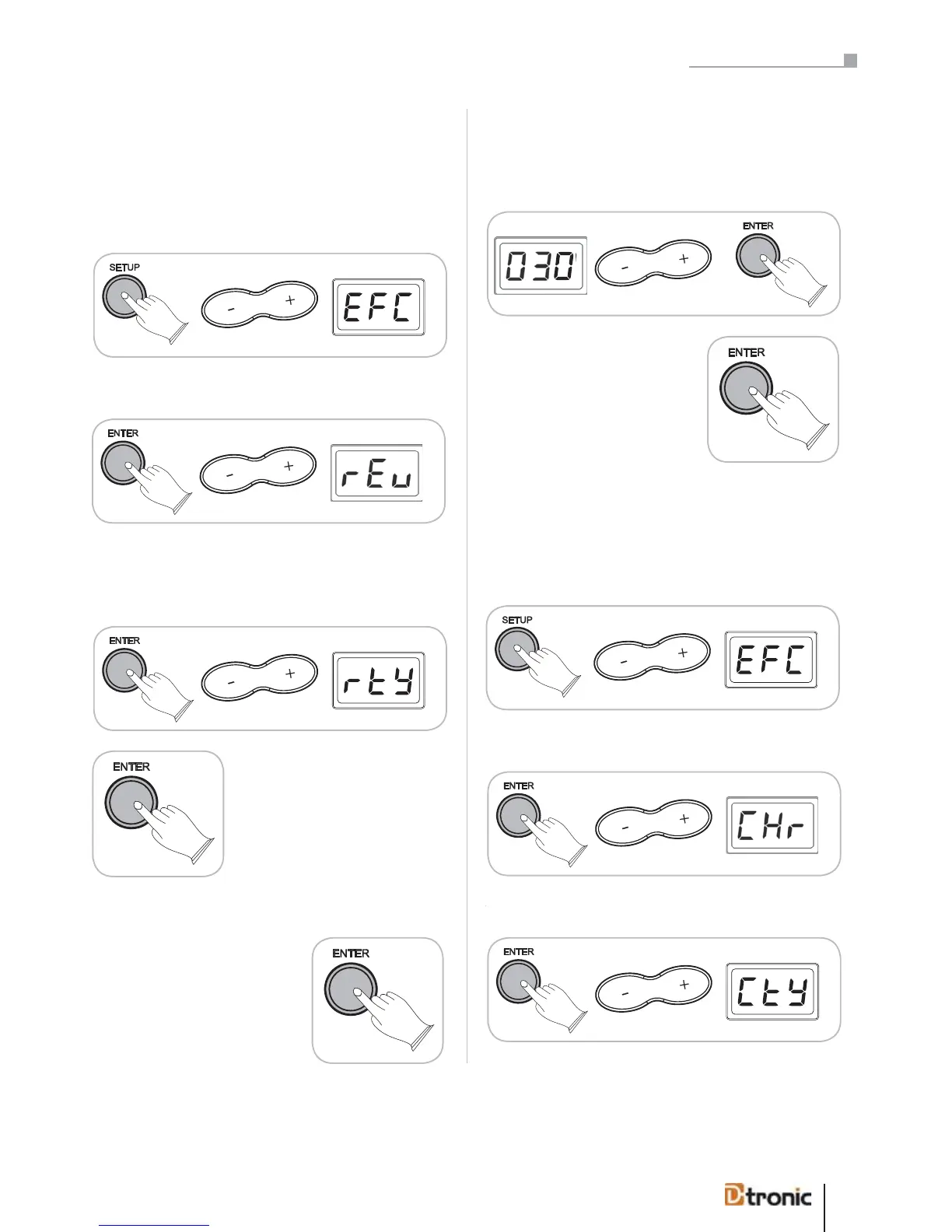
Press ENTER, use +/- to select Reverb (rEv).
Reverb Type (rtY)
To edit reverb type press ENTER and choose rtY.
Press ENTER to choose between 8
kinds of reverb types:
Room1 (r1), Room2 (r2),
Room3 (r3)
Hall1 (H1), Hall2 (H2),
Plate (PLA)
Delay (dLY), PanDelay (PdL)
or turn the effect off (oFF).
Press ENTER to confirm (or BACK
to cancel).
Reverb Level (rEL)
Use +/- to select rEL and press ENTER to adjust the level of the
Reverb effect between a range from 000 – 127.
Press ENTER to confirm (or BACK
to cancel).
4.2 Chorus effect
Another interesting effect is the Chorus effect.
Press SETUP, use +/- to select EFC.
Press ENTER, use +/- to select Chorus (CHr).
To edit chorus type press ENTER and choose CTY.
4.1 Reverb effect
This function gives you the possibility to choose various digi-
tal reverb effects to generate a realistic acoustic atmosphere.
Press SETUP, use +/- to select EFC.
To edit chorus type press ENTER and choose CtY.
Part 5: Configuring the drum kit


 To Next Page