EasyManua.ls Logo

Dual 1228 - Operation and Controls; Single Play Operation Modes

Dual 1228
36 pages
Print Icon
To Next Page IconTo Next Page
To Previous Page IconTo Previous Page
Loading...
Inbetriebnahme
und
Bedienung
Betrieb
als
Plattenspieler
Spurwinkel
Selector
(6)
in
Stellung
Jie
Mitlaufachse
(4),
be
henfal
ch
Setzer
hallplatten
erforder!
ntrierstück
(20)
e
hte
Schallplatte
auf
den
Plattenteller
1
und
legen
Sie
die
e
bitte
die
Plattenteller-Drehzah
der
45
L
nd
klappen
Sie
min,
entriegeln
Sie
den
|
Nadelschutz
nach
1.
Automatischer
Start
(nu
O
cm-Schallplatten
mit
33
1/3
U
jer
17
cm-Schallplatten
mit
45
U
'euertaste
(17)
nach
,start”
schieben
Die
Tonarmaufsetzautomatik
des
Gerätes
ist
für
(die
heute
ausschlieBlich
hergestellten)
Schallplattenausgelegt
und
de
chaltung
der
Plattenteller-Dreh
ppelt
der
Plattenteller
zahlen
ge
Drehzahl
33
1/3
U/min
narm
in
der
Einlaufrille
von
m-Langspielplatten
auf,
bei
der
Drehzahl
J/min
analog
dazu
in
der
Einlaufrille
von
le)
Schallplatten
Weitung
der
Start-Funktion
Steuer
(17)
in
Richtung
„start
hieben.
Die
Steuertaste
kehrt
selbst
3uhestellung
zurück.
Der
Ton
senkt
sich
langsam
ab
und
setzt
die
Ab
adel
behutsam
in
die
Einlaufrille
der
bis
zum
An
2.
Manuelle
Inbetriebnahme
a)
Bringen
Sie
den
Steuerhebel
des
Tonarm
liftes
(13)
auf
Y.
b)
Führen
Sie
den
Tonarm
von
Hand
über
die
gewünschte
Stelle
der
Schallplatte.
c)
Bringen
Sie
den
Steuerhebel
durch
leichtes
Antippen
in
die
Stellung
X.
Anmerkung
Der
Tonarmlift
ist
der
Start-Automatik
über
geordnet.
Bei
Tonarmlift
in
Stellung
Y
und
automatischem
Start
schwenkt
der
Tonarm
in
die
Aufsetzposition.
Zum
jeweils
gewünsch
ten
Zeitpunkt
kann
das
Absenken
durch
An
tippen
des
Steuerhebels
erfolgen
Start
and
Operation
Single
play
operation
Set
tracking
angle
selector
(6)
to
position.
single’
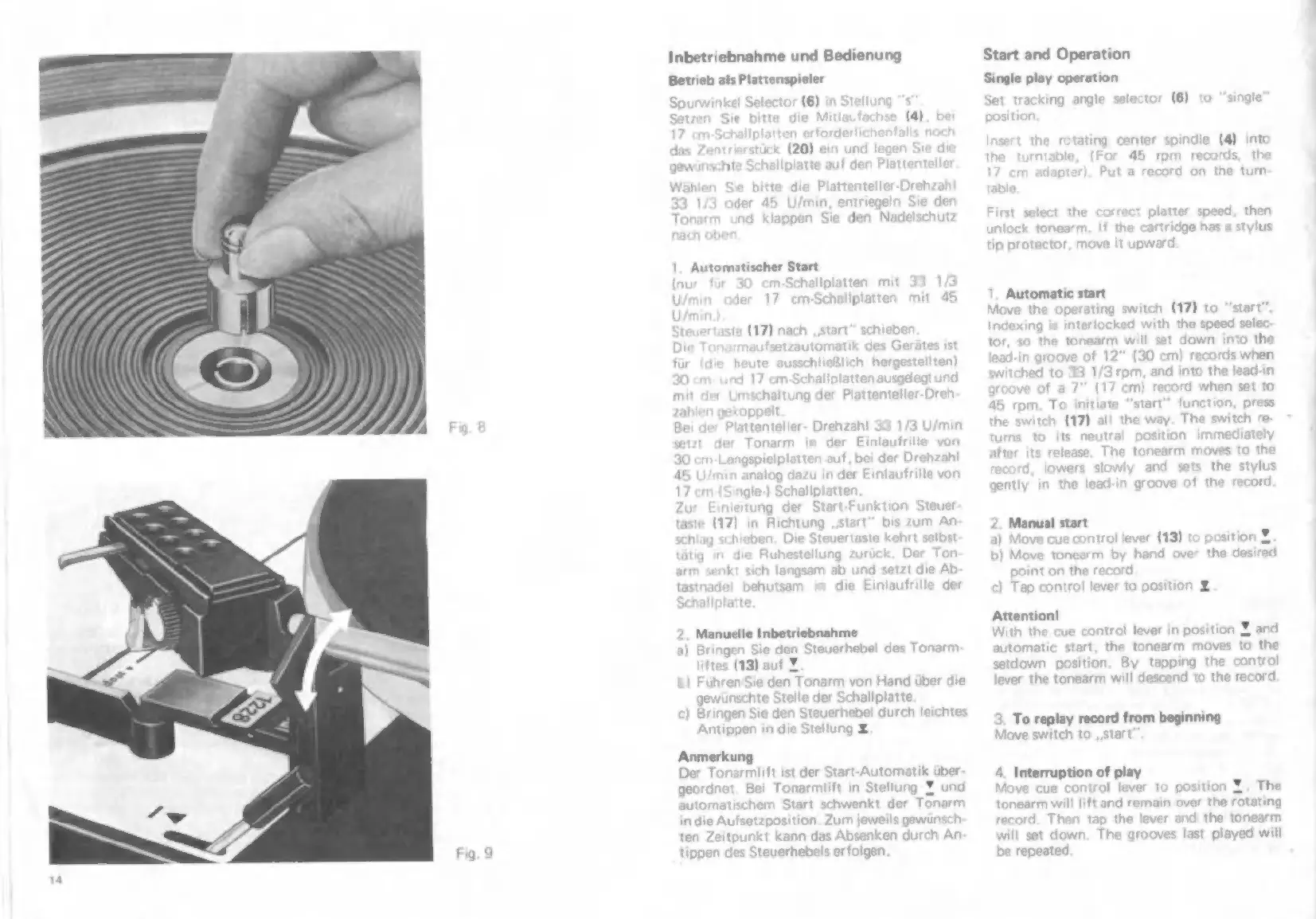
Insert
the
rotating
center
spindle
(4)
into
the
turntable,
(For
45
rpm
records,
the
17
cm
adapter).
Put
a
record
on
the
turn
table
First
select
the
correct
platter
speed,
then
unlock
tonearm,
If
the
cartridge
has
a
stylus
tip
protector,
move
it
upward
Automatic
start
Move
the
operating
switch
(17)
to
“start”.
Indexing
is
interlocked
with
the
speed
selec
tor,
so
the
tonearm
will
set
down
into
the
lead-in
groove
of
12”
(30
cm)
records
when
witched
to
33
1/3
rpm,
and
into
the
lead-in
groove
of
a
7"
(17
cm)
record
when
set
to
45
rpm.
To
initiate
“start”
function,
press
the
switch
(17)
al!
the
way.
The
switch
re-
ts
neutral
position
immediately
s
to
the
record,
lowers
slowly
and
sets
the
stylus
gently
ir
turns
after
its
release.
The
tonearm
mov
the
lead-in
groove
of
the
record
2.
Manual
start
ue
control
lever
(13)
to
position
Y,
the
desired
3)
Move
b)
Move
tonearm
by
hand
ove
point
on
the
record
c)
Tap
control
lever
to
position
Y
Attention!
With
the
cue
control
lever
in
position
Y
and
automatic
art,
the
tonearm
moves
to
the
setdown
position.
By
tapping
the
control
lever
the
tonearm
will
descend
to
the
record
3.
To
replay
record
from
beginning
Move
switch
to
„start
4.
Interruption
of
play
Move
cue
control
lever
to
position
Y.
The
tonearm
wil!
lift
and
remain
over
the
rotating
record.
Then
tap
the
lever
and
the
tonearm
will
set
down.
The
grooves
last
played
will
be
repeated.

Related product manuals