EasyManua.ls Logo

Dual 502 - Troubleshooting Common Issues; Platter and Speed Malfunctions; Tonearm and Stylus Problems; Acoustic Feedback

Dual 502
14 pages
Print Icon
To Next Page IconTo Next Page
To Previous Page IconTo Previous Page
Loading...
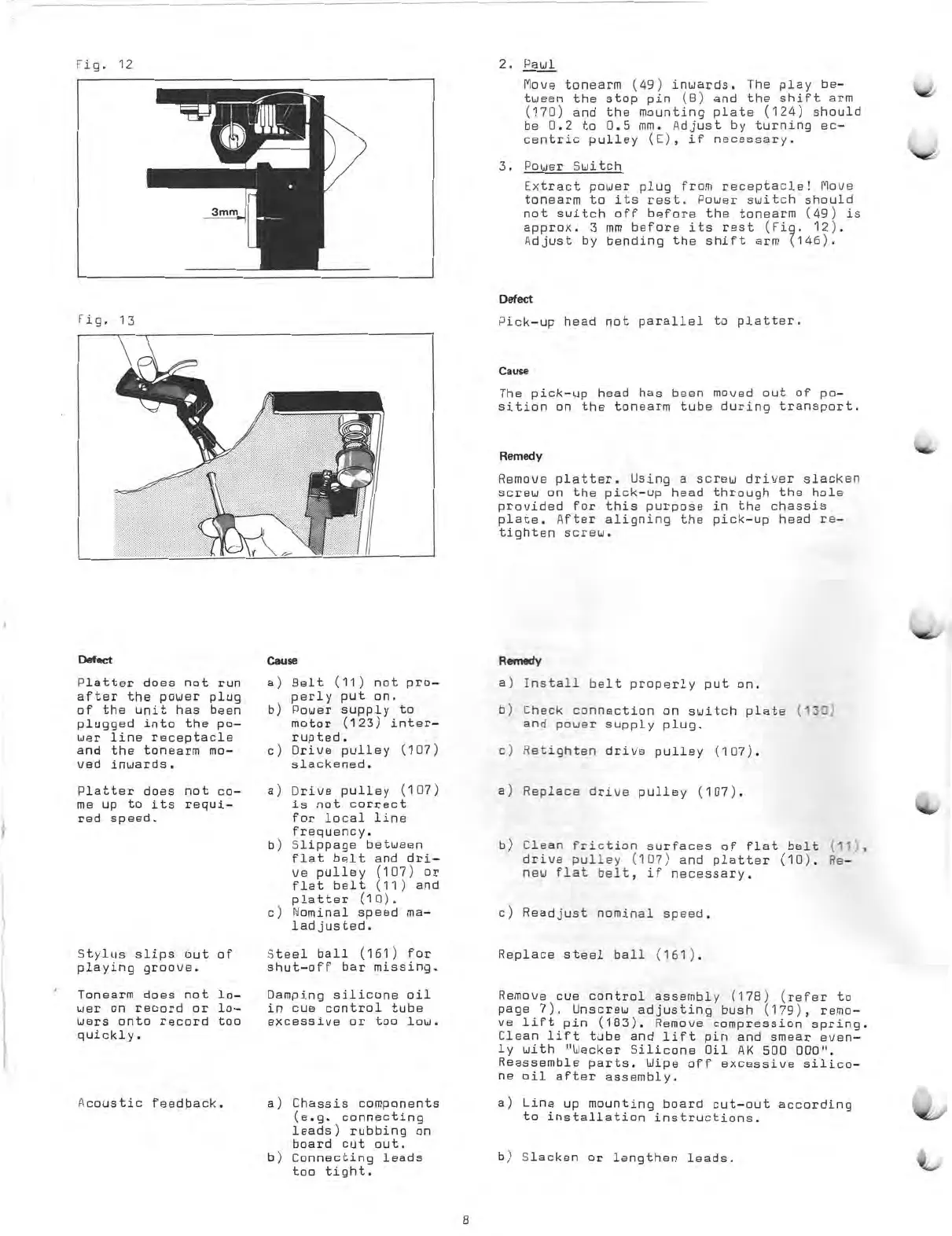
Fig.
12
7
E
3
'
wau
3mm
2.
Paul
Move
tonearm
(49)
inwards.
The
play
be-
tween
the
stop
pin
(8)
and
the
shift
arm
(170)
and
the
mounting
plate
(124)
should
be
0.2
to
0.5
mm.
Adjust
by
turning
ec-
centric
pulley
(E),
if
necessary.
3.
Power
Switch
Extract
power
plug
from
receptacle!
Move
tonearm
to
its
rest.
Power
switch
should
not
switch
off
before
the
tonearm
(49)
is
approx.
3
mm
before
its
rest
(Fig.
12).
Adjust
by
bending
the
shift
arm
(146).
Defect
Fig.
13
Pick
-up
head
not
parallel
to
platter.
Defect
Platter
does
not
run
after
the
power
plug
of
the
unit
has
been
plugged
into
the
p0
-
wer
line
receptacle
and
the
tonearm
mo-
ved
inwards.
Platter
does
not
co-
me
up
to
its
requi-
red
speed.
Stylus
slips
out
playing
groove.
Tonearm
does
not
wer
on
record
or
wers
onto
record
quickly.
Cause
a)
b)
c)
a)
b)
c)
Belt
(11)
not
pro-
perly
put
on.
Power
supply
to
motor
(123)
inter-
rupted.
Drive
pulley
(107)
slackened.
Drive
pulley
(107)
is
not
correct
for
local
line
frequency.
Slippage
between
flat
belt
and
dri-
ve
pulley
(107)
or
flat
belt
(11)
and
platter
(10).
Nominal
speed
ma-
ladjusted.
of
Steel
ball
(161)
for
shut-off
bar
missing.
lo-
Damping
silicone
oil
lo-
in
cue
control
tube
too
excessive
or
too
low.
Acoustic
feedback.
a)
Chassis
components
(e.g.
connecting
leads)
rubbing
on
board
cut
out.
b)
Connecting
leads
too
tight.
Cause
The
pick
-up
head
has
been
moved
out
of
Po-
sition
on
the
tonearm
tube
during
transport.
Rmmedy
Remove
platter.
Using
a
screw
driver
slacken
screw
on
the
pick
-up
head
through
the
hole
provided
for
this
purpose
in
the
chassis
plate.
After
aligning
the
pick
-up
head
re-
tighten
screw.
Reime
a)
Install
belt
properly
put
on.
b)
Check
connection
on
switch
plate
(13Z,
and
power
supply
plug.
c)
Retighten
drive
pulley
(107).
a)
Replace
drive
pulley
(107).
b)
Clean
friction
surfaces
of
flat
belt
(11,
,
drive
pulley
(107)
and
platter
(10).
Re
-
neu
flat
belt,
if
necessary.
c)
Readjust
nominal
speed.
Replace
steel
ball
(161).
Remove
cue
control
assembly
(178)
(rarer
to
page
7).
Unscrew
adjusting
bush
(179),
remo-
ve
lift
pin
(183).
Remove
compression
spring.
Clean
lift
tube
and
lift
pin
and
smear
even-
ly
with
"Wacker
Silicone
Oil
AK
500
000".
Reassemble
parts.
Wipe
off
excessive
silico-
ne
oil
after
assembly.
a)
Line
up
mounting
board
cut-out
according
to
installation
instructions.
b)
Slacken
or
lengthen
leads.
8

Related product manuals