EasyManua.ls Logo

Dual 601 - Pitch Control

Dual 601
20 pages
Print Icon
To Next Page IconTo Next Page
To Previous Page IconTo Previous Page
Loading...
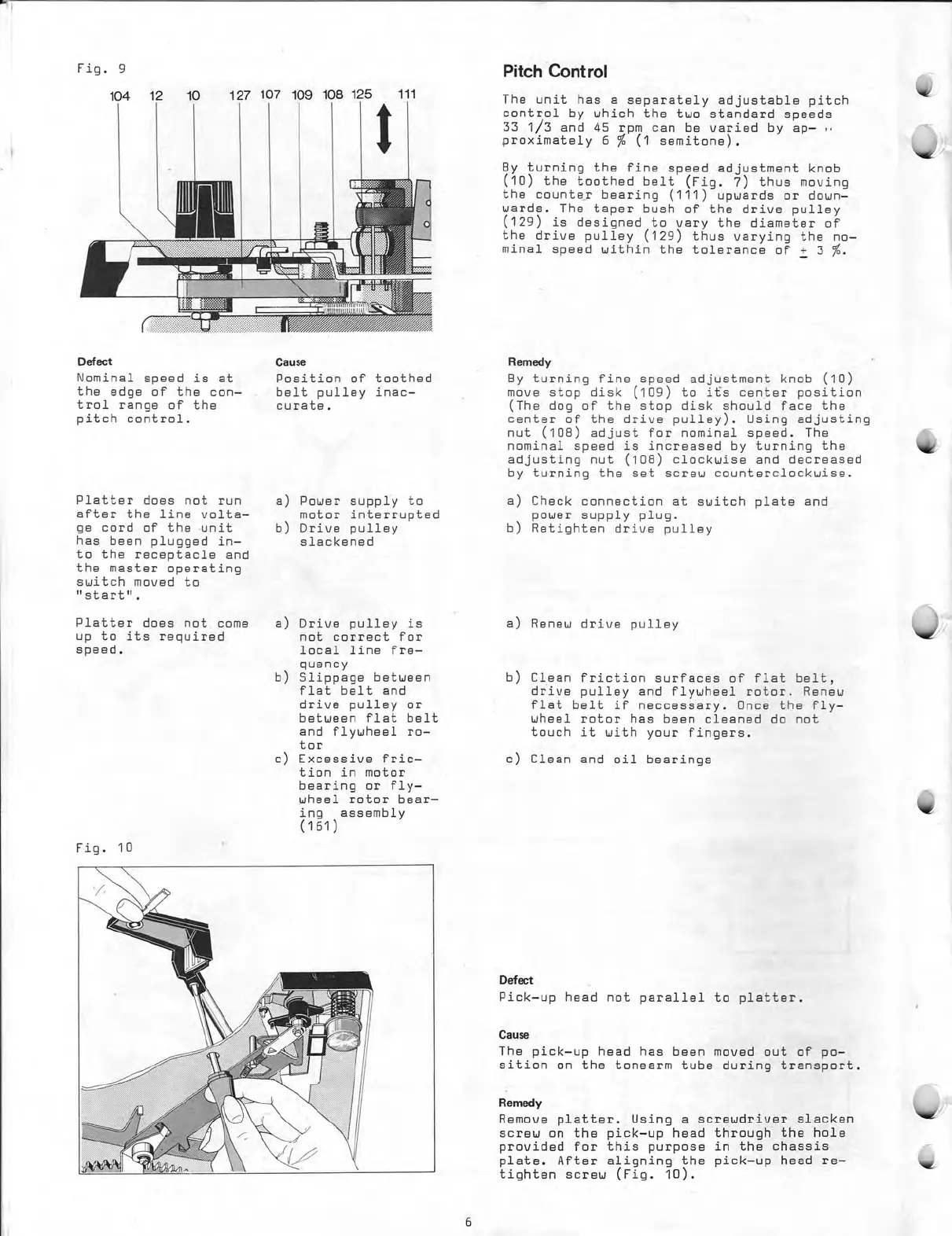
Fig.
9
104
12
10
127
107
109
108
125
Defect
Nominal
speed
is
at
the
edge
of
the
con—
trol
range
of
the
pitch
control.
Platter
does
not
run
after
the
line
volta—
ge
cord
of
the
unit
has
been
plugged
in
to
the
receptacle
and
the
master
operating
switch
moved
to
"start".
Platter
does
not
come
up
to
its
required
speed.
Fig.
10
111
Cause
Position
of
toothed
belt
pulley
inac—
curate.
a)
Power
supply
to
motor
interrupted
b)
Drive
pulley
slackened
a)
Drive
pulley
is
not
correct
for
local
line
fre—
quency
b)
Slippage
between
flat
belt
and
drive
pulley
or
between
flat
belt
and
flywheel
ro—
tor
Excessive
fric—
tion
in
motor
bearing
or
fly—
wheel
rotor
bear—
ing
assembly
(161)
)
Pitch
Cont
rol
The
unit
has
a
separately
adjustable
pitch
control
by
which
the
two
standard
speeds
33
1/3
and
45
rpm
can
be
varied
by
ap—
proximately
6
%
(1
semitone).
By
turning
the
fine
speed
adjustment
knob
(10)
the
toothed
belt
(Fig.
7)
thus
moving
the
counter
bearing
(111)
upwards
or
down
werde.
The
taper
bush
of
the
drive
pulley
(129)
is
designed to
vary
the
diameter
of
the
drive
pulley
(129)
thus
varying
the
no—
minal
speed
within
the
tolerance
of
+
3
%.
Remedy
By
turning
fine
speed
adjustment
knob
(10)
move
stop
disk
(109)
to
its
center
position
(The
dog
of
the
stop
disk
should
face
the
center
of
the
drive
pulley).
Using
adjusting
nut
(108)
adjust
for
nominal
speed.
The
nominal
speed
is
increased
by
turning
the
adjusting
nut
(108)
clockwise
and
decreased
by
turning
the
set
screw
counterclockwise.
a)
Check
connection
at
switch
plate
and
power
supply
plug.
b)
Retighten
drive
pulley
a)
Renew
drive
pulley
b)
Clean
friction
surfaces
of
flat
belt,
drive
pulley
and
flywheel
rotor.
Renew
flat
belt
if
neccessary.
Once
the
fly—
wheel
rotor
has
been
cleaned
do
not
touch
it
with
your
fingers.
c)
Clean
and
oil
bearings
Ddect
Pick
—up
head
not
parallel
to
platter.
Cause
The
pick
—up
head
has
been
moved
out
of
po—
sition
on
the
tonearm
tube
during
transport.
Remedy
Remove
platter.
Using
a
screwdriver
slacken
screw
on
the
pick
—up
head
through
the
hole
provided
for
this
purpose
in
the
chassis
plate.
After
aligning
the
pick
—up
head
re—
tighten
screw
(Fig.
10).
6

Related product manuals