EasyManua.ls Logo

Dual 601 - Stroboscope

Dual 601
20 pages
Print Icon
To Next Page IconTo Next Page
To Previous Page IconTo Previous Page
Loading...
8.
Setting
of
nominal
speed
To
bring
stop
disk
into
center
position
turn
adjustment
knob
correspondingly.
(The
nose
of
the
stop
disk
should
show
to
the
motor
pulley
center).
Adjust
nominal
speed
by
turning
adjusting
nut
(108)
counterclockwise
the
speed
is
reduced.
When
turning
lt
clockwise
the
speed
is
increased.
St
roboscope
Accurate
setting
of
the
platter
speed
33
1/3
rpm
can
be
checked
during
play
with
the
aid
of
the
stroboscope
device.
When
the
platter
(4)
is
rotating
at
exactly
33
1/3
rpm
the
lines
of
the
stroboscope
ap—
pear
to
stand
still.
If
the
lines
of
the
stroboscope
move
in
the
direction
of
rota—
tion
of
the
platter,
the
platter
speed
is
too
high.
If
the
lines
move
backwards,
the
platter
is
rotating
more
slowly
than
the
no—
minal
speed.
Adjustment
is
carried
out
with
the
"pitch"
knob
(10).
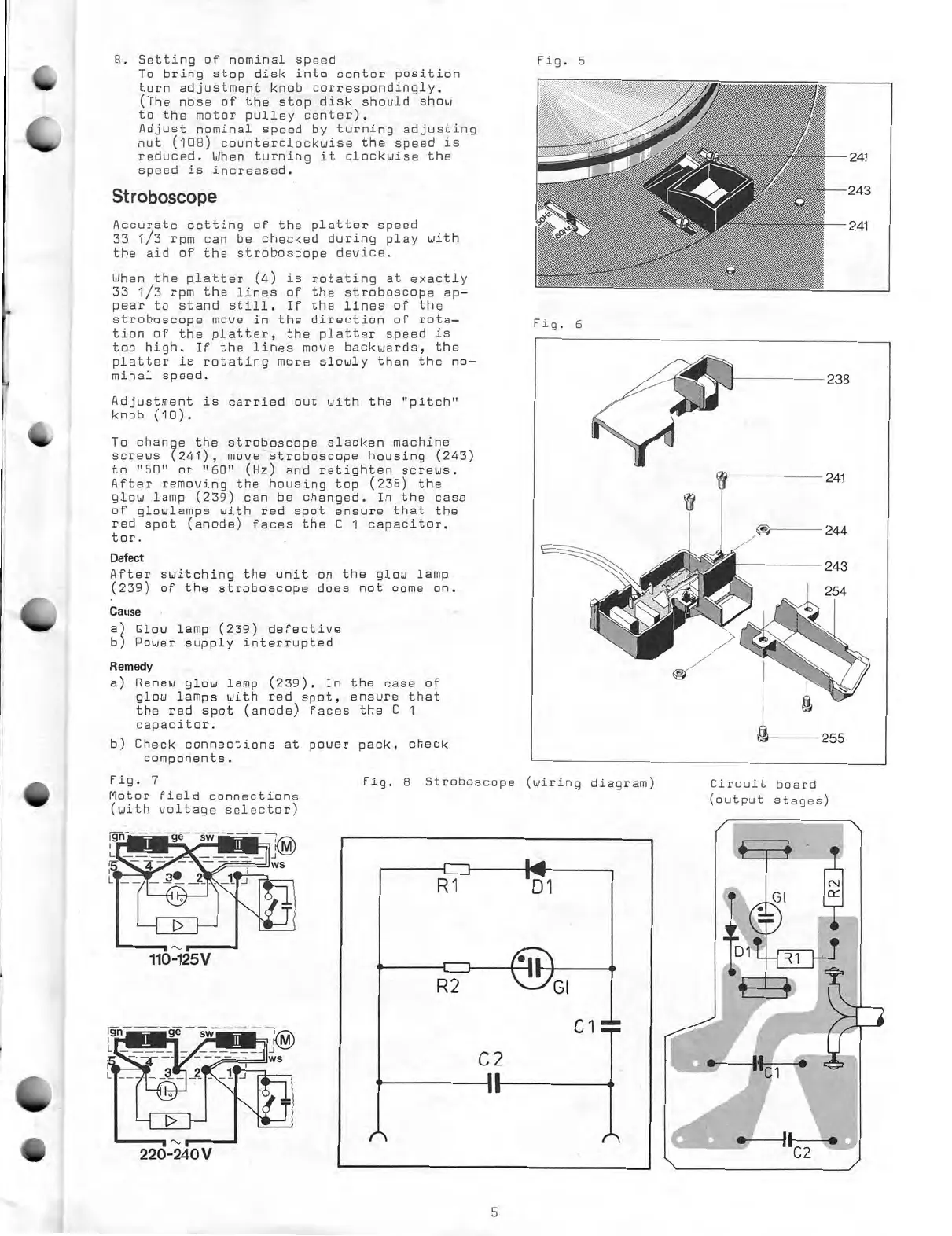
To
change
the
stroboscope
slacken
machine
screws
(241),
move
stroboscope
housing
(243)
to
"50"
or
"60"
(Hz)
and
retighten
screws.
After
removing
the
housing
top
(238)
the
glow
lamp
(239)
can
be
changed.
In
the
case
of
glowlamps
with
red
spot
ensure
that
the
red
spot
(anode)
faces
the
C
1
capacitor.
tor.
Defeet
After
switching
the
unit
on
the
glow
lamp
(239)
of
the
stroboscope
does
not
come
on.
Cause
a)
Clou
lamp
(239)
defective
b)
Power
supply
interrupted
Remedy
a)
Renew
glow
lamp
(239).
In
the
case
of
glow
lamps
with
red
spot,
ensure
that
the
red
spot
(anode)
faces
the
C
1
capacitor.
b)
Check
connections
at
power
pack,
check
components.
Fig.
7
Motor
field
connections
(with
voltage
selector)
110-125V
220-240V
Fig.
5
Fig.
6
Fig.
8
Stroboscope
(wiring
diagram)
Circuit
board
(output
stages)
5

Related product manuals