EasyManua.ls Logo

Dual DTJ 301 - User Manual

Dual DTJ 301
99 pages
Go to English
Print Icon
To Next Page IconTo Next Page
Loading...
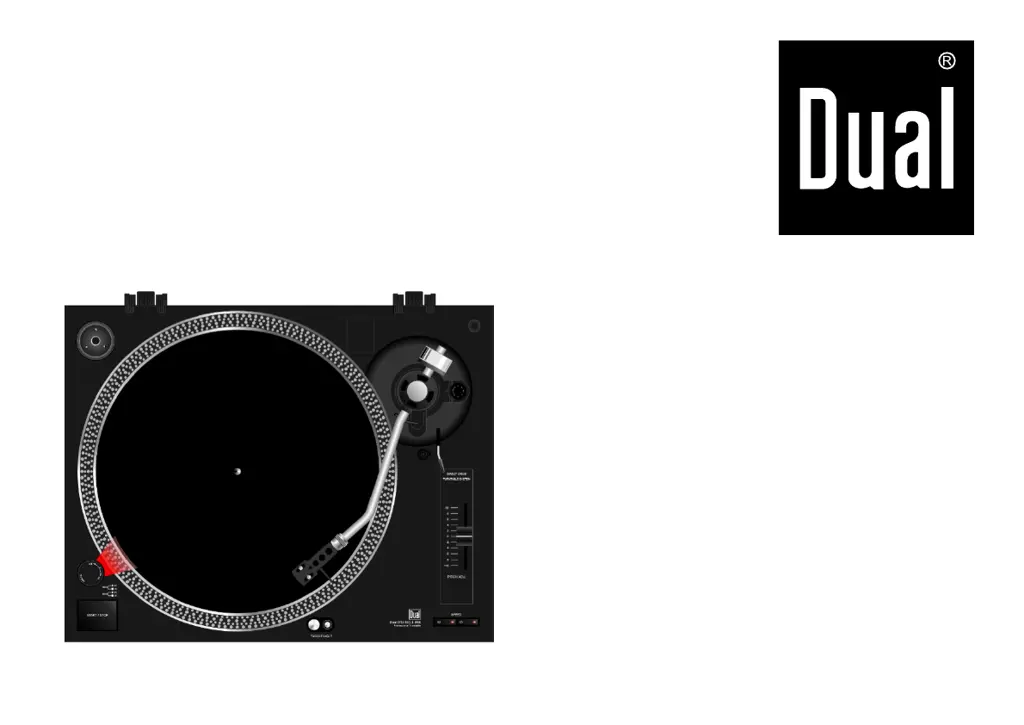
DTJ 301 USB
DTJ 301.1 USB
DJ-Plattenspieler
mit USB-Anschluss
Bedienungsanleitung
DTJ 301_1018-De

Table of Contents

Questions and Answers

Summary

Preface

Manual Layout Features

Explains how different text elements in the manual indicate content type.

Target Audience

Identifies users for whom the manual is intended, including setup, operation, cleaning, and disposal.

Important Notes for UK Users

Mains Plug and Fuse

Details on the 13 Amp plug, fuse replacement, and suitability for socket outlets.

Connecting the Mains Plug

Wire colour coding and terminal connection for mains plug wiring.

Copyright Information

Notes on copyright consent for recording and playback of material.

Safety and Setup

General Safety Precautions

Covers electrical safety, avoiding liquids, opening housing, and professional repairs.

Safety Usage and Setup

Usage Safety Rules

Addresses unattended use, maintenance, volume levels, user supervision, and modifications.

Setup Guidelines

Specifies placement on sturdy surface, avoiding heat sources, and operating horizontally.

Operating Environment and Intended Use

Operating Environment and Precautions

Details on humidity, magnetic fields, temperature changes, cable routing, and plug access.

Intended Use

States the unit is designed for playing records.

Record Player Description

Included Accessories

Lists all parts included in the delivery package with the record player.

Special Features

Highlights capabilities like 33/45 rpm playback, scratch playing, direct drive, and USB digitisation.

The Controls

Control Identification

Detailed labelling and numbering of all physical controls and ports on the unit.

Operation Preparation

Initial Setup Steps

Assembling dust cover, placing player on stable surface, and positioning away from speakers.

Turntable and Mat Installation

Instructions for placing the turntable and turntable mat correctly.

Spindle Adapter Usage

Explains the purpose and storage of the spindle adapter for 7" records.

Tone Arm Head Installation

Step-by-step guide to installing the tone arm head and securing it.

Tone Arm Adjustment

Tone Arm Securing

How to secure the tone arm for transport using the clip.

Counterweight Attachment

Instructions for screwing the counterweight onto the tone arm.

Stylus Force Adjustment

Procedure for balancing the tone arm and setting stylus pressure.

Advanced Adjustments

Stylus Pressure Notes

Guidance on counterweight positioning effects and recommended stylus pressure.

Anti-Skating Control

Explains skating force and how to set the anti-skating control to match stylus force.

Stylus Illuminator and Dust Cover

Stylus Illuminator Operation

How to use the stylus illuminator switch to light the stylus tip.

Dust Cover Installation

Steps for attaching the dust cover receptacles to the hinges.

Adjustable Feet

Feet Adjustment for Leveling

How to use adjustable feet for height and levelness adjustments, including range.

Connecting the Record Player

System Diagram

Visual representation of connecting multiple players and the PC.

Connection Details

Connecting to Amplifier

Guidance on connecting audio cables to amplifier inputs, noting channel assignment.

Connecting to Computer

Instructions for connecting the player to a computer via USB.

Mains Power Connection

Simple instruction to plug the mains cable into a socket.

PHONO;LINE Switch Setting

How to set the PHONO/LINE switch based on amplifier connection type.

Stylus Protection

Removing Stylus Cap

How to remove the stylus protection cap before playing a record.

Replacing Stylus Cap

Recommendation to replace the stylus cap after playing for protection.

Playing a Record

Playback Procedure

Step-by-step guide for placing record, powering on, selecting speed, and starting playback.

Interrupting Playback

How to lift the tone arm stylus off the record during playback.

Advanced Playback Features

45 RPM Records

Instructions for playing 45 rpm records with large centre holes using the adapter.

Speed Fine Adjustment

Using the PITCH ADJ. slider to fine-tune playback speed from -10% to +10%.

USB Connection and Digitization Setup

System Requirements for USB

Lists necessary hardware and software specifications for computer connection.

Software Installation Notes

Recommends installing Audacity software and provides website for updates.

Digitizing Music Workflow

Connecting Player for Digitization

Connects the player's USB terminal to a computer's USB port.

Setting Up Audacity Software

Configures Audacity preferences for playback and recording devices and channels.

Recording and Saving Music

Music Digitization Process

Details steps for starting, pausing, stopping, and playing back recordings in Audacity.

Exporting Audio Files

Instructions on how to save the recorded audio as a WAV file.

Cleaning and Maintenance

Cleaning Precautions

Safety warning against wet cleaning and lists recommended cleaning agents.

Stylus and Record Cleaning

Methods for cleaning the stylus and records before playback.

Replacing the Stylus

Guidance on when and how to replace the stylus, and recommended type.

Pickup System Installation

Installing Alternative Pickup

Steps for reading the manufacturer's manual, fitting stylus protection, and connecting wires.

Troubleshooting

Common Unit Problems

Lists symptoms like tone arm skipping and their possible causes/remedies.

Audio Quality Issues

Addresses poor tone quality, noise, and dropouts, linking them to stylus or record condition.

Speed and Sound Issues

Covers incorrect speed, quiet/distorted sound, and no sound via computer speakers.

Technical Specifications

Device Dimensions and Weight

Provides physical dimensions, weight, motor type, and start/stop times.

Electrical and Environmental Data

Details power consumption, voltage, ambient conditions, and humidity requirements.

Performance Metrics

Lists frequency range, channel separation, output levels, flutter, SNR, and stylus type.

USB Port and Directives

Specifies USB port compatibility and lists relevant product directives and standards.

Contact and Disposal Information

Manufacturer Contact Information

Provides company name, address, and website for inquiries.

Packaging Disposal

Advice on environmentally responsible disposal and recycling of packaging materials.

Unit Disposal Instructions

Guidance on proper disposal of the unit as WEEE, avoiding household waste.

Safety Warning for Disposal

Crucial safety advice for disposing of worn-out units, including cutting the mains cable.

Summary

Preface

Manual Layout Features

Explains how different text elements in the manual indicate content type.

Target Audience

Identifies users for whom the manual is intended, including setup, operation, cleaning, and disposal.

Important Notes for UK Users

Mains Plug and Fuse

Details on the 13 Amp plug, fuse replacement, and suitability for socket outlets.

Connecting the Mains Plug

Wire colour coding and terminal connection for mains plug wiring.

Copyright Information

Notes on copyright consent for recording and playback of material.

Safety and Setup

General Safety Precautions

Covers electrical safety, avoiding liquids, opening housing, and professional repairs.

Safety Usage and Setup

Usage Safety Rules

Addresses unattended use, maintenance, volume levels, user supervision, and modifications.

Setup Guidelines

Specifies placement on sturdy surface, avoiding heat sources, and operating horizontally.

Operating Environment and Intended Use

Operating Environment and Precautions

Details on humidity, magnetic fields, temperature changes, cable routing, and plug access.

Intended Use

States the unit is designed for playing records.

Record Player Description

Included Accessories

Lists all parts included in the delivery package with the record player.

Special Features

Highlights capabilities like 33/45 rpm playback, scratch playing, direct drive, and USB digitisation.

The Controls

Control Identification

Detailed labelling and numbering of all physical controls and ports on the unit.

Operation Preparation

Initial Setup Steps

Assembling dust cover, placing player on stable surface, and positioning away from speakers.

Turntable and Mat Installation

Instructions for placing the turntable and turntable mat correctly.

Spindle Adapter Usage

Explains the purpose and storage of the spindle adapter for 7" records.

Tone Arm Head Installation

Step-by-step guide to installing the tone arm head and securing it.

Tone Arm Adjustment

Tone Arm Securing

How to secure the tone arm for transport using the clip.

Counterweight Attachment

Instructions for screwing the counterweight onto the tone arm.

Stylus Force Adjustment

Procedure for balancing the tone arm and setting stylus pressure.

Advanced Adjustments

Stylus Pressure Notes

Guidance on counterweight positioning effects and recommended stylus pressure.

Anti-Skating Control

Explains skating force and how to set the anti-skating control to match stylus force.

Stylus Illuminator and Dust Cover

Stylus Illuminator Operation

How to use the stylus illuminator switch to light the stylus tip.

Dust Cover Installation

Steps for attaching the dust cover receptacles to the hinges.

Adjustable Feet

Feet Adjustment for Leveling

How to use adjustable feet for height and levelness adjustments, including range.

Connecting the Record Player

System Diagram

Visual representation of connecting multiple players and the PC.

Connection Details

Connecting to Amplifier

Guidance on connecting audio cables to amplifier inputs, noting channel assignment.

Connecting to Computer

Instructions for connecting the player to a computer via USB.

Mains Power Connection

Simple instruction to plug the mains cable into a socket.

PHONO;LINE Switch Setting

How to set the PHONO/LINE switch based on amplifier connection type.

Stylus Protection

Removing Stylus Cap

How to remove the stylus protection cap before playing a record.

Replacing Stylus Cap

Recommendation to replace the stylus cap after playing for protection.

Playing a Record

Playback Procedure

Step-by-step guide for placing record, powering on, selecting speed, and starting playback.

Interrupting Playback

How to lift the tone arm stylus off the record during playback.

Advanced Playback Features

45 RPM Records

Instructions for playing 45 rpm records with large centre holes using the adapter.

Speed Fine Adjustment

Using the PITCH ADJ. slider to fine-tune playback speed from -10% to +10%.

USB Connection and Digitization Setup

System Requirements for USB

Lists necessary hardware and software specifications for computer connection.

Software Installation Notes

Recommends installing Audacity software and provides website for updates.

Digitizing Music Workflow

Connecting Player for Digitization

Connects the player's USB terminal to a computer's USB port.

Setting Up Audacity Software

Configures Audacity preferences for playback and recording devices and channels.

Recording and Saving Music

Music Digitization Process

Details steps for starting, pausing, stopping, and playing back recordings in Audacity.

Exporting Audio Files

Instructions on how to save the recorded audio as a WAV file.

Cleaning and Maintenance

Cleaning Precautions

Safety warning against wet cleaning and lists recommended cleaning agents.

Stylus and Record Cleaning

Methods for cleaning the stylus and records before playback.

Replacing the Stylus

Guidance on when and how to replace the stylus, and recommended type.

Pickup System Installation

Installing Alternative Pickup

Steps for reading the manufacturer's manual, fitting stylus protection, and connecting wires.

Troubleshooting

Common Unit Problems

Lists symptoms like tone arm skipping and their possible causes/remedies.

Audio Quality Issues

Addresses poor tone quality, noise, and dropouts, linking them to stylus or record condition.

Speed and Sound Issues

Covers incorrect speed, quiet/distorted sound, and no sound via computer speakers.

Technical Specifications

Device Dimensions and Weight

Provides physical dimensions, weight, motor type, and start/stop times.

Electrical and Environmental Data

Details power consumption, voltage, ambient conditions, and humidity requirements.

Performance Metrics

Lists frequency range, channel separation, output levels, flutter, SNR, and stylus type.

USB Port and Directives

Specifies USB port compatibility and lists relevant product directives and standards.

Contact and Disposal Information

Manufacturer Contact Information

Provides company name, address, and website for inquiries.

Packaging Disposal

Advice on environmentally responsible disposal and recycling of packaging materials.

Unit Disposal Instructions

Guidance on proper disposal of the unit as WEEE, avoiding household waste.

Safety Warning for Disposal

Crucial safety advice for disposing of worn-out units, including cutting the mains cable.

Dual DTJ 301 Specifications

General IconGeneral
Drive TypeDirect Drive
Speeds33 1/3, 45 RPM
USB OutputYes
Pitch Control±10%
Cartridge TypeMM (Moving Magnet)
MotorDC Motor
Effective Arm Length230 mm
Tracking Force Adjustment Range0-4 g
Power Consumption5 W
OutputsRCA, USB
Start/Stop ButtonYes
Power SupplyAC 100-240V, 50/60Hz
Platter MaterialAluminum
TonearmStatic balanced
S/N Ratio>= 50 dB
Cartridge Weight Range4-6g

Related product manuals