EasyManua.ls Logo

Dualit BEAN TO GO - User Manual

Dualit BEAN TO GO
21 pages
Print Icon
To Next Page IconTo Next Page
Loading...
Coffee Machine
Instruction Manual & Guarantee
Bean to Go
DON’T FORGET
TO REGISTER
YOUR PRODUCT
WWW. DUALIT.COM/REGISTER
OR BY POST

Questions and Answers

  • M
    Margaret SmithNov 25, 2025
    What to do if Dualit BEAN TO GO Coffee Maker control buttons are not working?
    • D
      douglas99Nov 25, 2025
      If the control buttons aren't working, it could be due to a few reasons: the control panel is dirty, the control buttons are being pressed incorrectly, the protective film has not been removed, or the machine is new or has been stored for a while. Clean and dry the whole control panel with the cleaning cloth provided or a dry towel. Ensure the control button is pressed directly below the icon you wish to select. Peel off the protective film over the buttons if it's still there. When the Water Tank is empty, from new or after storing, it can take a while for the Pump to prime. Ensure the Water Tank is full to max and turn on the machine. The Pump will run and water should come out of the Adjustable Coffee Nozzle. This could take from 30 seconds to one minute. If the water does not come out ...
  • L
    Lori KelleyAug 23, 2025
    Why is my Dualit Coffee Maker vibrating when dispensing?
    • D
      Danny RobinsonAug 23, 2025
      Your machine has a powerful pump which can cause vibrations when machine is placed incorrectly or pre-ground coffee has been placed into the hopper. Unplug the device and remove the Water Tank. Ensure the machine is placed on a flat, even surface. Increase the grind size to free the Grinder if pre-ground coffee has been placed into the hopper.
  • S
    Sean Brown PhDAug 25, 2025
    Why Dualit BEAN TO GO Coffee Maker appliance turned itself off?
    • G
      Garrett ThompsonAug 26, 2025
      Depending on the mode selected, the appliance shuts down after 20-40 minutes of inactivity. Press the Power Button to turn machine back on.
  • J
    Jay FigueroaAug 27, 2025
    What to do if Dualit Coffee Maker descale warning is displayed?
    • N
      Nicholas HarrisAug 27, 2025
      The appliance will display a Descale Warning when a descale is required. Follow the descale instructions on page 22 for more information. It is recommended that this process is carried out once a month.
  • A
    Amber GarrisonAug 28, 2025
    What to do if Dualit Coffee Maker appears to be leaking?
    • B
      Brenda CooperAug 28, 2025
      If the appliance appears to be leaking, it could be due to water beneath the machine or coffee grind that is too fine. Ensure that the internal and external drip trays have been emptied. Adjust the grinder size to a coarser setting.
  • G
    griffintravisSep 18, 2025
    Why is the first cup of coffee poor quality with Dualit BEAN TO GO?
    • A
      alison17Sep 19, 2025
      The appliance may not have dispensed enough coffee powder into the infuser. Discard this coffee, all other coffees will be of good quality.
  • P
    Philip AndersonSep 16, 2025
    What to do if Dualit BEAN TO GO Coffee Maker empty system warning is displayed?
    • H
      Heather GonzalezSep 16, 2025
      If the empty system warning is displayed, it means the empty system function is running. Do not touch the machine and allow the empty system function to finish.
  • R
    Ryan WilliamsSep 18, 2025
    Why is my Dualit BEAN TO GO coffee too hot?
    • S
      seanreyesSep 18, 2025
      If your coffee is too hot, it could be because the thermoblock is too hot after dispensing steam, or the machine has an excessive limescale build up. Flush out excess heat by operating the Hot Water function for 10 seconds. Descale the appliance. See page 22 for more information.
  • D
    Daniel RhodesSep 7, 2025
    Why is my coffee strong with Dualit BEAN TO GO?
    • A
      Alex FloresSep 7, 2025
      If your coffee is too strong, it might be because the volume of coffee dispensed is too low, the coffee grind is too fine, or you prefer your coffee weak. Adjust the dosing between 30-250ml to suit your taste preference. Increase the grind size on the Coffee Grinder until the resulting coffee is to your taste. The dosing can be adjusted between 30-250ml to suit your taste preference.
  • J
    James AdamsSep 4, 2025
    Why is my coffee weak with Dualit BEAN TO GO?
    • J
      Joseph LloydSep 4, 2025
      If your coffee is weak, it could be due to several reasons: the volume of coffee dispensed is too high, the coffee grind is too coarse, or you prefer your coffee strong. Adjust the dosing between 30-250ml to suit your taste preference. Decrease the grind size on the coffee grinder until the resulting coffee is to your taste. Use the double espresso dose to make a single coffee.

Summary

Your Coffee Machine

Important Safety Precautions

Key Safety Safeguards

Essential guidelines for safe appliance use, including child safety.

Electrical Safety

Precautions concerning power supply, earthing, and damaged cords.

General Operational Safety

Guidelines for safe operation, placement, and cleaning.

Before First Use Preparation

Instructions for preparing the machine before its initial operation.

Know Your Bean to Go Coffee Machine

Limescale Warning and Prevention

Limescale Management Steps

Steps to check water hardness, use softener, and descale.

Coffee Machine Buttons and Warnings

Button Functions

Explanation of each button's function on the coffee machine.

Warning Icons and Meanings

Meaning of various warning symbols displayed by the machine.

Machine Modes and Settings

Selecting Machine Modes

Procedure for selecting ECO, Standard, or Speed modes.

Setting Up Your Coffee Machine

Guarantee Voidance: Limescale

Warning: Limescale build-up can void the product guarantee.

Using Your Coffee Machine

Selecting and Brewing Drinks

Instructions for selecting and brewing different types of coffee drinks.

Warming Milk Using Steam

Frothing Milk

Programmable Dosing

Adjusting Drink Volume Settings

Steps to set custom volumes for espresso and lungo drinks.

Grind Size Adjustment

Adjusting Coffee Grind Settings

Steps to adjust the grinder setting for optimal coffee extraction.

Descaling the Machine

Manual Rinse Procedure

Daily Cleaning Procedures

Coffee Grind and Water Temperature

The Importance of Coffee Grind

Explanation of how grind size affects coffee extraction quality.

Troubleshooting Common Issues

Coffee Quality Problems

Addressing issues related to coffee taste, temperature, and crema.

Milk Frothing and Steam Performance

Product Guarantee Details

Overview

The Dualit Bean to Go Coffee Machine is a high-pressure espresso machine designed for household use, offering a range of coffee-making functions and settings. It emphasizes constant care and maintenance to prolong its life, including regular rinsing of the steam wand, descaling, and manual rinsing after each use.

Function Description:

The machine allows users to prepare various coffee drinks, including espresso, lungo, and double shots, as well as dispense hot water and steam/froth milk. It features a control panel with touch-sensitive areas for selecting different functions and modes. The adjustable coffee nozzle accommodates various cup heights.

Important Technical Specifications:

  • Water Tank Capacity: 1.2 liters
  • Coffee Bean Hopper: Designed for whole beans only; ground coffee should not be used in the hopper.
  • Grind Size Adjustment: Features a grind size selector knob, allowing users to adjust the coarseness of the grind from finer to coarser.
  • Programmable Dosing: Factory settings are 35ml for Espresso, 70ml for Lungo, and 140ml for Hot Water. Espresso and Lungo modes can be adjusted between 30-250ml.
  • Auto Shut-Off: The machine has an auto shut-off feature, with times varying depending on the selected mode: 10 minutes for ECO, 20 minutes for Standard, and 30 minutes for Speed mode.
  • Power: Requires connection to a mains supply with appropriate voltage.
  • Dimensions: Not explicitly stated, but implied to be a countertop appliance.

Usage Features:

  • Modes: Offers three operating modes: ECO, Standard, and Speed, each with different settings for illumination, pre-brewing, and auto shut-off time. Pre-brewing moistens ground beans for fuller flavor.
  • Drink Selection: Dedicated buttons for Espresso, Lungo, Double Shot, Steam, and Hot Water.
  • Milk Warming and Frothing: The steam wand is used for warming and frothing milk. Instructions emphasize using chilled semi-skimmed milk for best results and maintaining a milk temperature of 70-75°C.
  • Hot Water Dispensing: Allows dispensing of hot water, with adjustable volume.
  • Cup Warming: Users are advised to pre-warm cups to ensure coffee stays hot.
  • Grind Adjustment: The grind size can be adjusted to achieve the desired coffee extraction, with finer grinds for denser crema and coarser grinds for less bitter flavor.
  • Barista Training: The manual provides guidance on achieving the "perfect coffee," including advice on coffee bean types (Arabica vs. Robusta), roast, grind, water temperature, and milk frothing techniques.
  • Recipes: Includes recipes for common coffee drinks like Americano, Flat White, Latte, Mocha, Hot Chocolate, and Babycino.

Maintenance Features:

  • Regular Cleaning: Recommended daily cleaning includes draining and washing the external and internal drip trays, emptying and rinsing the coffee grounds container, rinsing the infuser, cleaning the inside of the machine with a brush, and cleaning the steam wand and metal cover.
  • Descaling: Essential for preventing limescale build-up, which can cause permanent damage and is not covered by the guarantee. The descaling frequency depends on water hardness (Soft, Medium, Hard). Dualit recommends using an OSCAR 150 Water Softening Bag and Kilrock-Espresso Machine limescale removing solution. The machine will display a warning when descaling is overdue.
  • Manual Rinse: A manual rinse function is recommended at the end of each day to flush water through the coffee nozzle and remove residue.
  • Empty System Function: Recommended for long periods of inactivity to drain water from the system and prevent limescale build-up.
  • Troubleshooting: A comprehensive section addresses common issues such as the appliance not turning on, control buttons not working, slow coffee dispensing, milk not frothing, and issues with coffee quality (weak, strong, not hot enough, no crema).
  • Product Registration: Users are encouraged to register their product for efficient customer service, access to recipes, and safety notifications.
  • Guarantee: A 1-year guarantee covers defects in materials or workmanship, subject to terms and conditions, and does not cover damage due to limescale build-up, improper use, or unauthorized modifications.
  • Environmental Protection: Instructions for proper disposal of the appliance at the end of its life cycle are provided.

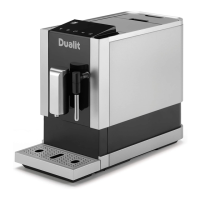
Dualit BEAN TO GO Specifications

General IconGeneral
BrandDualit
ModelBEAN TO GO
CategoryCoffee Maker
LanguageEnglish

Related product manuals