2
TEMPTIMEDATEPROGSET
MO TU WE TH FR SA SU
28,0C
1 2 3 4
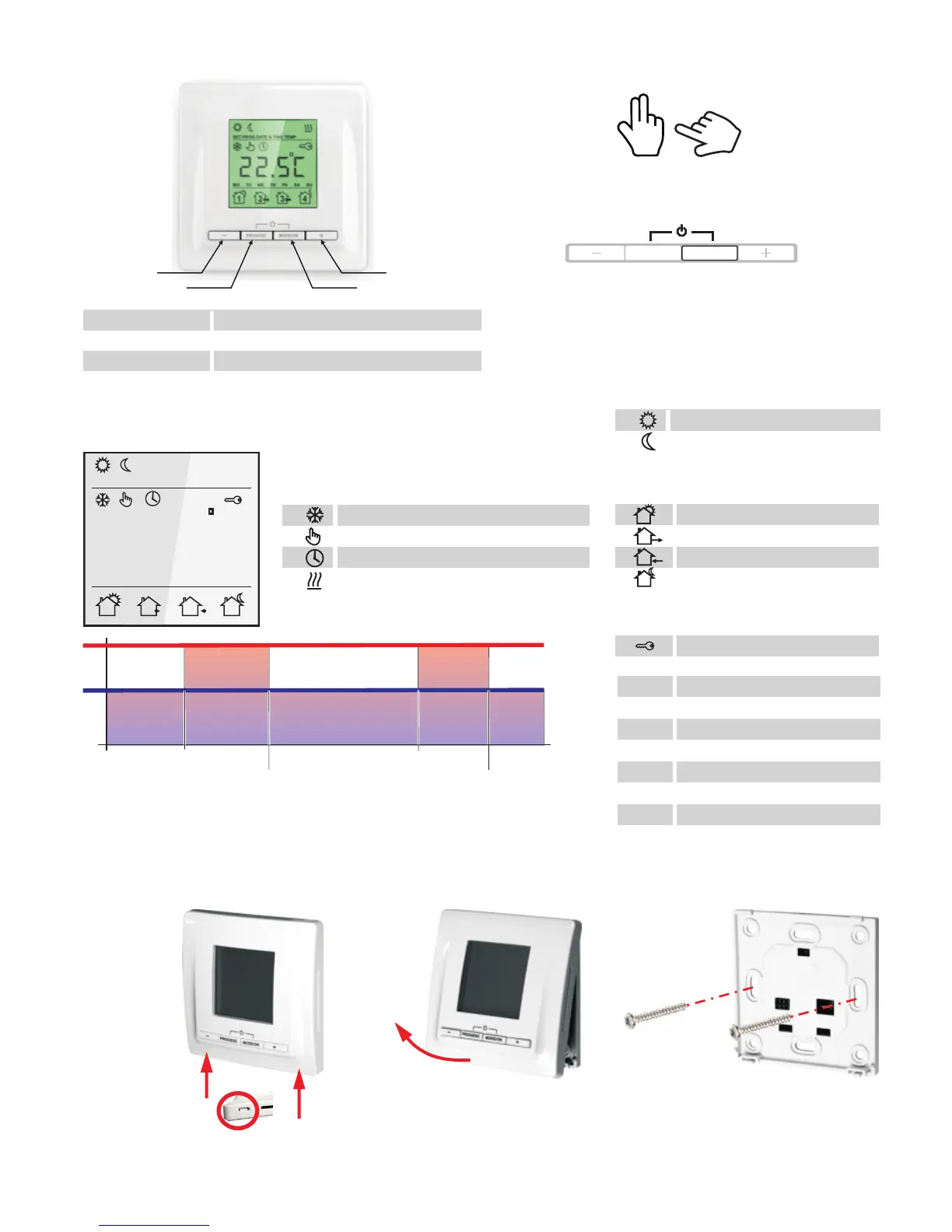
DISPLAY STRUCTURE
Other
Operation modes
Temperature settings
freeze protection mode
constant temperature maintenance
programm mode
heating on
Comfort modus, temp. adjustable
Economy modus, temp. adjustable
Programm modes
4
2
3
1
„WAKE UP“
„LEAVING HOME“
„COMING HOME“
„GOING TO SLEEP“
PROG / ESC
MODE /OK
decrease the values
enter the programm mode and EXIT
switch the indication & set limits and modes
increase the values
1
2
3
4
-
+
Hands are used, if it is necessary to push
several butons together or push buttons for
longer time
To start the described action, the marked
button must be pushed
PROG/ESC
MODE/OK
1
2
3
4
CONTROLS AND SETTINGS
RESERVATION
Technical data are subject to change without notice. Changes, errors and printer's errors do not justify claims for damages. For safety
components and systems the relevant standards and regulations are to be observed, as well as the corresponding operating and installation
instructions.
During the „COMFORT“ period the desired comfort temperature will be maintained.
During the „ECONOMY“ period the temperature will be reduced to the desired
minimum temperature to safe energy.
INSTALLATION
Thermostat is locked
MO Monday
TU Tuesday
WE Wednesday
TH Thursday
FR Friday
SA Saturday
SU Sunday
Confort temperature
Minimum temperature
Wake up
Leaving home
Comming home
Going to sleep



 To Next Page