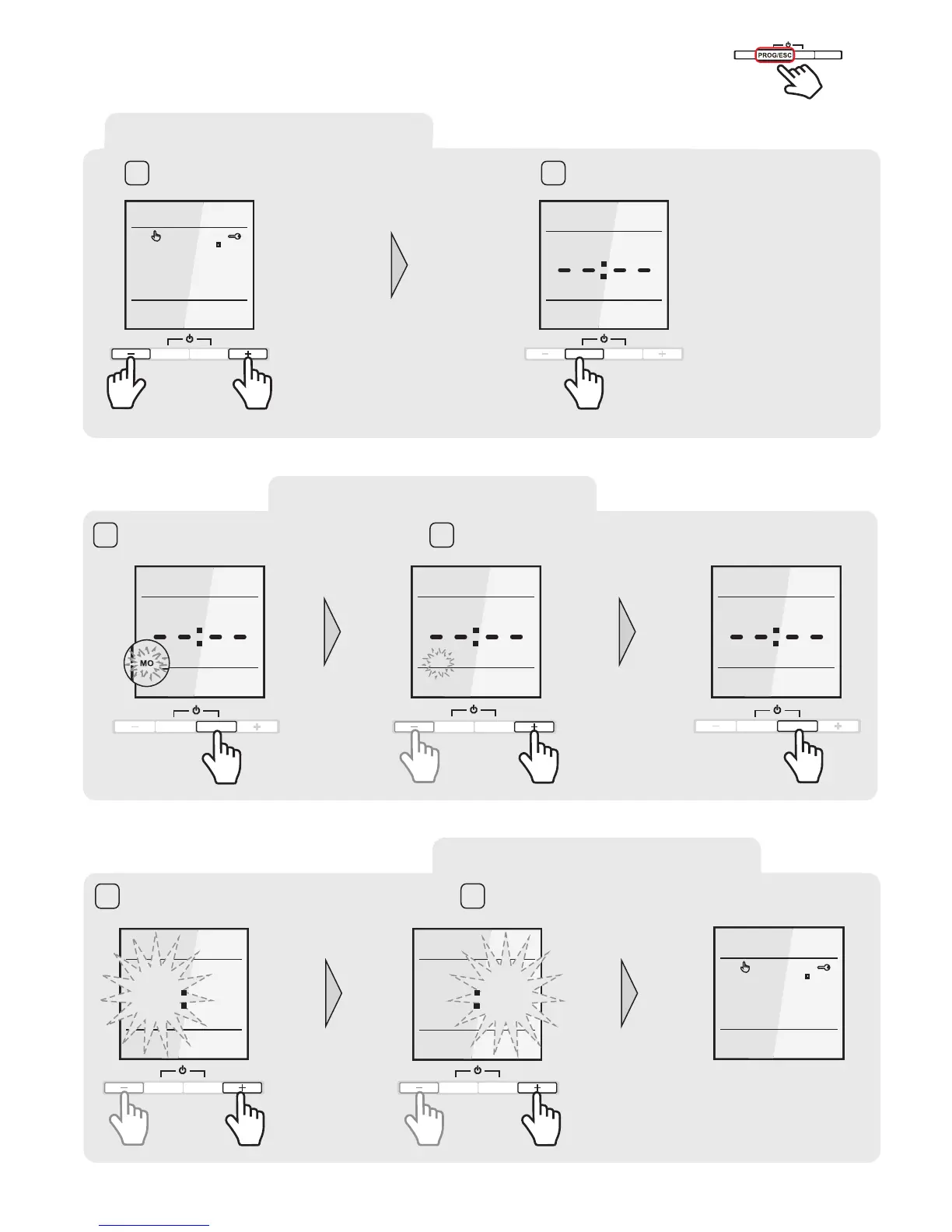
SET TIME
Set the required hour with the “+” or “–” button.
Confirm the selection with MODE/OK button.
Now the minutes procedure start.
5
Set the required minutes with the “+” or “–” button.
Confirm the selection with the MODE/OK button.
The „Day and time setting“ procedure is completed.
6
SET
TIME
WE
12 40
PROG/ESC
MODE/OK
SET
TIME
WE
12 00
PROG/ESC
MODE/OK
TU
TEMP
19,0C
Unlock the thermostat
Press and hold the PROG/ESC button for 8 seconds
TEMP
WE
19,0C
PROG/ESC
MODE/OK
PROG/ESC
MODE/OK
WE
SET
DATE & TIME
1 2
8s
ENTER THE PROGRAMMING
SET DAY
Press the MODE/OK button. The „Day
of the week symbol“ will start to blink
3
Set the actual day of the week with the “+” or “–” button. Confirm
the selection with MODE/OK button.
4
SET
DATE
MO
PROG/ESC
MODE/OK
PROG/ESC
MODE/OK
SET
DATE
TU
SET
DATE
TU
PROG/ESC
MODE/OK



 To Next Page