5
After setting the desired modus in the Step 14 press the MODE/OK button. The thermostat will proceed to set up the time for Wake-up event for
the next day of the week (TUESDAY) - please repeat the setting from step3 . - 14 for all other days
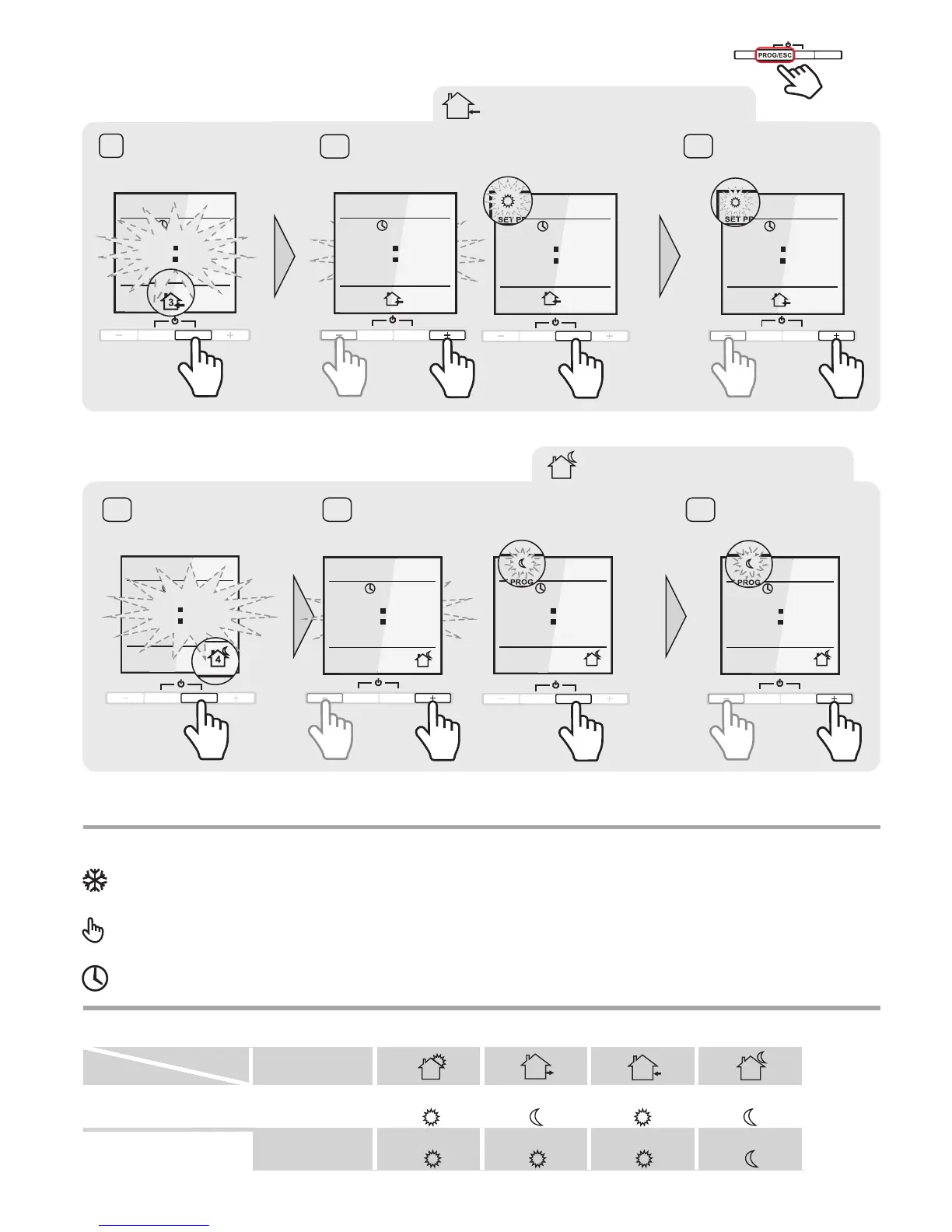
COMING HOME EVENT
3
Press the MODE/OK button.
The time will start to blink
9
10
Set your COMING HOME time with “+” and “–” buttons.
Confirm the selection with the button.MODE/OK
Set the COMFORT modus
with “+” or “–” button.
11
PROG/ESC
MODE/OK
PROGSET
1900,
TIME
MO
3
PROG/ESC
MODE/OK
PROGSET
3
1930,
TIME
MO
PROG/ESC
MODE/OK
3
TEMPPROGSET
MO
1930,
PROG/ESC
MODE/OK
3
TEMPPROGSET
MO
1930,
GOING TO SLEEP EVENT
4
Press the MODE/OK button.
The time will start to blink
13
12
Set your GOING TO SLEEP time with “+” and “–” buttons.
Confirm the selection with the MODE/OK button.
Set the modus
with “+” or “–” button.
ECONOMY
14
PROGSET
2200,
TIME
4
MO
PROG/ESC
MODE/OK
PROGSET
2230,
TIME
MO
4
PROG/ESC
MODE/OK
TEMPPROGSET
MO
2230,
4
PROG/ESC
MODE/OK
TEMPPROGSET
MO
2230,
4
PROG/ESC
MODE/OK
EVENT TIME PROGRAMMING
4 sec.
PROG/ESC
MODE/OK
+
-
DEFAULT SETTINGS
Time
Temperature level
Time
Temeparture level
7:00
7:00
8:00
8:00
19:00
19:00
22:00
22:00
Monday to Friday
Saturday and Sunday
Event
Day
1
3
2
4
OPERATION SCHEME DESCRIPTION
CONSTANT TEMPERATURE MODE
The thermostat constantly maintains the desired floor temperature. The temperature is adjustable from +12°C up to +35°C.
PROGRAM MODE
Depending on time and day of the week the thermostat automatically switches the „Comfort“ or „Economy“ floor temperature modus
depending your selections. The temperature is adjustable from +12°C up to +35°C.
ANTI - FREEZING
This mode is suitable to keep minimum positive temperature in the premise while nobody inside for a long time.
adjustable from +5°C up to +12°C.
The temperature is



 To Next Page