EasyManua.ls Logo

Ducasa TP520 - SELECT OPERATION MODE; Choosing an Operation Mode; ALARM INDICATION; Heating System Alarms

Ducasa TP520
8 pages
Print Icon
To Next Page IconTo Next Page
To Previous Page IconTo Previous Page
Loading...
7
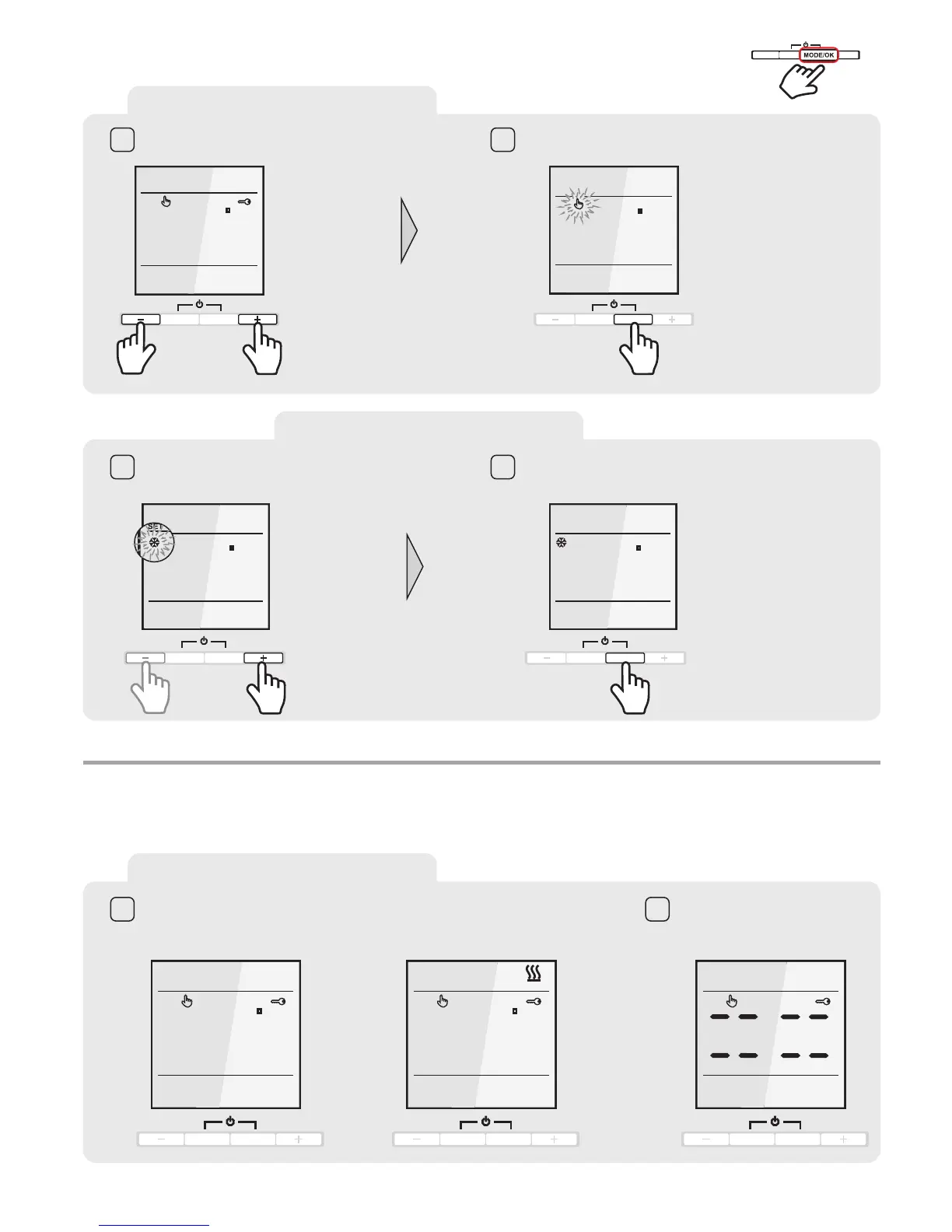
ENTER THE PROGRAMMING
Unlock the thermostat
Press and hold MODE/OK button for 4 seconds.
The operation scheme indicator will start to blink
TEMP
WE
19,0C
PROG/ESC
MODE/OK
1 2
PROG/ESC
MODE/OK
4s
WE
SET
19,0C
OPERATION MODE SELECTION
PROG/ESC
MODE/OK
Set the operation scheme with the
+orbutton.
Confirm the selection with MODE/OK.
The scheme is set.
3 4
WE
SET
19,0C
PROG/ESC
MODE/OK
WE
SET
19,0C
SELECT OPERATION MODE
4 sec.
PROG/ESC
MODE/OK
+
-
SELECT OPERATION MODE
ALARM INDICATION
ALARM INDICATION
Display apears in case of -
SENSOR FAILURE
Display apears in case if the heating system fails to heat the surface to more than
+5°C or in case of surface overheating by more than +45°C occurs.
1 2
TEMP
WE
LO C
PROG/ESC
MODE/OK
TEMP
WE
HI C
PROG/ESC
MODE/OK
WE
PROG/ESC
MODE/OK
--
--

Related product manuals