E
27
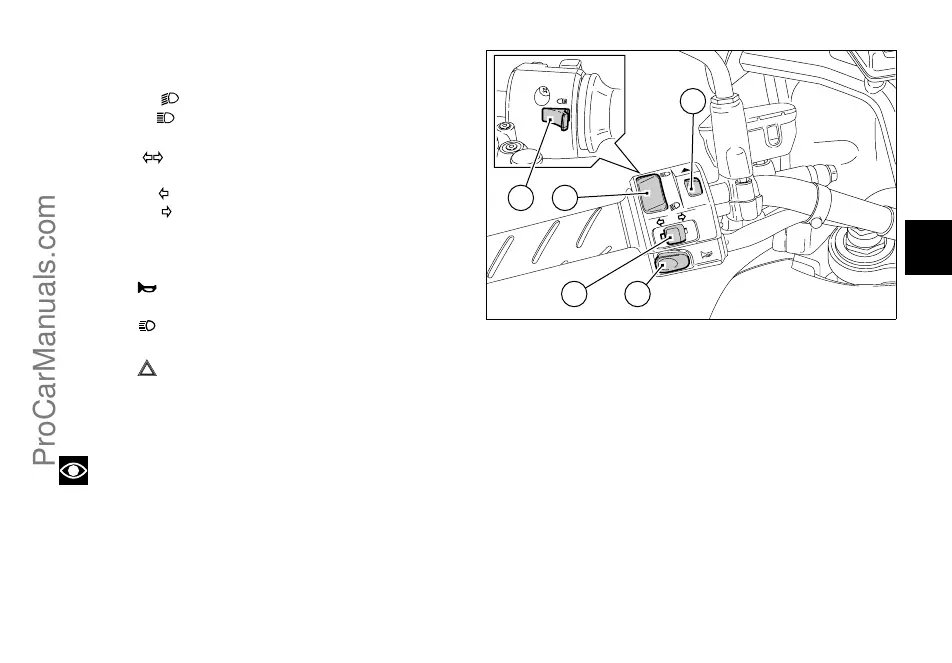
Left switch (fig. 17)
1) Dip switch, light dip switch, two positions:
- position = low beam on;
- position = high beam on.
2) Switch = 3-position turn indicator:
- centre position = OFF;
- position = left turn;
- position = right turn.
To reset turn indicators, push in when switch is back to
central position .
3) Button = warning horn.
4) Button = high-beam flasher.
5) Button = Emergency stop flashers
Press this button to turn on all direction indicators at
the same time.
Press it again to turn them off.
Note
When devices (1), (2), (4) and (5) are activated, the
relevant pilot lights on the instrument panel turn on (see
page 13).
32
1
5
4
fig. 17
DUCum_1000DS####03_###e.book Page 27 Wednesday, March 12, 2003 4:33 PM
ProCarManuals.com













 To Next Page