Need help?
Do you have a question about the Duncan Andromeda and is the answer not in the manual?
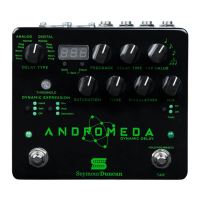
8-way switch to select between delay types.
Indicates the currently loaded preset.
Press to cycle through the 32 preset banks.
Cycles through presets A/B/C/D and enters SAVE mode.
Sets the desired number of delay repeats, up to infinite.
Controls the delay time, overriding preset tempo.
4-way switch to set note division of the delay time.
Controls sensitivity and modes (Hard/Soft/Off) for dynamic expression.
Adjusts grit, brightness, and chorus effect on the wet signal.
Determines the balance of wet/dry signal.
Controls decay behavior when bypassed and effect on/off.
Switches between TAP tempo and PRESET scrolling modes.
Download software for utility, options, and firmware updates.
Rename, backup, and restore presets using Librarian software.
Set delay time in milliseconds or beats per minute.
Connect and control Andromeda via standard MIDI controllers.
Specifies input (1M Ohm) and output (100 Ohms) impedance.
Details gain (Unity), noise (<-105dBV), and frequency response.
Lists power requirements, current draw, dimensions, and weight.
Lists CC# and value ranges for knobs and parameters.
MIDI control for dynamic expression and functions like bypass.
Details how BPM and mS delay messages are sent.
A straightforward digital delay for general applications.
Warm, rich repeats modeled after bucket brigade delay.
Digital delay using dynamic expression for ducking effects.
Analog delay with dynamic expression for ambient swells.
Digital delay paired with lush chorus for depth and sparkle.
Analog delay with modulation and saturation for vintage tone.
Dreamy reverse delay for psychedelic solos and ambient soundscapes.
Emulates vintage tape delays using digital engine and controls.
 General
| Brand | Duncan |
|---|---|
| Model | Andromeda |
| Category | Music Pedal |
| Language | English |

 To Next Page