GraphicProducts.com | 800-788-5572
Using Toro Max from a PC | 15
USING TORO MAX FROM A PC
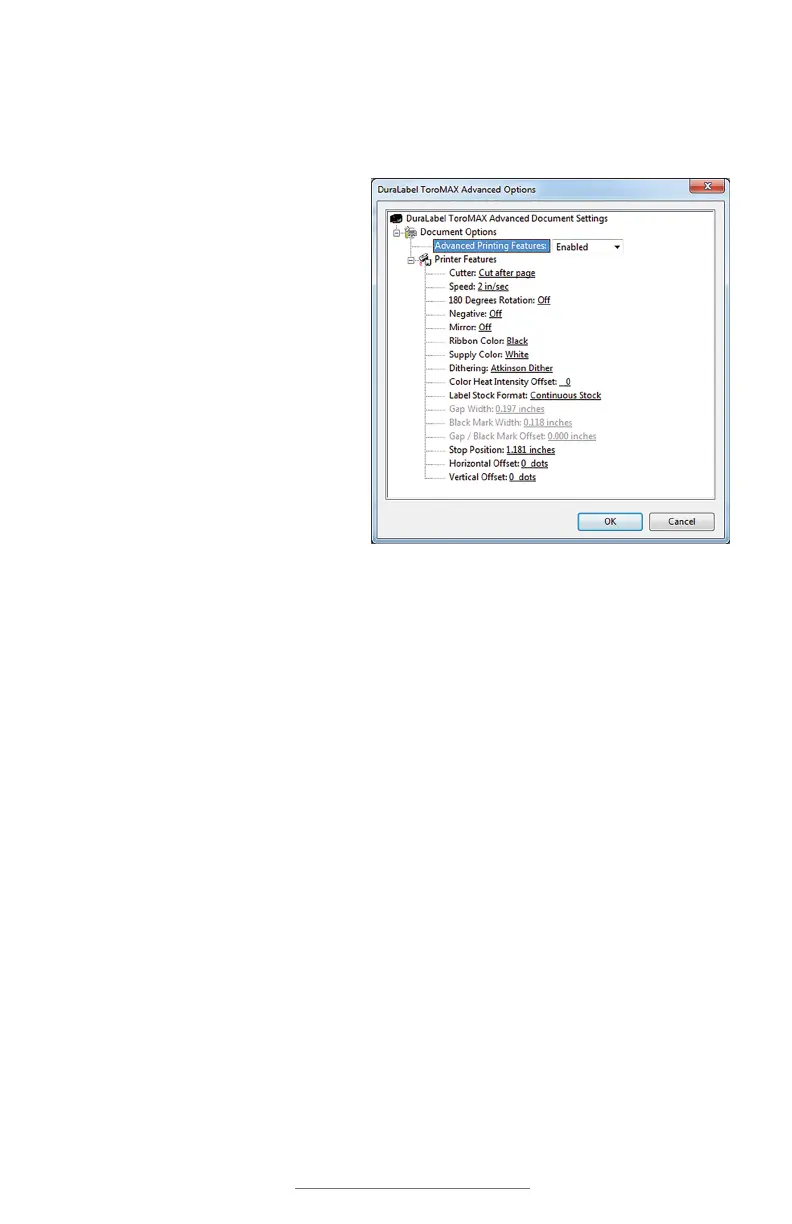
When accessing the Printing Preferences from a PC, the orientation setting (landscape/
portrait) will be the only option immediately available. Additional options for unusual
needs, or for troubleshooting, can be reached by clicking the “Advanced…” button:
• Cutter: cut after each label
printed, after a complete job, or
not at all
• Speed: choose the printing speed
(by default, 2 inches per second)
• 180 Degrees Rotation: choose
whether your Toro Max rotates
all print jobs by 180 degrees for
troubleshooting.
• Negative: invert the colors of the
design, from “printed” (ribbon
color) to “not-printed” (label stock
color) and vice versa.
• Mirror: flip the design backward,
as if viewed in a mirror.
• Ribbon Color and Supply Color: manually select different material colors for
software previews; the actual printed results will not be changed.
• Dithering: choose how Toro Max uses patterns of dots to approximate shades of
darkness.
• Heat Intensity Offsets: for troubleshooting, adjust the heat used in the printing
process.
• Label Stock Format (and following options): manually select the type of label
stock: continuous stock, stock with gaps (die-cut supply), or stock with marks
(black-mark supply).
The remaining options may be useful for troubleshooting, but should ordinarily be left at
their default values.



 To Next Page