16 | Cleaning Your Toro Max
GraphicProducts.com | 800-788-5572
CLEANING YOUR TORO MAX
Periodic cleaning of the print head, cutter blade, and platen roller will extend the life of
the printer and help maintain optimal printing quality.
IMPORTANT! Always turn the power off and disconnect Toro Max from all power
sources before cleaning or performing maintenance. After cleaning, wait at least
5 seconds before turning the power on again.
TO CLEAN YOUR TORO MAX:
1. Turn the printer off, and disconnect it from all power sources (AC power and battery,
if installed).
2. Press the cover release latch, and raise the cover of the printer. The cover
mechanism will hold the printer open.
3. Remove the ribbon cartridge and label stock (if loaded), and place them on a clean,
flat surface.
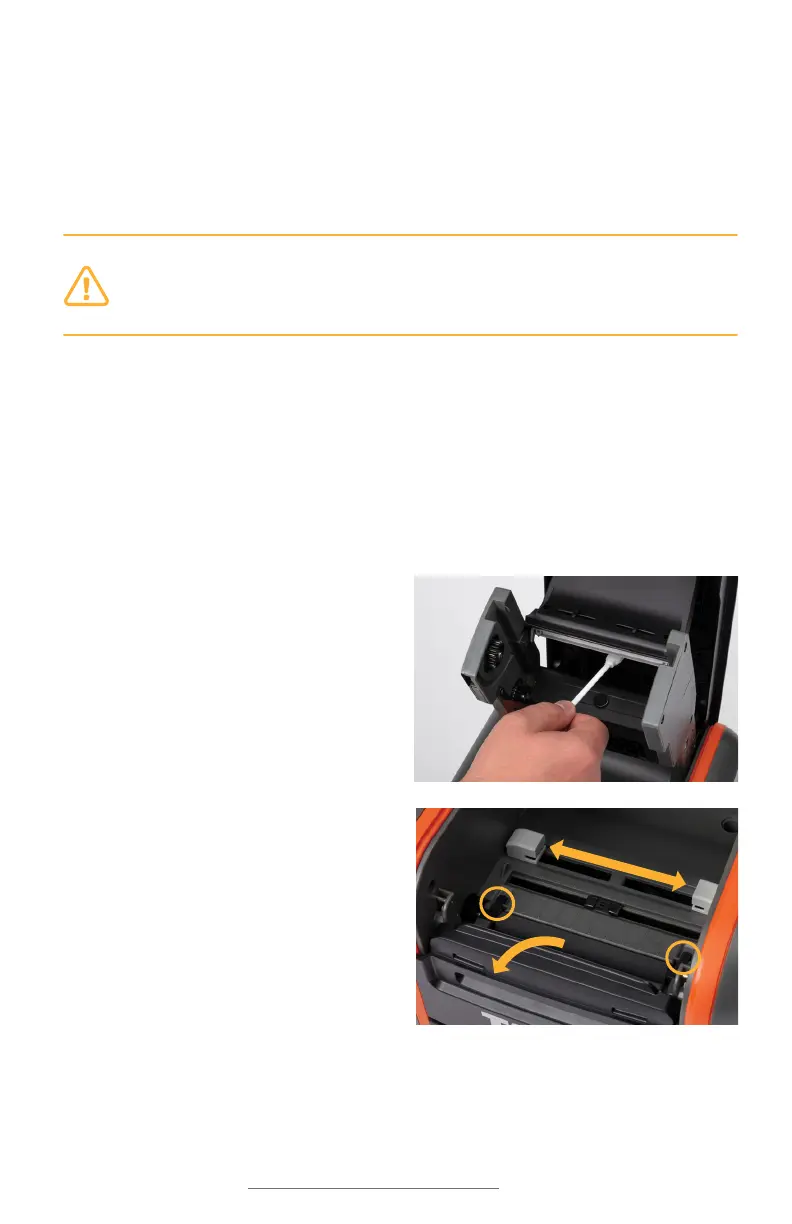
4. Open an individually-packaged
cleaning swab, or lightly moisten a
clean, soft cloth with isopropyl alcohol
(isopropanol).
5. Gently rub the swab or cloth back and
forth across the front and underside of
the print head to remove any built-up
adhesive or residue.
6. Run the swab or cloth between and
around the gray adjustable label guides
in the floor of the printer, to clear any
dust or adhesive build-up.
7. Lift the two black latches on either
side of the black rubber roller (“platen
roller”), and lift it out. (You can use the
notched end of the supply spindle to
help release the latches.) Use the swab
or cloth to gently wipe away any material that has stuck to the roller surface.
Then, press the platen back into place, until the latch on each side has locked it
down again.
9



 To Next Page