DURASTAR.COM10
WIRED THERMOSTAT
RESE T
LOCK
▼
▼
TIME ON
TIME
OFF
FOLLO
W
ME
AUXI L
HEATER MOD E
FAN
SPEED
ECO
SWING TEMP
1
2
3
4
5
67
89
10
11
12
13
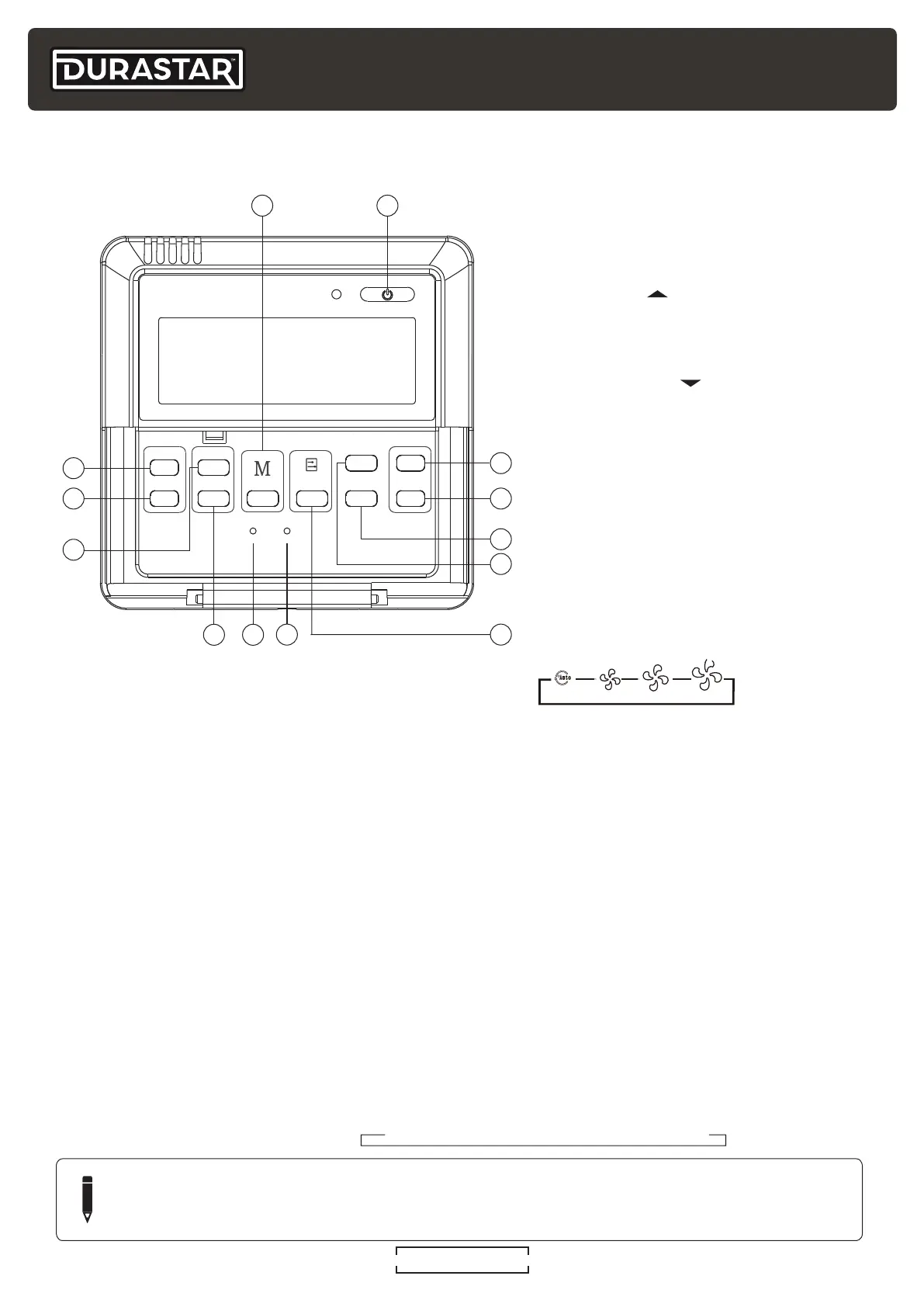
1. ON/OFF Button
Press to turn the air conditioner ON and
OFF.
2. UP Button
Press to increase the set temperature in
1°F / 1C increments.
3. DOWN Button
Press to decrease the set temperature
in 1°F / 1C increments.
4. SWING Button
Function is not available for this model.
5. ECO Button
For details on ECO mode, see the ECO
feature section of this manual.
6. FAN SPEED Button
Press to select the following fan speeds:
NOTE
Press the Temp Up and Down buttons (#2 & #3) simultaneously to switch between
Fahrenheit and Celsius (some models).
7. LOCK Button
Used to lock/unlock the thermostat settings.
8. RESET Button
Used to restore the system to its default settings.
9. AUXILIARY ELECTRICAL HEATER BUTTON
For use with third party electrical heaters. Not included with this unit.
10. FOLLOW ME Button
For details, see the FOLLOW ME feature section of this manual.
11. TIME OFF Button
Press to initiate the TIMER OFF feature. For details, see the TIMER feature section of this manual.
12. TIME ON Button
Press to initiate the TIMER ON feature. For details, see the TIMER feature section of this manual.
13. MODE Button
Press to select the operating mode.
→→→
→



 To Next Page