13
ENG
6.4 Parameter interface
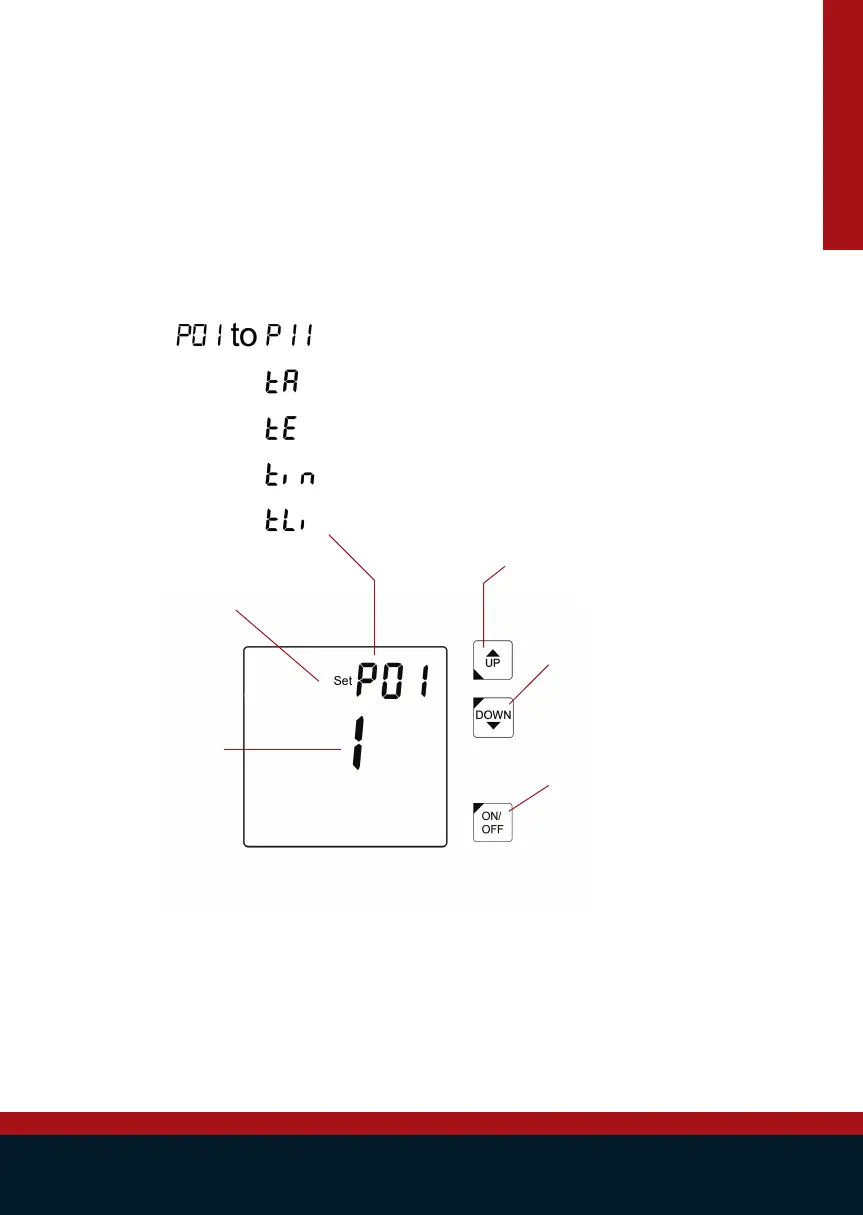
By pressing UP & DOWN simultaneously the parameter interface we’ll be entered. Here all the
parameters are shown and can be set by a qualied person in order to make the heat pump more
efcient, depending on the specic conditions of the swimming pool. A complete list of parameters
can be found in the parameters list, section 6.5.
Set:
Is not visible when
you scroll through the
list of parameters.
When the ON/OFF
has been pushed it
will be visible and the
selected parameter
can be changed.
Up:
Scroll up through the list of parameters.
Edit the value of the selected parameter.
Down:
Scroll down through the list of
parameters.
Edit the value of the selected
parameter.
ON/OFF:
Select the parameter you want to
edit
Parameter name:
Name of parameter. The following can be found:
Value parameter:
Current value of the
selected parameter.
Any changes will be
saved automatically.
Sensor settings/parameter
Factory editable settings/parameter


 To Next Page