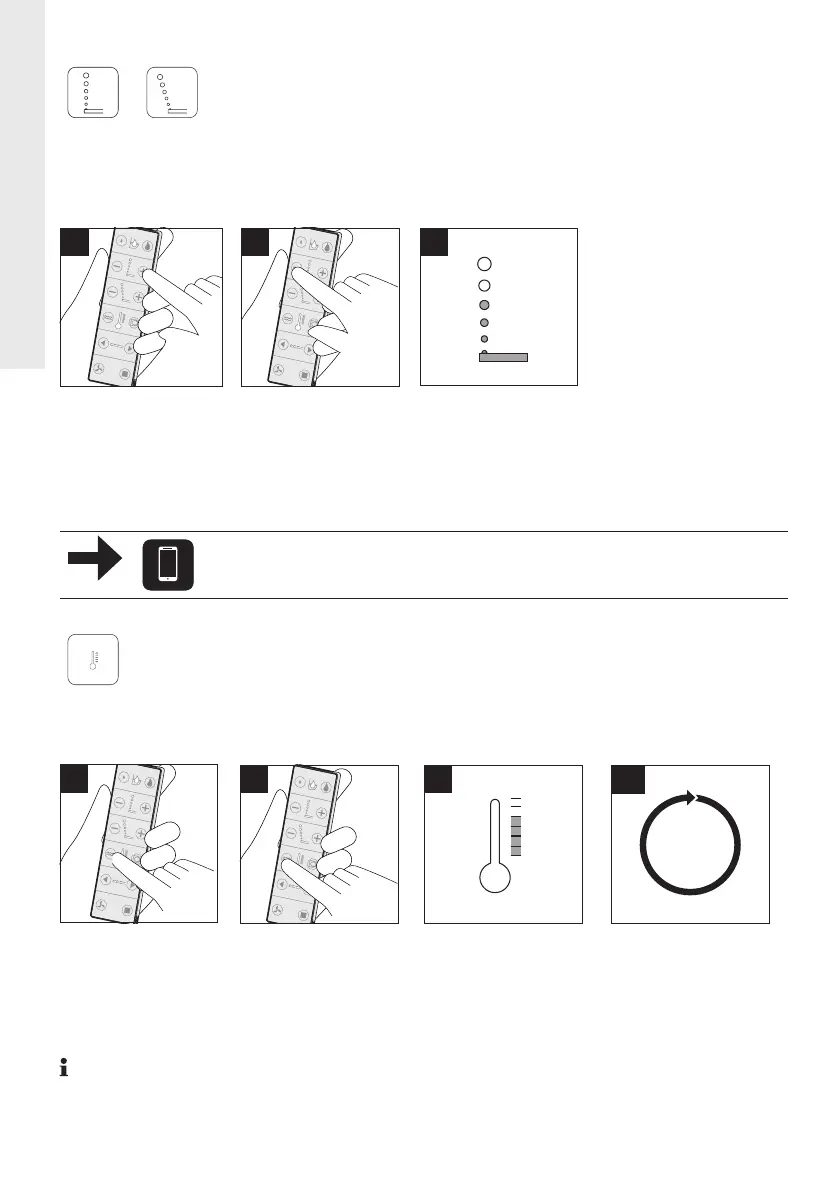
Adjust water spray intensity
Water spray intensity can be set individually to 3 different levels (low / medium /
high). Water spray intensity can be set for Rearwash and / or Ladywash functions
independant from each other via respective button.
3
1
> LEDs indicate
setting.
Adjust water spray intensity (Rearwash)
Adjust water spray intensity (Ladywash)
Adjust water temperature
Water temperature can be set individually to 4 different levels (off (0) / low (1) /
medium (2) / high (3)).
1
> Press icon
shown to
activate setting
mode.
If you choose level off, the water has the temperature of inlet water and the LEDs are
off.
> Press Plus to
increase the
water spray
intensity.
2
> Press Minus to
decrease the
water spray
intensity.
> Press again to
adjust water
temperature.
0
1
2
3
+
+
+
+
> Setting cycle.
4
2
> LEDs indicate
settings.
22
EN





 To Next Page