Owner's Guide
13
Part: XXXXX Rev XX
MAIN
ECM1D
2
12 3
1, 3
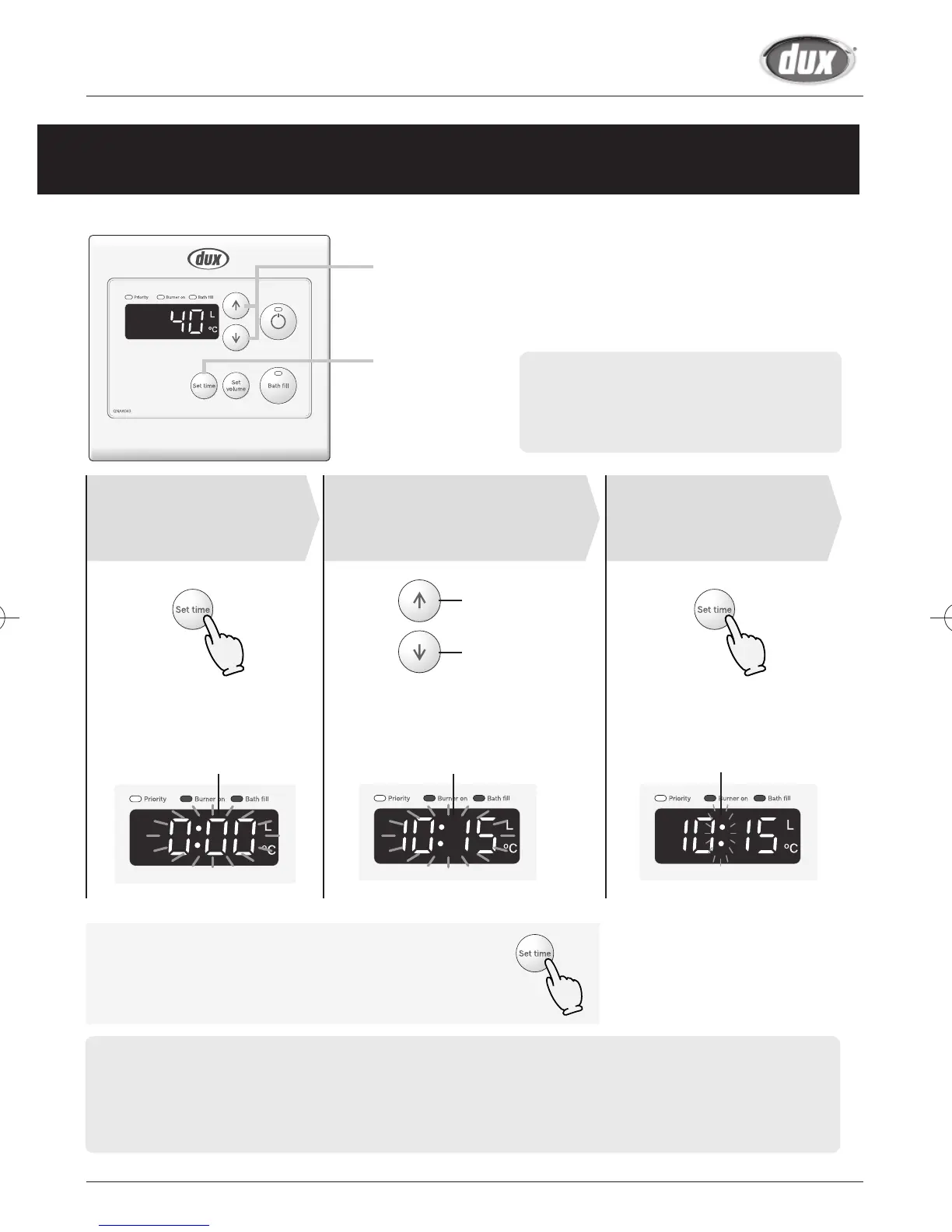
Clock Adjustment
(Main Controller)
Note: Only the main controller has a clock
function.
Clock setting and the clock can be dis-
played regardless of “ON or OFF" of
the operation button.
(The illustration is in a state of "OFF".)
Press the Set
Time Button
(Until “0:00” is ashing)
Press the Set
Time Button
Adjust the clock
Increase
Decrease
The time changes in 1-minute increments
with each press on the button, and
then in 10-minute increments if the
button is kept pressed down.
The flashing changes to
constant illumination when the
clock has been set.
Flashing Flashing Flashing
Display the clock
Press the set time button.
The clock display will then return to the original screen display.
• The clock display will disappear if hot water is used or the temperature of the hot water is changed during
the clock display.
• If the Time set button is pushed when the hot water is being used or a high temperature (60°C or more) is set,
the clock is displayed for 10 seconds and will return to the original screen display after that.
• In the event of a power cut or after disconnecting the power supply, the clock on the display screen will
show 0:00 when the power is restored. In this case the clock will need to be reset.



 To Next Page