Need help?
Do you have a question about the DWK WHEATON R2P 2.0 and is the answer not in the manual?
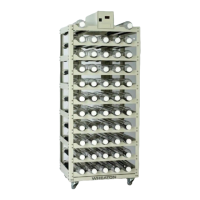
Overview of the Wheaton R2P 2.0 Bottom Drive Roller Apparatus.
Details the warranty terms and conditions for the roller apparatus.
Procedures for reporting and handling transit damage to the product.
Explains the meaning of various safety symbols used in the manual and on the unit.
Provides essential guidelines for safe operation and handling of the apparatus.
Highlights specific safety precautions related to grounding and electrical connections.
Lists the technical specifications of the R2P 2.0 Bottom Drive Roller Apparatus.
Provides physical dimensions and capacity information for different models.
Lists optional accessories and configurations available for the apparatus.
Instructions for inspecting the apparatus upon receipt for any shipping damage.
Details the voltage and frequency requirements for operating the equipment.
Information regarding the power cord and its proper use.
Guide to the initial startup sequence and navigating the touch screen interface.
Steps for setting up the unit for the first time, including initial settings.
Explains how the screen saver activates and what it displays.
Explains how to navigate the main operational screens via the touch interface.
Instructions on using the numerical keypad for entering data and settings.
Describes the main 'Home' screen and its icons for unit monitoring and control.
Details how to set bottle speed, rotation direction, and rock mode.
Explains how to set or view the unit's network identification number.
Describes the icon used to toggle the unit's network connection status.
Explains how to view and interpret active alarms on the unit.
Details the icon indicating the unit's current power source (AC or battery).
Explains the screen lock function and its impact on user control.
Describes accessing the screen that lists and describes all interface icons.
Access to less frequently updated or used settings and functions.
Accesses the setting for controlling the acceleration/deceleration rate of the roller.
Allows configuration of high and low temperature alarm thresholds.
Enables loading of previously saved operational settings and profiles.
Allows saving current operational settings and profiles to memory registers.
Facilitates downloading recorded event logs to a USB drive.
Provides the function to clear the unit's internal event log memory.
Allows setting the system's current date and time for accurate logging.
Access to initial setup, system reset, calibration, and seldom-used functions.
Allows programming the maximum bottle diameter for accurate speed indication.
Enables calibration of optional temperature sensors for accurate readings.
Configures the communication protocol for network connectivity.
Allows adjustment of the motor gear ratio for optimal performance.
Toggles the audible alarm notification for system faults.
Resets the unit to factory default settings or performs a master reset.
Recalibrates the touch screen coordinates for optimal responsiveness.
Indicates the function for updating the unit's firmware, currently not in use.
Restores the unit to its original factory default settings.
Lists parameters that revert to default settings after power cycling.
Overview of the unit's network capabilities for remote monitoring and control.
Identifies the available network ports and provides cabling information.
Configuration options for network connectivity.
Details the RS-422/485 network connection, including pin-out and dry contact functionality.
Explains the Ethernet TCP/IP connection and IP address configuration.
Describes the WSP protocol for legacy CART2 software compatibility.
Details the Modbus protocol for integration with factory automation systems.
Explains how to download internal event logs using a USB flash drive.
Instructions for turning the internal event logging feature on or off.
Guides the user through the process of downloading event log files.
Provides an example of the format and content of the downloaded event file.
Explains the structure of the event file for easy import and sorting in spreadsheets.
Instructions on how to erase event log files from the unit's memory.
Guidelines for periodic inspection of the apparatus for wear and damage.
Outlines a schedule for routine maintenance tasks and their intervals.
A list of common unit issues, their potential causes, and remedies.
Step-by-step instructions for replacing the motor unit.
Detailed steps for safely replacing the unit's fuses with correct ratings.
Explains how the battery backup system operates during power loss.
Information on the type and service life of replacement batteries.
 General
| Model | R2P 2.0 |
|---|---|
| Material | Borosilicate Glass |
| Capacity | 2.0 liters |
| Temperature Rating | Autoclavable up to 121°C |
| Standards Compliance | ASTM E438, USP Type I |

 To Next Page