WHEATON® R2P
™
2.0 Bottom Drive Roller Apparatus
33
DWK Life Sciences | 856.825.1100 | www.dwk.com | P/N 50099817 Rev. 11/2021
Temperature Sensor Calibration Screen
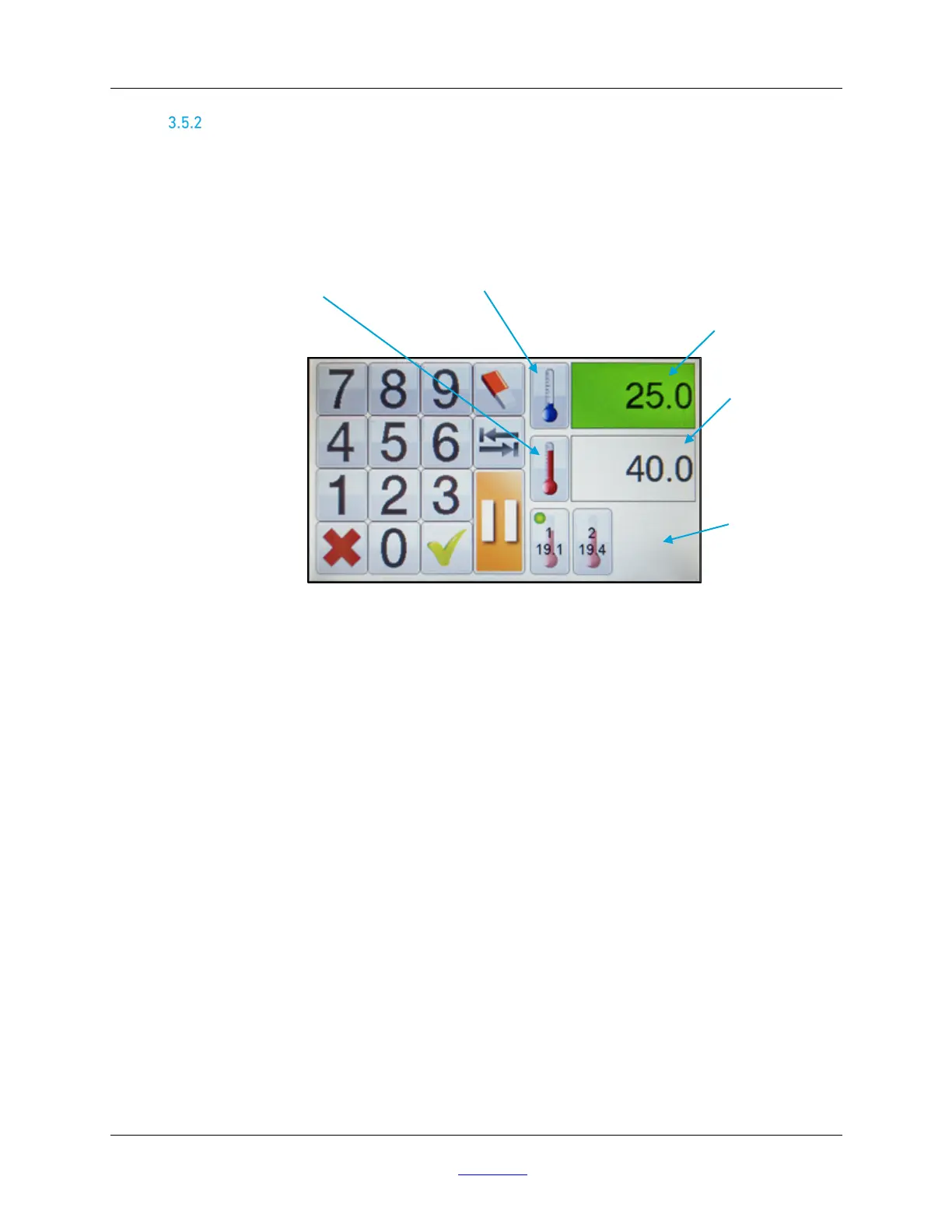
Looking at the Factory Screen, this is the second icon on the top left Pressing this icon brings up the
temperature sensor calibration screen. If optional temperature sensors are connected to the unit, the
bottom right corner of the display has an icon for each temperature sensor available. Sensors
available will be shown with bold icons, while unavailable sensors will be shown with faded icons.
FIGURE 19 – TEMPERATURE SENSOR CALIBRATION
Temperature Calibration Setup
Each sensor requires a two-point calibration, using a high temperature and a low temperature
reference. It is recommended that a non-drifting temperature reference be used and checked with a
calibrated thermometer. A minimum difference of 30°C between high and low temperatures is
recommended for best accuracy. Calibration temperature range is between -40°C and +50°C.
Temperature Calibration Sensor Procedure
To calibrate each sensor, press the icon for the temperature sensor to be calibrated. A green dot will
appear in the upper left corner of the chosen sensor icon. The current uncalibrated temperature will
appear in this icon. There are two data entry fields above the temperature sensor icons to set the
high and low temperature points. The field with the blue thermometer sets the low temperature and
the field with the red thermometer sets the high temperature. Press the respective data field to
switch between high or low temperature calibrations. Once in the proper field (low temp or high
temp), wait for the uncalibrated sensor value to stabilize, then enter the value of the temperature
reference, checked with a calibrated thermometer. To enter a negative number, a user must enter a
value and then press the tab button to toggle between positive and negative. To complete the
calibration for each point, the user must press the thermometer icon to the left of the chosen data
field, then press the green check mark. Repeat the process for the second temperature point.
Available Temperature
Sensors
Low Temperature
Point Data Field


 To Next Page