Please read these notes first:
?Read these instructions carefully before installing your
equipment.
?Install the stands in a suitable location on a flat, horizontal
surface.
?Do not attempt to alter or modify any part of the stand or it's
attachments.
?Do not use if any parts are broken or appear to be damaged.
? Tighten all bolts and fixings securely. Only use fixings provided
with this stand.
? Do not mount your equipment near to sources of heat or
moisture.
Bitte lesen Sie die folgenden Anmerkungen vor der Montage:
Lesen Sie sich vor dem Zusammenbau diese Anleitung bitte
sorgfältig durch.
?Bauen Sie den Ständer auf einer weichen, ebenen Fläche
zusammen(Kratzgefahr).
?Ändern Sie keinesfalls eigenmächtig Teile des Ständers oder
des mitgelieferten Zubehörs.
?Sollten Teile beschädigt sein, bauen Sie den Ständer bitte nicht
weiter zusammen. Packen Sie den Ständer wieder ein und
bringen ihn zu Ihrem Fachhändler.
?Alle Verbindungen müssen sorgfältig durchgeführt werden.
Bitte verwenden Sie ausschließlich das mitgelieferte Zubehör.
?Vermeiden Sie die Aufstellung in der Nähe von Wärmequellen
wie Heizung, Kamin, Heizlüfter etc. Extrem hohe
Luftfeuchtigkeit ist zu vermeiden.
?
Home Systems Professional Automotive Multimedia
Performance Speaker Stands
Instruction Manual
Performance Lautsprecherständer
Bedienungsanleitung
www.dynaudio.com
Stand
3
Top plate x 2
Top-Platte x 2
Fixing kit x 1
Zubehörtasche x 1
Base plate
Assembly x 2
Sandwich-Boden-
Platte x 2
Column x 2
Säule x 2
In the box
Inhalt

 Need help?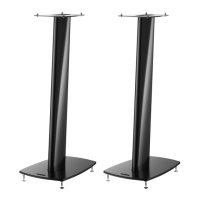

 To Next Page
 General