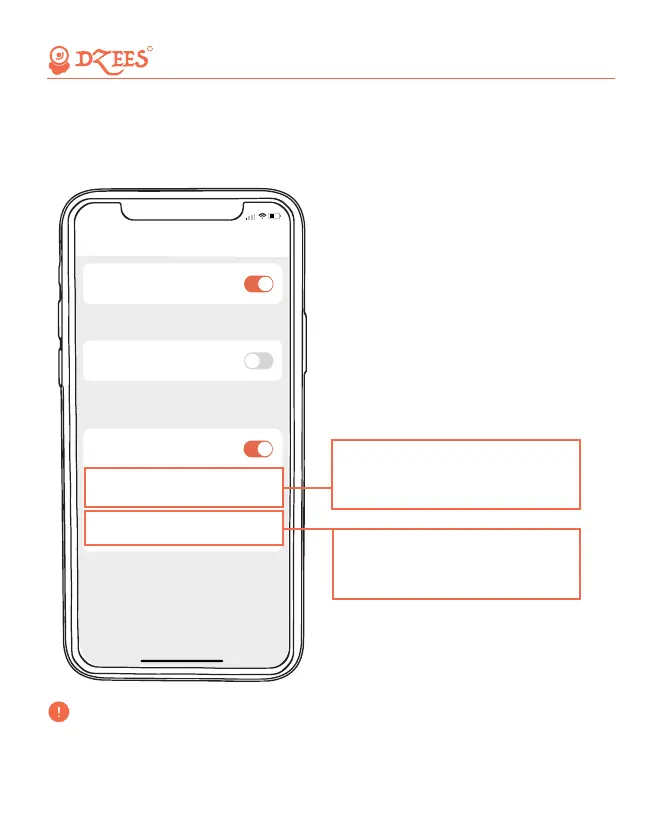
After Night Vision is turned on, the camera will support night viewing to
improve camera shooting performance in a dark environment.
12. Night Mode
All about Your Smart Security
R
5:50
Lighting Setting
After night vision is turned on, the camera will support
night viewing. Improve camera shooting performance in
dark environments.
After the Indicator Light is turned on, the camera informs
the current working status through the indicator light.
Indicator light
<
After Alarm Flash is turned on, the camera will
automatically light up the flash when the motion detection
is triggered.
Alarm Flash
Night Vision
Night Vision Mode
Infrared mode
>
Light Sensitivity Level
Medium
>
'Infrared mode' is a black and white
view under night vision; 'White light
mode' is a color view under night
vision.
The light sensitivity level indicates the
intensity of light, and it is easy to
detect when high sensitivity is turned
on in a dark place.
'White light mode' will turn on the spotlight at night and capture a
colorful view. The spotlight will be constantly on when there is a
motion detected or when living view.
17


 To Next Page