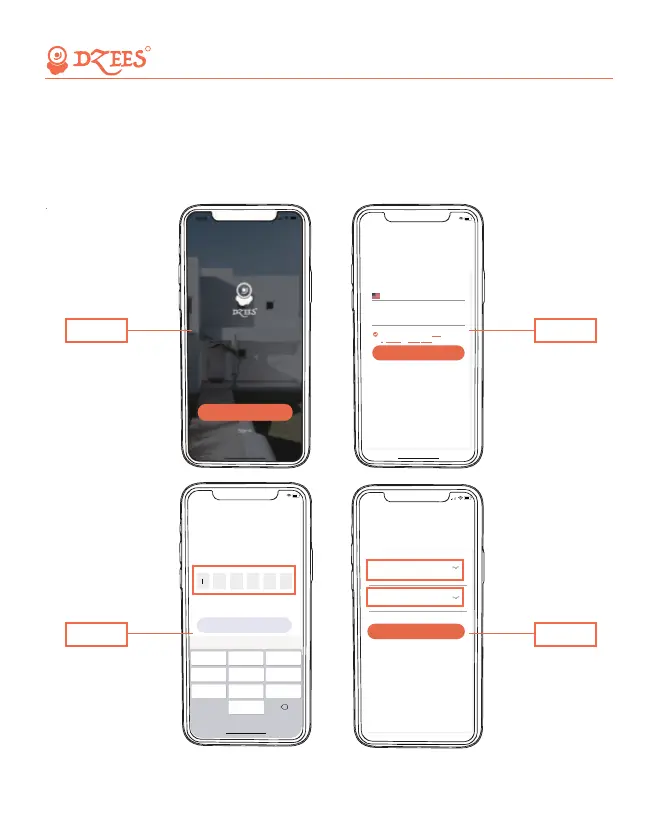
New users need to sign up by Email ID.
Click 'Sign up a New Account' and follow the steps to complete the
registration.
4. Account Registration
5:39
....
<
>
Sign up
Enter an email ID, and we’ll send a verification code
to you.
Country/Region
United States
Email ID
xxx@zumimall.com
I understand and agree with
Agreement
User
andPrivacy Policy
Next Step
5:39
....
<
Next Step
Verification Code
We just send a verification code to your email ID
, please fill in correctly.
xxx@zumimall.com
Done
1 2
0
A B C
4
G H I
5
J K L
6
M N O
7
P Q R S
8
T U V
9
W X Y Z
3
D E F
X
5:41
<
Finish
Set Password
For your safety,password must contain at least one
uppercase letter,one lowercase letter,one number
and has a minimum length of 8 characters.
Password
Confirm Password
Step 3
Step 2
Step 4
All about Your Smart Security
R
Sign up for a New Account
Step 1
04


 To Next Page